Forex Demo Account Guide: What It Is, How It Works & How to Use It
A forex demo account lets you trade in a simulator using virtual money. You get real-time prices, a live charting platform, and the same order types you use on a real account.
This guide shows you what a demo account is, how it works, and how to use it for skill-building. You will learn how demo pricing and execution can differ from live trading, what settings matter most, and how to structure practice so it transfers to real results. You will also learn common demo mistakes, such as using unrealistic position sizes, ignoring spreads and swaps, and overtrading because losses feel fake.
You will finish with a simple process to pick a broker demo and set it up, including what to check on the platform and what to track in a trading journal.
Key Takeaways
Key Takeaways
- In het kort: A forex demo account lets you trade live market prices with virtual money.
- In het kort: Use a demo to learn your platform, test a strategy, and build repeatable execution.
- In het kort: Match demo settings to real trading, account currency, leverage, lot size, and typical trade size.
- In het kort: Treat costs as real, spreads, swaps, commissions, and slippage shape results.
- In het kort: Avoid demo-only habits, oversizing, overtrading, and ignoring risk rules.
- In het kort: Track your work like a business, log setups, entries, exits, risk, and mistakes in a journal.
- In het kort: Pick a demo from a broker you would trust with real funds, start with a practical broker checklist.
What a Forex Demo Account Is (and What It Isn’t)
Definition and purpose
A forex demo account is a practice account funded with virtual money. You place trades in a real trading platform using live or near live pricing. You see spreads, swaps, and commissions if the broker models them in demo.
You use a demo to learn the platform, test order types, and rehearse a strategy with rules. You also use it to check basic execution, like how stops and limits trigger in normal conditions.
A demo account is not a performance guarantee. It is a training tool.
Common myths that waste your time
- Myth: Demo profits guarantee live profits. Demo results often look better because execution can be cleaner and you feel no pressure.
- Myth: Demo trading is useless. It is useful if you treat it like a real account and track results, costs, and risk.
- Myth: You should demo with a huge balance. A big demo balance hides risk mistakes. Match the demo balance to the amount you plan to fund.
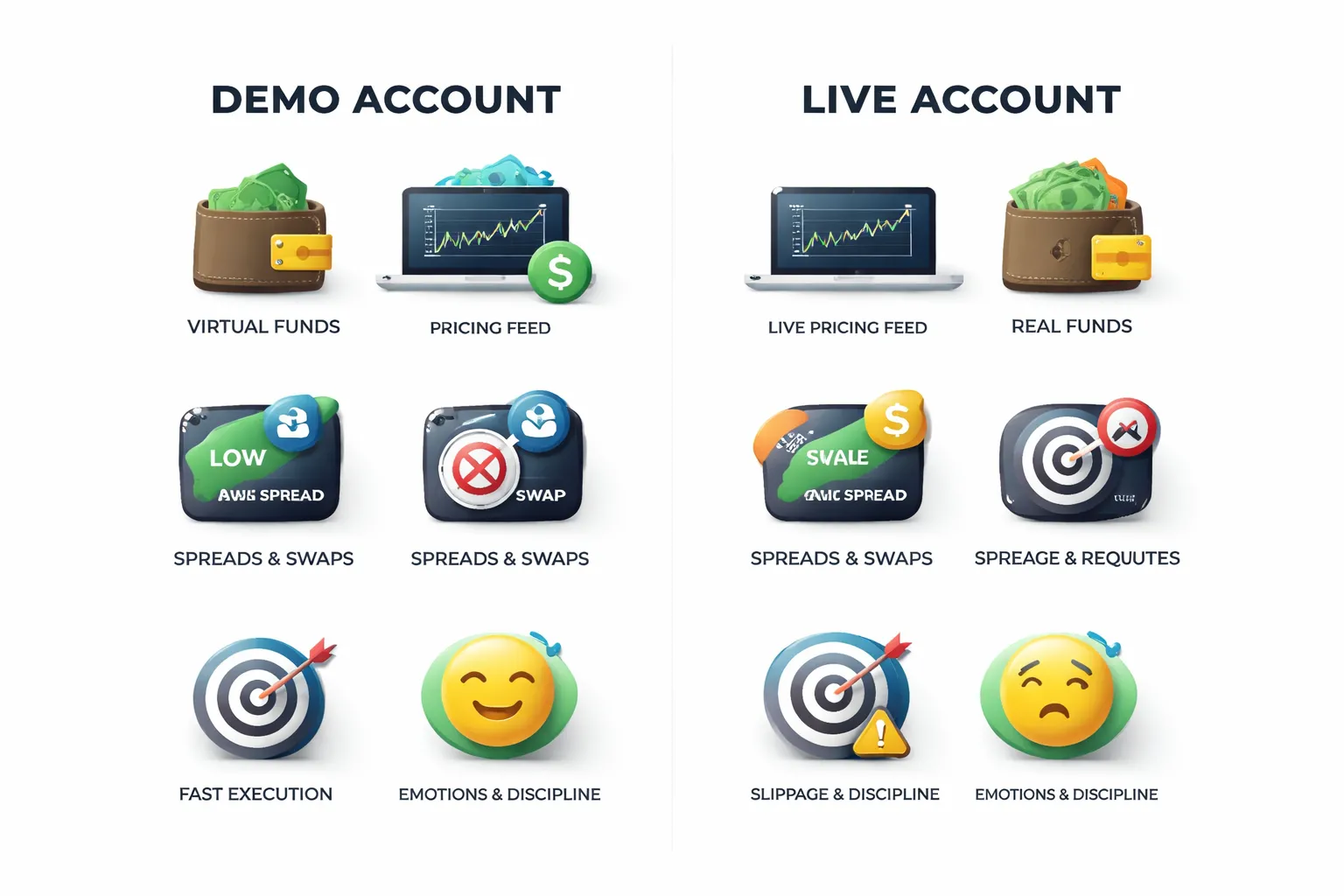
- Myth: Demo fills match live fills. Some brokers simulate perfect fills in demo. Live markets can slip, reject, or requote.
Demo vs live, where results differ
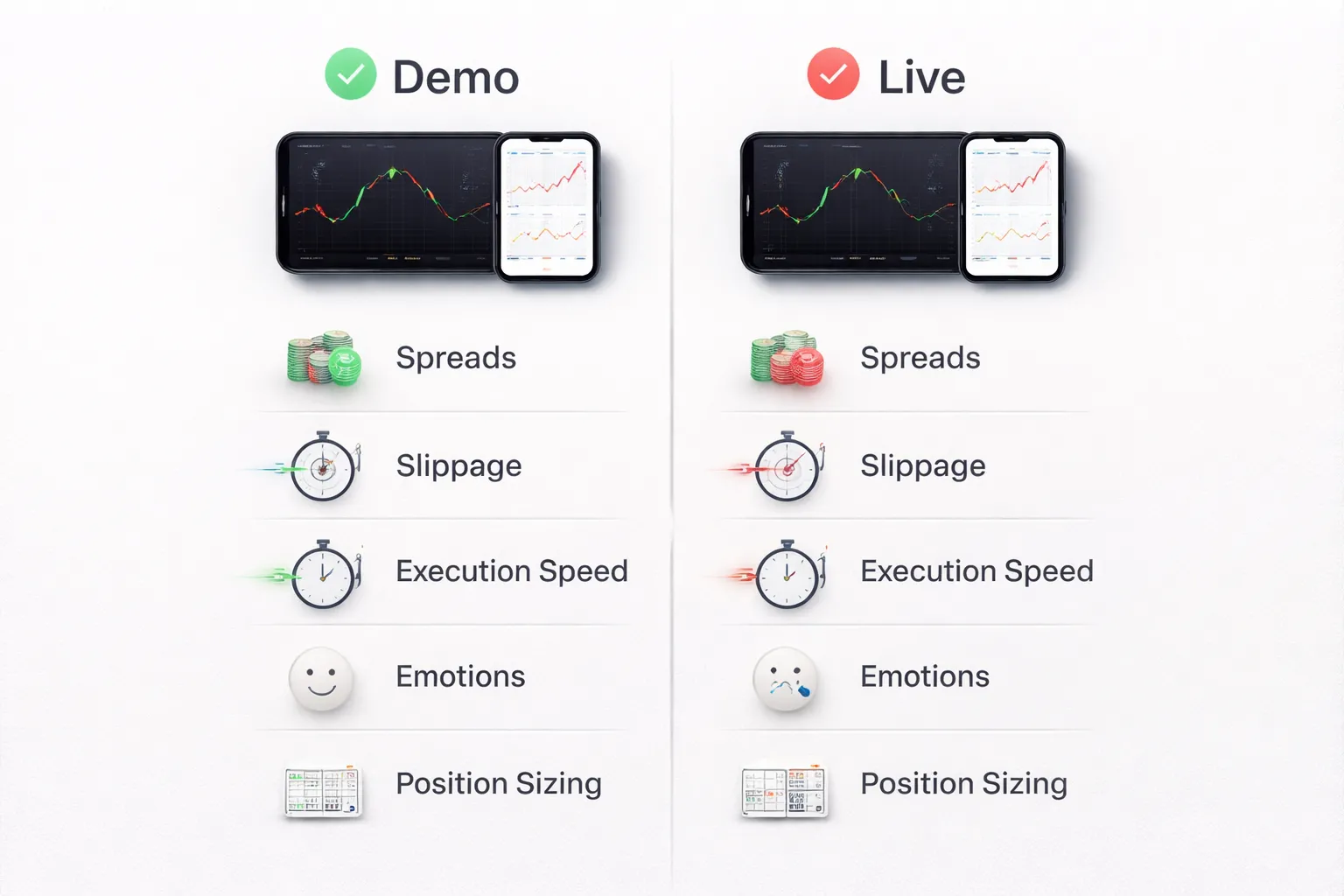
Expect gaps between demo and live. These gaps come from execution and from you.
- Slippage and fills. Live orders can fill worse than expected, especially on news, low liquidity sessions, and fast moves.
- Spreads. Live spreads can widen. A demo may show tighter spreads or fewer spread spikes.
- Order handling. Live trading can include partial fills, rejections, and latency effects. Demo often skips these issues.
- Fees and financing. Some demos do not apply realistic swaps or commissions. Verify fee settings and compare with the broker’s schedule. See spreads, commissions, and swaps.
- Emotions. Demo trading does not trigger the same fear, greed, and hesitation. Live trading changes your timing and your discipline.
Who should use a demo account
- Beginners. Learn platform basics, order types, position sizing, and risk limits without blowing real money.
- Strategy testers. Validate rules, journaling, and execution steps before you risk cash. Use consistent sample size and track every trade.
- Platform switchers. Move from MT4 to MT5, web to mobile, or to a new broker. Relearn hotkeys, trade tickets, and chart settings.
- Process builders. Practice your routine, pre trade checklist, and post trade review until it feels automatic.
How Forex Demo Accounts Work Under the Hood
Virtual balance, margin, and P&L mechanics
A demo account credits you with a virtual cash balance. The platform treats it like real equity. Your balance changes with each trade, based on price movement and costs.
Margin works the same way. Your broker sets leverage and margin rules. When you open a position, the platform locks required margin. Your free margin drops. Your equity updates tick by tick with unrealized profit or loss.
P&L follows simple math. For most forex pairs, price moves in pips. Your position size converts pips into account currency. The platform then subtracts trading costs like spread, commission, and swap. In demo, those costs may not match live.
| Item | What it means in demo | What to check |
|---|---|---|
| Balance | Virtual cash after closed trades | Start size that matches your planned live deposit |
| Equity | Balance plus open trade P&L | Equity swings during news and fast markets |
| Used margin | Funds locked to hold positions | Margin per lot and per symbol |
| Free margin | Equity minus used margin | How close you get to margin call levels |
| Margin level | Equity divided by used margin | Stop-out and margin call thresholds |
Price feeds and execution, why demo fills can feel too perfect
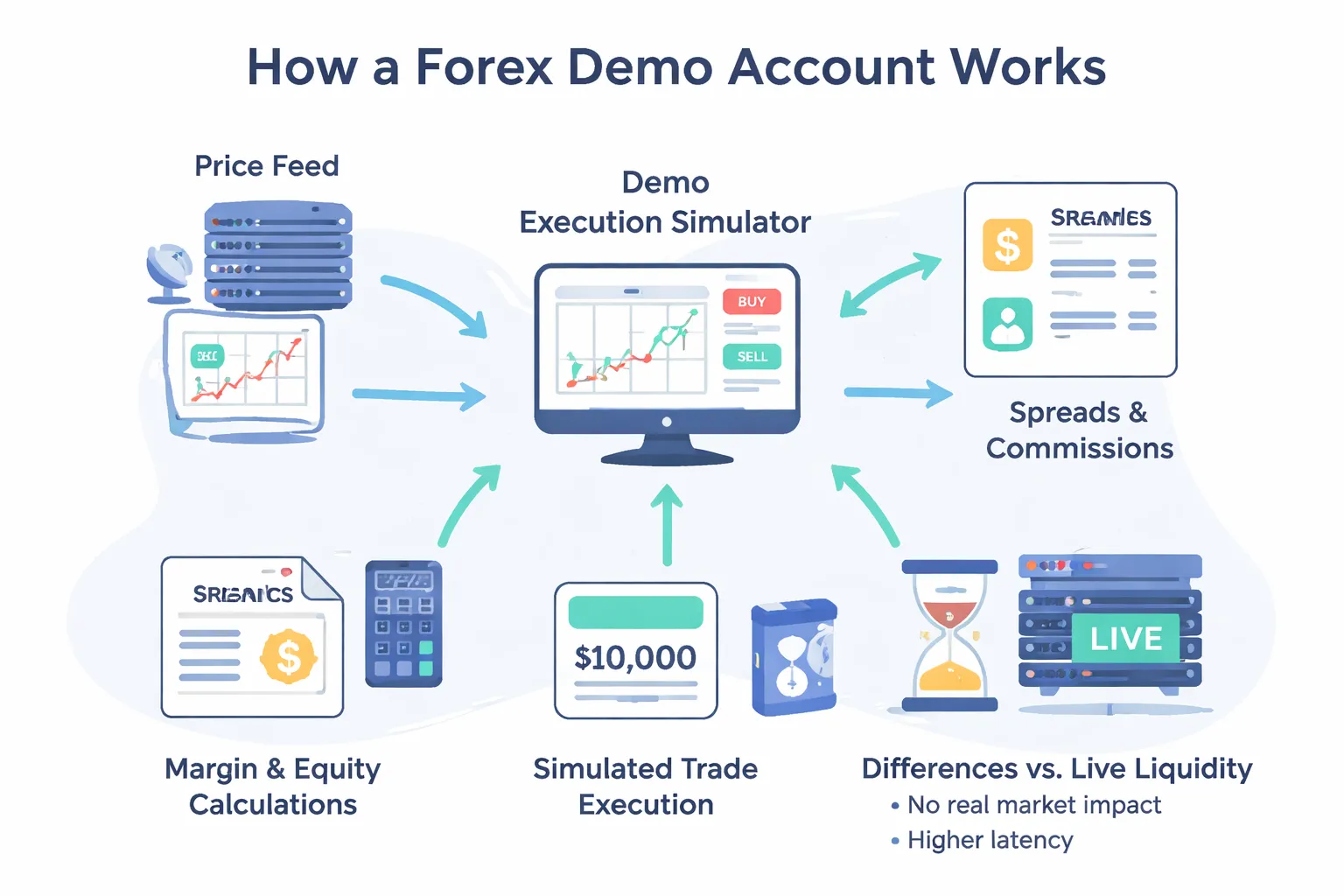
Your demo platform receives a price stream. It then simulates order matching. Many brokers route demo orders to an internal simulator, not the live liquidity stack.
This can make fills look clean. You may see fewer partial fills. You may see less slippage. You may get instant execution even when the market moves fast.
Demo execution quality depends on the broker model and server setup. Learn the difference between broker types before you judge your results. Use ECN vs STP vs market maker brokers to map the terms to what you see on your platform.
Spread, commission, and swap modeling
Most demos include the spread. Many include commissions if the account type charges them. Some demos simplify swaps. Some apply them, but with generic rates that do not match live.
- Spread. Often close to live during normal hours. It can stay tighter than live during spikes.
- Commission. Sometimes modeled correctly on RAW or ECN style accounts. Sometimes missing on demos that default to a spread-only profile.
- Swap. May apply at rollover time, but rates can differ. Triple swap rules can differ. Symbols like gold, indices, and crypto often show the biggest gaps.
Log your costs. Track average spread at your trading hours. Record commission per lot. Capture swap on holds longer than one day. Compare these numbers to the broker’s published contract specs.
Common demo limitations, liquidity simulation, requotes, and latency
Demo accounts rarely simulate real liquidity. Live markets move because other orders hit the book. Demo orders do not push price. You trade inside a model, not inside the full market.
- Liquidity. Demo may ignore depth limits. Live may widen spreads or slip you when size increases.
- Requotes. Demo may show fewer requotes. Live dealing desk execution can requote in fast moves.
- Latency. Demo servers can sit closer to you or run lighter loads. Live fills depend on server load, routing, and network delay.
- Slippage. Demo often understates negative slippage. Live can slip both ways, but traders feel the bad fills more.
- Stops and gaps. Demo may fill stops at clean levels. Live can gap through stops during news or weekend opens.
Treat demo results as process feedback, not proof of live performance. If you scalp, trade news, or use tight stops, assume your live fills will degrade.
Choosing the Right Demo Account (Broker + Platform Fit)
Pick a regulated broker demo, not a random app
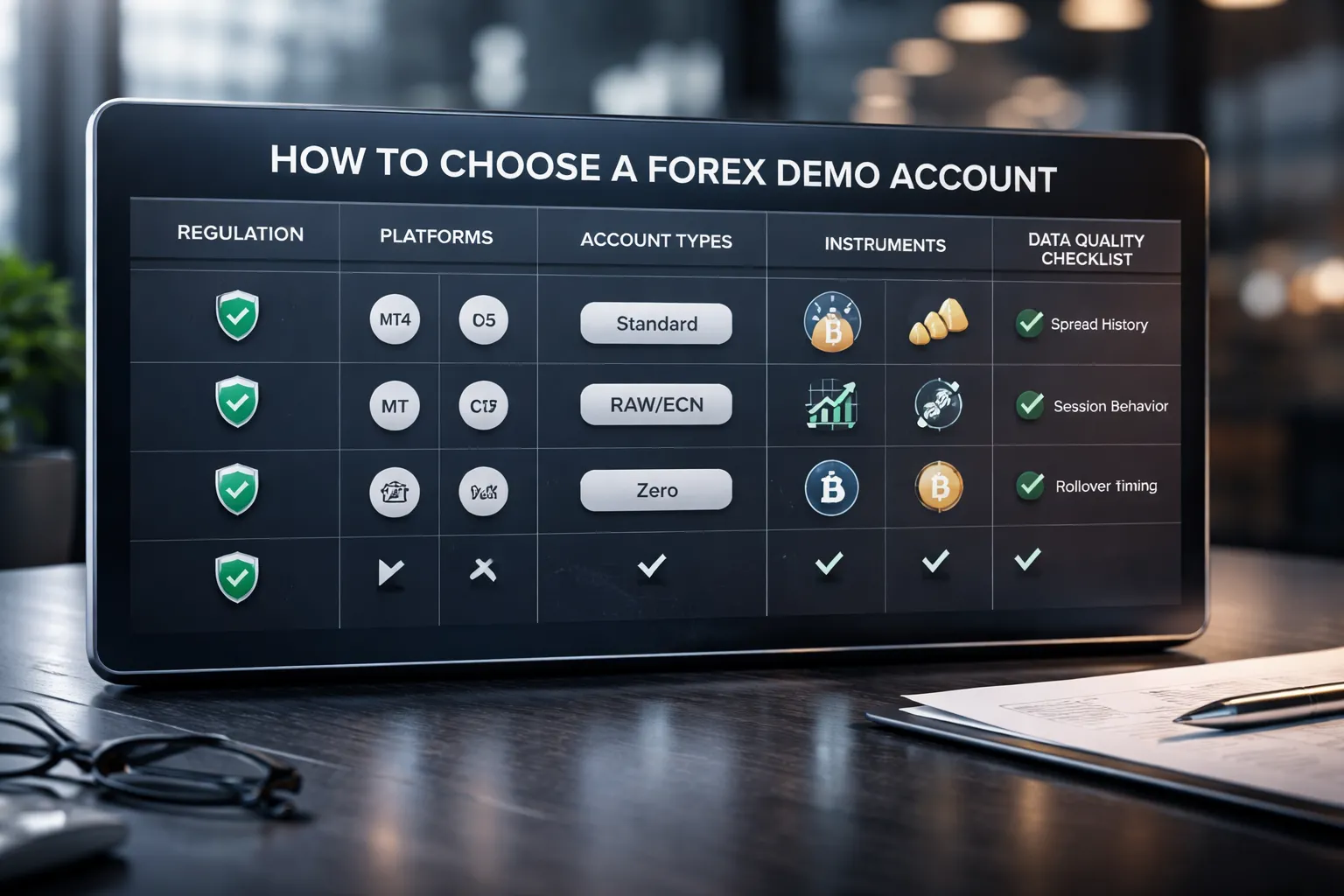
Your demo should match your live path. Start with brokers you can legally use in your country. Prefer regulated firms. You get clearer rules, better disclosures, and fewer gimmicks.
- Check the license. Look up the broker on the regulator register. Match the legal entity name, not just the brand name.
- Avoid “bonus” style demos. Some unregulated offers use fake pricing, fake liquidity, and aggressive upsells. That teaches bad habits.
- Confirm product availability. Some regions restrict CFDs, crypto CFDs, or leverage levels. Your demo should reflect those limits.
- Match your funding route. If you plan to use bank transfer, card, or local methods, check they exist on the live account. Demos skip this friction.
If you need help screening brokers, use this regulated broker guide.
Choose the platform that fits your trading goals
Do not pick a platform because it is popular. Pick it because it supports your workflow, order types, and tools.
- MT4. Best if you only need spot forex and a large library of older indicators and EAs. Many brokers still run it, but it is limited versus newer platforms.
- MT5. Better if you want more markets, more timeframes, improved testing tools, and modern order handling. It often supports more symbols than MT4 at the same broker.
- cTrader. Strong for order entry, depth of market, and execution transparency tools. Good if you care about precise fills and want a clean interface.
- Web terminals. Good for basic execution and portability. Weak for advanced testing, automation, and some order management features. Treat them as a backup unless you trade very simply.
Pick one platform and stay there during practice. Platform switching resets your muscle memory, hotkeys, and order routines.
Mirror the live account type you plan to trade
Account type changes your cost structure. That changes your strategy results. Your demo should use the same pricing model you will fund.
- Standard. Usually no commission. Costs sit inside the spread. This can suit swing trading and longer holds, where spread matters less per trade.
- RAW or ECN style. Lower spreads, plus a commission per lot. This can suit active trading, scalping, and strategies sensitive to spreads.
- Zero spread claims. Often means fixed or near zero spreads on some pairs, with higher commissions, wider spreads at news, or limits on symbols and hours. Test it during active sessions and news windows.
| Account type | Typical pricing | Who it usually fits | What to verify in demo |
|---|---|---|---|
| Standard | Spread only | Lower frequency trading | Average spread by session, rollover charges |
| RAW or ECN style | Tight spread plus commission | Higher frequency trading | All in cost per round trip, commission per lot, minimum lot size |
| Zero spread | Zero or near zero spread plus higher fees | Cost sensitive entries | When spreads stop being zero, symbol limits, execution limits |
Make sure the demo includes the instruments you will trade
Instrument coverage changes volatility, spreads, and trading hours. If you demo majors but plan to trade gold or indices, your demo will mislead you.
- Majors. Usually tighter spreads and deeper liquidity. Best for learning execution and risk control.
- Minors. Wider spreads than majors. More gaps and thinner liquidity in some sessions.
- Exotics. Much wider spreads, higher swap risk, and sharper moves. Demo pricing often looks cleaner than live.
- Gold. Different tick value, session behavior, and volatility patterns. Spreads can widen fast during news.
- Indices. Different trading hours and gap behavior. Watch opens, closes, and overnight pricing.
- Crypto CFDs. If available in your region, expect wider spreads and weekend behavior. Many brokers change margin rules in fast markets.
Also match contract specs. Check lot size, minimum trade size, tick size, margin rate, and trading hours per symbol.
Data quality checklist, spreads, sessions, and rollover timing
Bad demo data builds bad expectations. Validate the feed before you trust your results.
- Spread history. Log spreads at different times for the same symbol. Check Asia, London, and New York. Look for sharp widening at session transitions.
- News behavior. Watch spreads and execution during major releases. If the demo stays calm, assume live will be worse.
- Session behavior. Check late Friday and early Monday. Look for gaps, wider spreads, and reduced liquidity.
- Rollover timing. Confirm the broker server time and when swaps apply. Check the triple swap day. Many brokers apply it midweek, often Wednesday.
- Swap rates. Verify long and short swaps per instrument. Small differences change results for multi day holds.
- Symbol specs. Confirm digits, pip value, contract size, and margin requirements. A mismatch breaks your position sizing.
- Price source. Ask if the demo uses the same feed as live. If the broker will not answer, treat the demo as a basic training tool only.
Step-by-Step: How to Open and Set Up a Demo Account
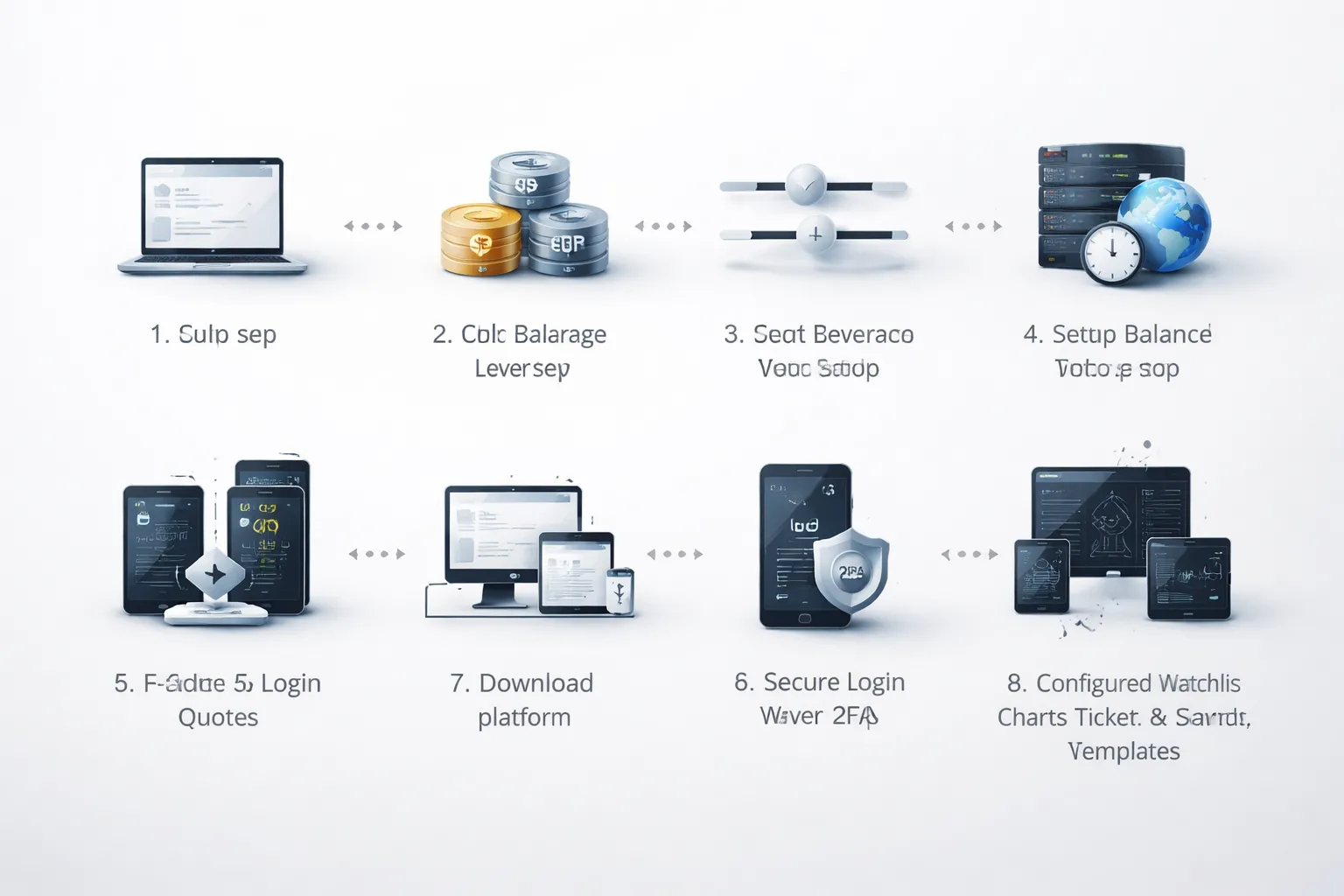
Quick signup workflow and typical verification requirements
Open the broker site or app. Choose “Demo” or “Practice.” Enter your name, email, country, and phone. Create a strong password. Confirm your email.
Most brokers skip full KYC for a demo. Some still ask for basic identity data to reduce abuse. Expect these checks:
- Email verification. Required. You get a login or activation link.
- Phone verification. Common. You receive an SMS code.
- Residence and tax info. Sometimes required due to local rules.
- ID upload. Rare for demo. More common if you also start a live application.
Use a dedicated email for trading accounts. Save your broker client ID and demo account number in a password manager.
Configure base currency, starting balance, and leverage realistically
Match your demo to your intended live setup. Otherwise, your results mislead you.
- Base currency. Set it to the currency you will deposit in live, usually USD, EUR, or GBP. This changes your P&L display and your margin figures.
- Starting balance. Use a number you can fund within 30 days. If you plan to start with $500, do not set $50,000.
- Leverage. Copy the leverage you will get in your region and account type. High leverage makes bad risk look good until it fails.
If the broker offers multiple execution models, confirm which one your demo uses. Start with the same model you plan to trade live. Read this practical checklist for choosing a forex broker if you still compare brokers.
Choose a server, time zone, and quote format (5-digit or 3-digit)
Platform settings change your charts and your order handling. Set them once and keep them stable.
- Server. Pick the correct broker server for your region and platform, for example “Broker-Demo” vs “Broker-Live.” A wrong server causes login errors and missing symbols.
- Time zone. Set chart time to match your trading plan. If you use New York close daily candles, use a platform feed that supports it. Do not mix time zones across devices.
- Quote digits. Most major pairs quote in 5 digits, JPY pairs in 3 digits. This affects how you read spreads and set stops.
| Pair type | Typical quote | 1 pip equals |
|---|---|---|
| Non-JPY majors | 1.08543 | 0.00010 |
| JPY pairs | 148.327 | 0.010 |
If your platform shows fractional pips, the last digit is a pipette. A 1.2 pip spread may display as 12 points.
Download or connect platforms and log in securely
Use the broker’s official download links. Install the platform you will trade live.
- Web terminal. Fast setup. Good for basic testing and order flow checks.
- Desktop platform. Better for templates, hotkeys, and stable chart layouts.
- Mobile app. Good for monitoring and alerts. Avoid heavy analysis on a small screen.
Log in with the demo account number and the correct server. If the broker provides separate “investor” or “read-only” passwords, use them for sharing screenshots or logs.
- Enable 2FA on your broker portal if available.
- Use a password manager. Do not reuse your email password.
- Lock down API keys if you connect third party tools. Use IP restrictions when possible.
Basic layout setup: charts, watchlists, order tickets, and templates
Set up your workspace before you place trades. Keep it simple and repeatable.
- Watchlist. Add only the pairs you will trade. Include their correct symbol names, for example EURUSD, EURUSD.a, or EURUSDm.
- Charts. Open 1 to 3 timeframes per pair. Start with one clean chart, then add indicators only if you can name the rule they support.
- Order ticket. Enable one-click trading only if you already use hard risk limits. Set default order size to the smallest lot available.
- Risk fields. Turn on SL and TP lines on chart. Show spread, swap, and margin level in the terminal panel.
- Templates. Save a base template for each strategy. Save a separate template for news trading if you do it.
Check one trade end to end. Place a small market order, set SL and TP, modify it, then close it. Confirm the history shows entry price, spread cost, swaps, and commissions.
Getting Comfortable With the Trading Platform (Core Skills to Practice)
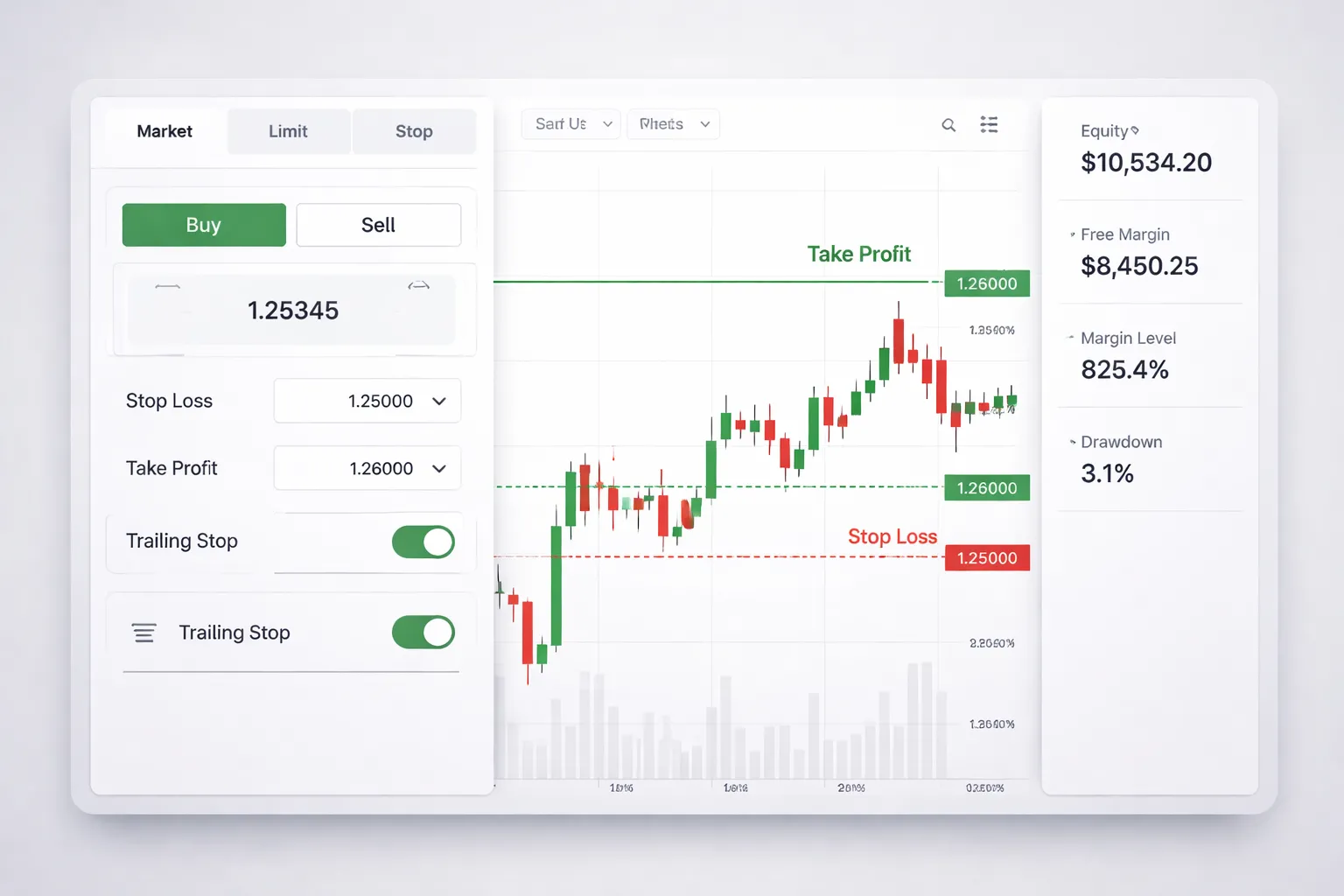
Placing and Managing Orders
Learn each order type until you can place it fast and without surprises. Use a demo to see how price, spread, and slippage change the fill.
- Market order. You buy or sell at the best available price. Practice during calm and fast markets. Compare the requested price to the filled price.
- Limit order. You set a better price than current. Practice placing buy limits below price and sell limits above price. Track missed entries when price turns early.
- Stop order. You enter after price breaks a level. Practice buy stops above highs and sell stops below lows. Note how spread can trigger stops earlier than you expect.
- Stop-limit. Where supported, you set a stop trigger and a limit price for the fill. Practice setting a realistic limit range. Too tight means no fill.
- Modify orders. Move entry, SL, and TP. Learn the platform rules for minimum distance, freeze levels, and step size.
- Partial close and scale out. Close part of a position, then adjust SL on the remainder. Confirm the platform recalculates average price and P and L correctly.
- OCO and brackets. If your platform supports it, link orders so one cancels the other. Use brackets so SL and TP attach to the position every time.
Risk Tools to Practice
Risk control is a platform skill. Make it repeatable.
- Position size calculator. Set a fixed risk per trade, like 0.5 percent or 1 percent. Enter stop distance in pips, confirm lot size output. Then cross-check it with the platform margin impact.
- Stop-loss. Place SL at the same time as entry. Practice setting SL by price, not by money. Verify the distance in points or pips and the cash risk shown in the order ticket.
- Take-profit. Set TP based on your plan, then check the risk to reward ratio before you send the order.
- Trailing stop. Test different trail distances. Watch how spread and volatility can stop you out on normal pullbacks.
- Break-even rule. Practice moving SL to entry only when your rules say so. Confirm you account for spread so break-even is real break-even.
| Tool | What to verify in the platform |
|---|---|
| Position size | Lot size matches your risk, margin impact stays within your limit |
| SL and TP | Correct side of the market, correct distance, attached to the trade |
| Trailing stop | Trail starts when expected, step settings do what you intend |
Charting Essentials
Your chart should help you make one decision, entry, exit, or no trade. Keep it clean.
- Timeframes. Practice switching between your planning timeframe and execution timeframe. Confirm you do not change the trade idea when you zoom in.
- Candlesticks. Learn how your platform builds candles, server time matters. A daily candle close can differ by broker.
- Drawing tools. Use horizontal lines for levels, trendlines for structure, and rectangles for zones. Practice snapping to highs and lows. Save and reuse layouts.
- Indicators. Add only what you use. Check inputs, periods, and applied price. Confirm indicator values match the timeframe you think you are on.
- Crosshair and data window. Use them to read exact price, time, and candle range. Stop estimating.
Alerts, One-Click Trading, and Hotkeys
Speed helps only if your workflow prevents errors. Build guardrails.
- Price alerts. Set alerts at entry levels, invalidation levels, and news volatility zones. Use push or email if you trade away from the screen.
- One-click trading. Turn it on only after you set default lot size and confirm order confirmation settings. Practice on the smallest size available.
- Hotkeys. Learn the keys for buy, sell, close, reverse, and modify. Then test them on demo until you can do it without looking. Add a rule, hotkeys only when your order ticket shows SL and TP.
- Error checks. Before you send, confirm symbol, lot size, SL, TP, and whether you are netting or hedging.
Reading Account Metrics
These numbers tell you if you can survive normal volatility. Watch them on every trade.
- Balance. Your closed P and L only. It does not change with open trades.
- Equity. Balance plus open P and L. This is your real account value right now.
- Used margin. Margin locked to hold open positions.
- Free margin. Equity minus used margin. This is your buffer for drawdown and new trades.
- Margin level. Equity divided by used margin, shown as a percent. This drives margin calls and stop outs. Learn your broker thresholds and keep a safety buffer.
- Drawdown. Peak to trough equity decline. Track both current drawdown and maximum drawdown for the session and week.
| Metric | What it means for your next click |
|---|---|
| Equity | Shows if your open loss is still within plan |
| Free margin | Shows if you can hold through normal swings without forced liquidation |
| Margin level | Warns you early, low values mean you are overleveraged |
| Drawdown | Shows if your risk settings match your strategy and market conditions |
If these metrics feel confusing, stop and check your broker rules and protections. Use a regulated forex broker so margin policies, disclosures, and stop-out rules stay clear.
How to Use a Demo Account the “Right” Way (A Practical Training Plan)
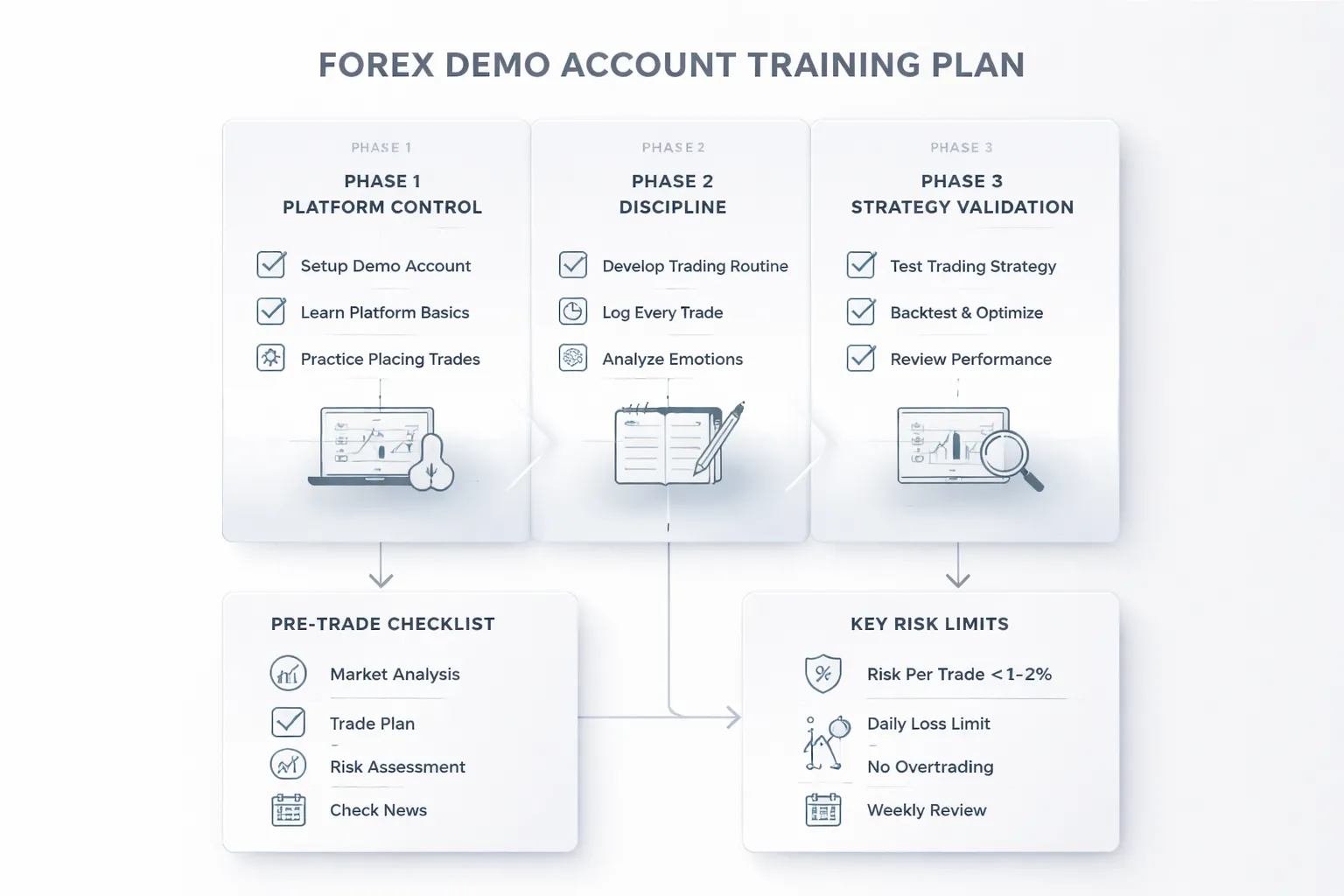
Set a Clear Objective
A demo account can train three different skills. Pick one. Track it.
- Platform learning: orders, lot sizing, stop loss, take profit, trailing stop, pending orders, chart tools, alerts, and reporting.
- Strategy validation: does your setup produce a positive result under real spreads and execution, across enough trades.
- Execution practice: can you follow rules under time pressure, without skipping steps or changing risk.
Do not mix objectives in the same week. You will change too many variables and learn nothing.
Create a Simple Trading Plan (One Page)
Write your rules before you place trades. Keep them tight. Keep them measurable.
- Market: one major pair only, for example EUR/USD or GBP/USD.
- Timeframe: one execution timeframe, one higher timeframe for direction.
- Setup rules: exact conditions that must appear before you act, and one clear reason to skip the trade.
- Entry: market or limit, and where the trigger sits.
- Stop loss: fixed rule, based on structure or volatility, never “where it feels safe”.
- Take profit: a fixed target rule, and a rule for partials or break even if you use them.
- Risk per trade: 0.25% to 1% of account balance.
- Daily max loss: 2R or 2% of balance, whichever comes first.
- Weekly max loss: 5R or 5% of balance.
- Trade limit: 1 to 3 trades per session, to stop overtrading.
Set demo balance close to what you plan to deposit live. If you plan to start with $500, do not practice on $50,000.
Use Realistic Constraints
Make demo feel like live. Match your real environment.
- Same schedule: trade only during the sessions you will trade live.
- Same device: if you will trade on a phone, practice on a phone, not a desktop.
- Same order types: if you will use limit orders live, do not rely on market orders in demo.
- No instant resets: do not top up the demo after a drawdown. Treat it like real capital.
- Same news rules: either avoid high impact news or define how you handle it, then stick to that rule.
Use a Pre-Trade Checklist and a Post-Trade Review
Your goal is a repeatable process. Checklists reduce mistakes. Reviews turn trades into data.
- Pre-trade checklist: pair and session match your plan, setup rules match, stop loss placed, position size matches risk, spread is acceptable, you are inside daily loss limits.
- Post-trade review: screenshot entry and exit, record R result, tag the setup, note mistakes, note if you followed the plan.
Track two scores each week.
- Discipline score: percent of trades that followed your rules.
- Performance score: total R gained or lost.
Do not move to live trading until discipline stays above 90% for at least 30 to 50 trades. If you plan to open a live account next, follow this step-by-step guide to opening a forex trading account.
Avoid “Demo Gambling”
Most demo results fail because you treat demo money like fake money. Avoid these patterns.
- Overleveraging: large lot sizes create wins that hide bad entries, then wipe the account in normal swings. Cap risk per trade and respect margin level.
- Revenge trading: you increase size after a loss to “get it back”. Your plan must stop you with daily max loss rules.
- Random experimentation: you change indicators and timeframes after every trade. Batch tests instead. One change per week only.
If you want to test a new idea, create a second demo account for experiments. Keep your main demo account strict and stable.
A Practical 3-Phase Training Plan
| Phase | Length | Focus | Rules | Pass Criteria |
|---|---|---|---|---|
| 1. Platform Control | 2 to 5 trading days | Order flow and risk sizing | Place 20 practice orders, use stop loss on 100%, size every trade by fixed risk | No sizing errors, no missing stops, you can find all reports fast |
| 2. Process and Discipline | 30 to 50 trades | Rule execution | One pair, one setup, fixed risk, daily and weekly max loss enforced | 90%+ rule compliance, no breach of loss limits |
| 3. Strategy Validation | 50 to 100 trades | Edge confirmation | No rule changes, track R, drawdown, win rate, average win and loss | Positive total R, drawdown within your tolerance, stable results across weeks |
Strategy Testing on Demo: From Idea to Evidence
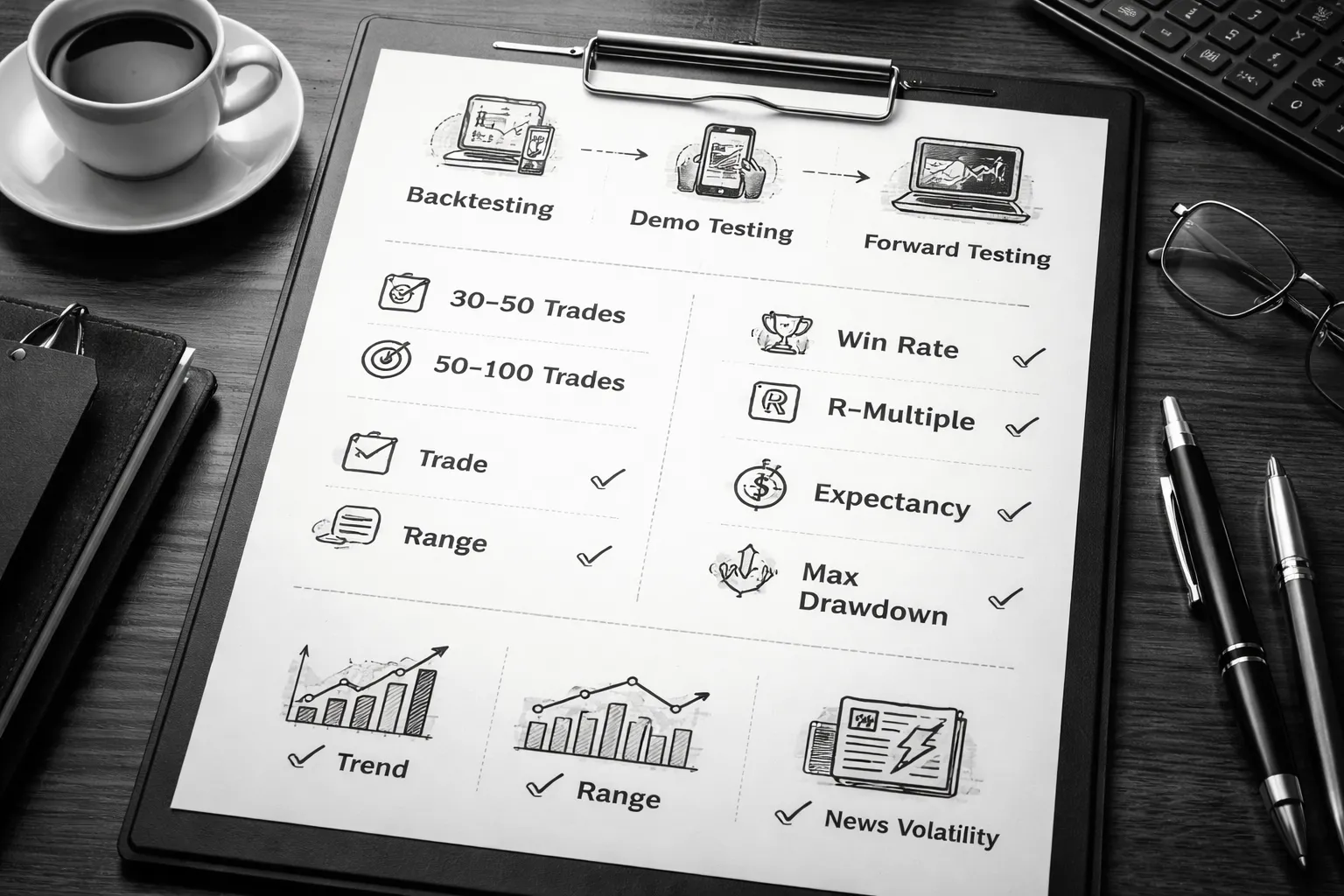
Backtesting vs forward testing, what each can and can’t prove
Backtesting checks if your rules had an edge on past data. It helps you spot obvious flaws fast. It cannot prove you will execute the rules live. It cannot prove your fills, spreads, and slippage will match real trading.
Forward testing on a demo checks if your process works in real time. It proves you can follow rules under pressure. It shows how your strategy behaves with live spreads, session changes, and news spikes. It still cannot prove you will act the same with real money, but it gets close.
- Use backtesting to filter ideas.
- Use demo forward testing to validate execution and robustness.
Sample size and time horizons, avoid conclusions from a small streak
A winning streak means little. A losing streak means little. You need enough trades across enough weeks to cover different conditions.
- Minimum check, 30 to 50 trades. Focus on rule execution.
- Validation check, 50 to 100 trades. Focus on edge stability.
- Time horizon, at least 4 to 8 weeks. Include quiet weeks and volatile weeks.
Keep variables fixed. One pair. One setup. Fixed risk per trade. Daily and weekly max loss enforced. If you change inputs mid-test, you restart the sample.
Tracking performance properly, focus on R not dollars
Track in R-multiples. R equals your planned risk per trade. This keeps results comparable as you scale.
| Metric | How to track it | What it tells you |
|---|---|---|
| Win rate | Wins divided by total trades | How often your setup works |
| Average win (R) | Mean R of winning trades | Your payoff size when right |
| Average loss (R) | Mean R of losing trades | Your damage when wrong |
| Expectancy (R) | (Win rate × avg win) minus (loss rate × avg loss) | Your average outcome per trade |
| Total R | Sum of R across the test | Net performance across the sample |
| Max drawdown (R) | Largest peak-to-trough drop in cumulative R | Worst stretch you must tolerate |
- Log every trade. Entry, stop, target, session, spread, reason for entry, reason for exit.
- Track rule compliance. Aim for 90%+ compliance with no breach of loss limits.
- Separate strategy performance from execution errors. Mark mistakes as mistakes.
Market regime awareness, trending vs ranging and news volatility
Your demo test must include different regimes. Many strategies work in one regime and fail in another.
- Trending periods reward breakouts and pullback continuation.
- Ranging periods punish breakout entries and reward mean reversion.
- News volatility widens spreads and increases slippage. It can break tight stops.
Tag each trade with a simple regime label. Trend, range, high-vol news. Then review results by tag. If performance collapses in one regime, you need a filter or you need to stand aside during that condition.
Also note execution effects. Different brokers handle spreads and fills differently, especially around news. This ties into how brokers route orders and price quotes. See spread vs commission before you assume your edge will survive real costs.
When to retire or refine a strategy, rule changes vs overfitting red flags
Refine a strategy only after you complete a clean sample. Do not patch rules after every loss.
- Refine when results show a consistent weakness, like most losses happen in a clear condition you can define and avoid.
- Retire when expectancy stays negative after 50 to 100 trades with high rule compliance.
Watch for overfitting.
- You add rules that rely on exact candle shapes or exact times with no clear logic.
- Your changes improve the last 10 trades but hurt the next 10.
- Your strategy needs constant tweaks to stay break-even.
- Your drawdown keeps expanding even when you execute well.
Make rule changes in controlled batches. Change one variable. Run a new 30 to 50 trade execution sample. Then validate again with 50 to 100 trades. If the new version does not improve expectancy and drawdown together, drop it.
Risk Management Practice (The Skill Most Traders Undertrain)
Risk Management Practice (The Skill Most Traders Undertrain)
Most demo accounts fail for one reason. You never practice loss control with the same discipline you use for entries.
Use demo to build a risk system you can repeat. Measure it. Lock it in. Then trade it without negotiation.
Position sizing basics: fixed lot, fixed risk %, and volatility-adjusted sizing
Position size decides your drawdown. It also decides if your edge survives.
- Fixed lot size. You trade the same lot every time. This makes results easy to compare. It breaks when your stop distance changes, because risk per trade swings.
- Fixed risk percent. You risk a set percent of equity each trade, like 0.25% to 1.0%. This keeps risk stable across different stop sizes. Use this for most demo testing.
- Volatility-adjusted sizing. You size positions based on recent volatility, so your stop sits beyond normal noise. Common inputs include ATR(14) or a 20-day average range. Your risk stays constant while stops expand or shrink with volatility.
Use one method per test batch. Do not mix sizing styles inside the same sample.
| Method | Best for | Main problem |
|---|---|---|
| Fixed lot | Early execution practice | Risk varies by stop distance |
| Fixed risk % | Strategy validation | Needs correct pip value and stop size |
| Volatility-adjusted | Markets with shifting ranges | More inputs, more ways to drift |
Leverage and margin pitfalls: how accounts blow up even on demo
High leverage does not kill you by itself. Oversized positions do.
- Margin calls come from exposure. If you stack positions, your free margin drops fast. One spike can close trades at the worst price.
- Small stops can hide big leverage. You can take huge size with a tight stop. A single slip, spread jump, or gap can turn a planned 0.5% loss into a multi percent hit.
- News spreads break math. Stops can fill worse than planned. Demo platforms can still simulate this poorly. Treat it as a warning, not protection.
Set a leverage rule for practice. Cap your total open risk and your total notional exposure. Track both.
Stop-loss placement logic: technical invalidation vs arbitrary pip distances
Your stop must sit where your trade idea becomes wrong. Not where you feel comfortable.
- Technical invalidation. Place the stop beyond a level that breaks your setup, like a swing high or low, structure break, or range boundary. If price reaches it, you exit because your premise failed.
- Arbitrary pip stops. Fixed 10 or 20 pip stops ignore volatility and structure. They create random exits and unstable expectancy.
After you set the stop, size the trade to match your risk rule. Do not move the stop wider to avoid a loss. If you trail, define the exact trail rule before the trade.
Risk controls: daily loss limit, weekly loss limit, and trade cap rules
Stops protect single trades. Risk controls protect your account from your worst day.
- Daily loss limit. Stop trading after you hit a fixed amount, like 1% to 2% of equity. You end the session. You do not try to win it back.
- Weekly loss limit. Pause trading after a larger drawdown, like 3% to 6%. Review execution errors first. Then review strategy.
- Trade cap. Limit the number of trades per day, like 3 to 6. This blocks revenge trading and overtrading.
Write these rules down. Add them to your platform alerts. If you plan to go live soon, match your broker settings and costs, see the spread and commission structure you will face.
Correlation and exposure: avoiding hidden concentration across pairs
Many forex pairs move together. You can think you have diversification and still carry one bet.
- Common concentration. Long EURUSD and long GBPUSD often means short USD twice. Long AUDUSD and long NZDUSD often means the same risk theme.
- Cross exposure. Long EURJPY plus long USDJPY can load you with JPY risk without noticing.
- Risk stack limit. Treat correlated trades as one position. Either reduce size or allow only one trade from the group.
In demo, tag every trade with its base currency exposure. Track your total USD, JPY, and EUR exposure at entry. Your goal is controlled concentration, not accidental leverage.
Psychology: Turning Demo Trading Into Emotional Skill-Building
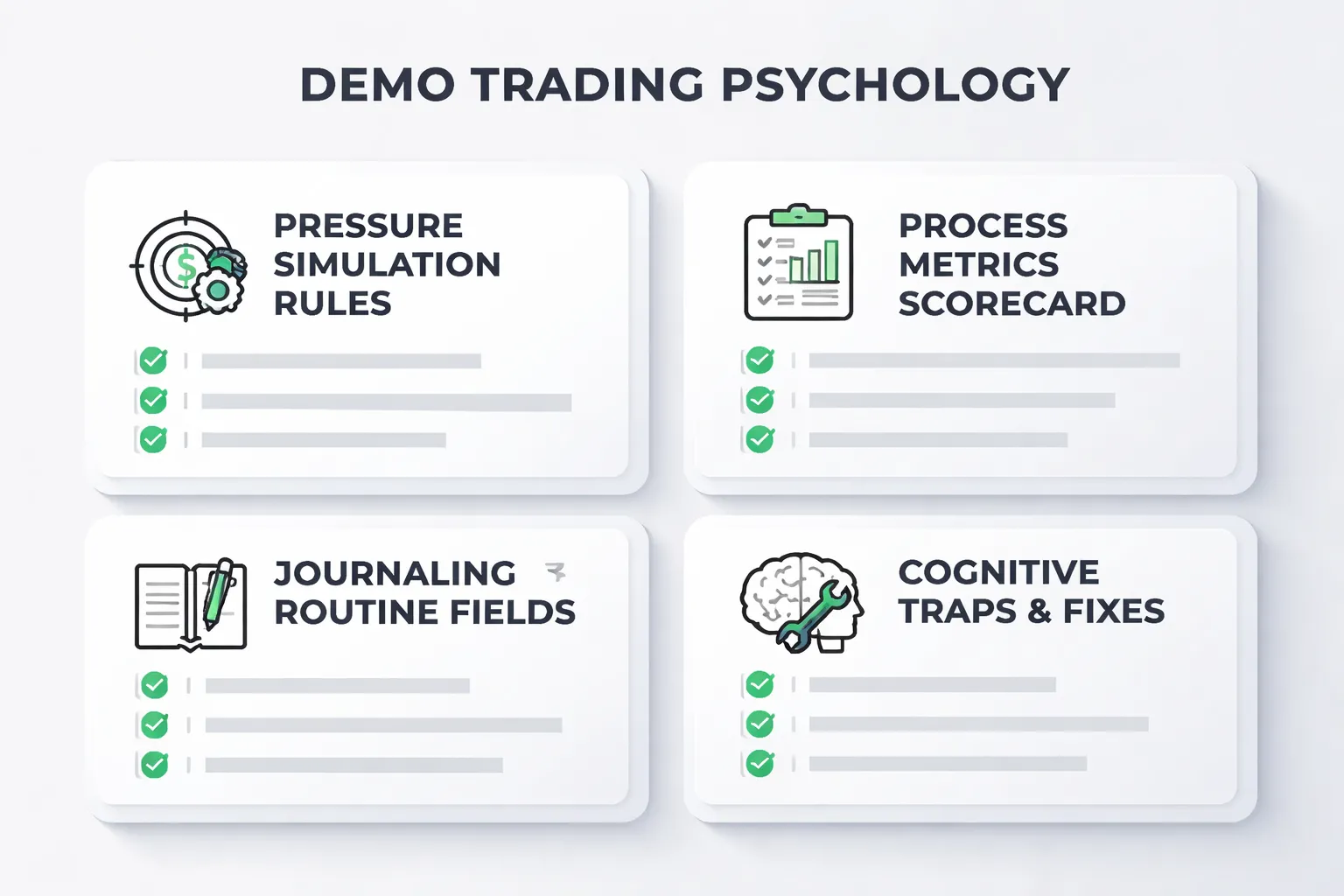
Why emotions feel different live, and how to simulate pressure in demo
Demo trading removes consequences. Your brain knows it. That reduces stress, and it also reduces focus.
Live trading adds three stressors. Money risk. Uncertain outcomes. Social pressure from your own expectations.
You can simulate pressure in demo if you make mistakes costly in a real way.
- Use realistic size. Set demo balance to what you will fund. Risk the same percent per trade you plan to use live.
- Add time pressure rules. Limit pre-trade analysis to a fixed window, for example 5 to 10 minutes. No extra chart hopping.
- Use a one-shot entry rule. One entry per setup. No repeated re-entries to chase a better price.
- Lock your risk. Place stop loss and take profit at entry. No widening stops. No removing stops.
- Introduce a penalty. If you break a rule, stop trading for 24 hours, or cut your next session size by 50%.
- Trade at the same hours. Match the sessions you will trade live. Your attention and patience change by time of day.
Track your heart rate if you can. Even a simple note like “calm, tense, rushed” at entry helps. You need repeatable behavior under mild stress before you add real money.
Process goals vs money goals, measure discipline instead of P&L
P&L hides bad decisions. A lucky win can reward poor execution. A normal loss can punish good execution.
Use process goals. Score each trade on rules, not outcome.
- Setup quality. Did the trade meet your written criteria.
- Risk plan. Did you place the planned stop. Did you keep risk per trade within your limit.
- Exposure control. Did your currency exposure stay inside your session cap.
- Execution. Did you enter where you planned. Did you avoid late entries.
- Management. Did you follow your rules for partials, trailing, or time exits.
Use a simple scorecard. Your target is a high rule-following rate, not a high win rate.
| Metric | How to measure | Target |
|---|---|---|
| Rule adherence | Trades that followed all rules, divided by total trades | 90%+ |
| Planned risk accuracy | Actual risk per trade vs planned risk | Within 5% |
| Stop integrity | Count of widened or removed stops | 0 |
| Overtrade rate | Trades taken outside your session plan | 0 to 1 per week |
| Revenge trading incidents | Trades taken within 30 minutes after a rule-break or big loss | 0 |
Set a promotion rule from demo to live. Example, 30 trading days, at least 50 trades, 90% rule adherence, and no stop integrity violations.
Building consistency habits, journaling, routines, and decision hygiene
You build emotional control by reducing decision load. You do that with routines.
- Pre-market checklist. News schedule. Key levels. Your max trades. Your max total exposure by currency.
- One strategy per session. One setup type. One timeframe set. No mixing systems.
- Trade journal fields. Pair. Session. Setup name. Entry reason in one sentence. Stop size. Risk percent. Currency exposures. Screenshot at entry and exit. Rule score.
- Post-trade review. Write the first mistake you made, if any. Write the one rule that would have prevented it.
- Weekly audit. Count rule breaks by category. Pick one rule to fix next week.
Decision hygiene matters most when you feel rushed. Remove triggers.
- Hide the P&L. Keep risk visible. Hide running profit where possible.
- Use alerts. Let price come to you. Stop watching every tick.
- Limit platforms and tabs. Too much input creates impulse trades.
Your demo should match live costs. If your platform lets you, add realistic spreads and commissions. Broker costs change how trades feel and how you manage exits. See spreads, commissions, and swaps before you move to live.
Common cognitive traps, FOMO, confirmation bias, and “it will come back” thinking
These errors show up in demo because you feel safe. They get worse live.
- FOMO. You enter late after a move starts. You justify it with “momentum.” Fix it with hard entry rules and a missed-trade rule, if price passes your entry, you stand down.
- Confirmation bias. You search for charts and posts that agree with your view. Fix it with a forced disconfirm step. Write one reason the trade fails, then decide.
- “It will come back” thinking. You hold losers because closing feels like admitting failure. Fix it with stop integrity. Your stop is a contract. If hit, you exit. No debate.
Add labels in your journal. Tag each trade with the main trap you faced. Over time you will see patterns, time of day, pairs, and conditions that trigger poor behavior.
How Long Should You Use a Demo Account Before Going Live?
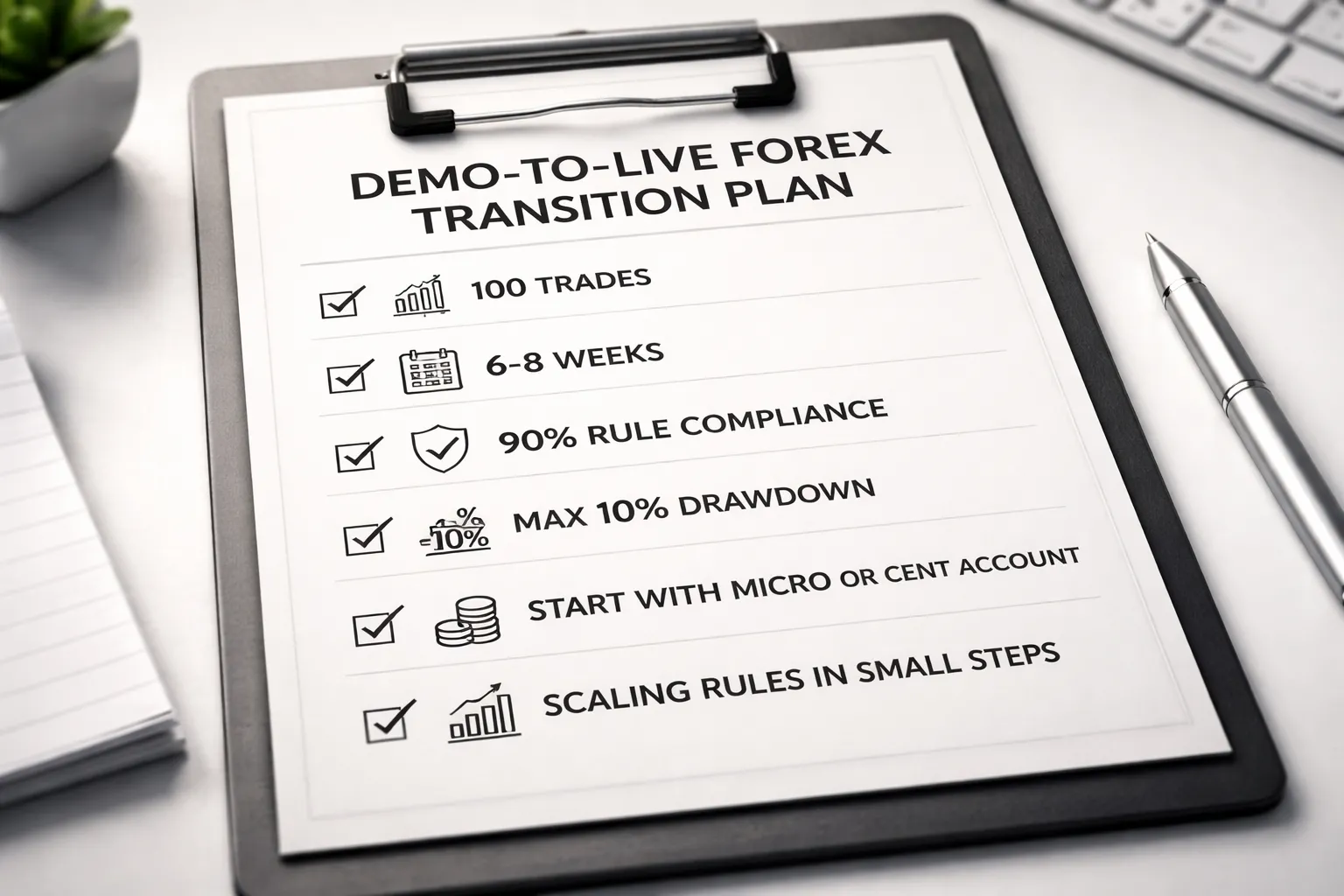
Readiness checklist
- Consistency: You follow the same setup rules every session. You do not change entries because you feel bored or impatient.
- Risk adherence: You risk a fixed amount per trade. You size positions from your stop distance, not from what you want to make.
- Repeatable execution: You place orders the same way, with the same steps. Entry, stop, target, and management rules stay stable.
- Journal discipline: You log every trade. You tag mistakes. You review weekly and write one fix for the next week.
Minimum benchmarks to consider
Use time and trade count. Time builds routine. Trade count tests your rules across conditions.
| Benchmark | Minimum target | What it proves |
|---|---|---|
| Sample size | At least 100 trades on your main setup | Your edge is not a small streak |
| Time in market | At least 6 to 8 weeks of active sessions | You can follow a routine, not just a burst of effort |
| Rule compliance rate | 90% or higher | You can execute without constant exceptions |
| Max drawdown cap | Under 10% peak to trough in the test period | Your risk control works when results dip |
| Risk per trade | 0.25% to 1% fixed | You can survive variance and keep trading |
| Overtrade control | Daily trade limit respected 95% of days | You can stop when your plan says stop |
If you trade multiple pairs, hit these benchmarks on one pair first. Then add the next pair and repeat.
Demo-to-live transition plan
- Step 1: Keep the same platform, chart template, and session times.
- Step 2: Go live with a micro or cent account where available. Use the smallest position size your broker allows.
- Step 3: Cut risk from demo. Start at 0.25% to 0.5% per trade, even if you used 1% in demo.
- Step 4: Trade only your A setup for the first 50 live trades. No new strategies. No new indicators.
- Step 5: Track rule compliance daily. If you break a core rule, reduce size for the next 10 trades.
- Step 6: Scale only after you earn it. Increase risk by small steps, such as +0.25%, after 30 to 50 trades with 90% rule compliance and drawdown under your cap.
- Step 7: Review broker protections before funding higher amounts. Use a broker with strong oversight and client safeguards. See regulated forex brokers.
Signs you’re not ready yet
- Erratic results: Big up weeks, then big down weeks. Your equity curve jumps because your sizing and behavior change.
- Rule-breaking: You move stops. You skip stops. You enter early. You widen risk after a loss.
- Overtrading: You take trades outside your plan to feel active. You chase after missed moves.
- Revenge trading: You increase size to win back losses fast.
- System hopping: You change methods after a small losing streak instead of reviewing execution.
- Ignoring conditions: You trade news spikes or low liquidity periods even when your rules say avoid them.
If you see these signs, stay on demo. Tighten one variable. Reduce pairs. Reduce session hours. Rebuild rule compliance first.
Pros, Cons, and Common Mistakes With Demo Accounts
Pros of a Forex Demo Account
- Safe learning. You can place real order types, make mistakes, and build routine without risking cash.
- Platform fluency. You learn how to set market, limit, and stop orders, adjust stop loss and take profit, use partial closes, and read your trade history.
- Controlled experimentation. You can test one variable at a time, like session hours, one pair, or a single setup. You can track results fast and cut what fails.
- Process training. You can practice pre trade checks, news filters, and risk rules until they feel automatic.
Cons and Limits You Need to Expect
- Unrealistic fills. Demo execution often looks cleaner than live. You may see less slippage, fewer re quotes, and better fills around news and thin liquidity.
- Spread and liquidity differences. Some demos use fixed or averaged spreads. Live spreads can widen in rollovers, news, and off hours.
- Missing emotional stakes. You will not feel the same fear, impatience, or regret. Your discipline can look better on demo than it will under real risk.
- False confidence from short samples. A good week can mean nothing. Variance can mask weak execution and weak risk control.
Common Demo Mistakes That Kill Your Learning Curve
- Using an unrealistic balance. If you plan to fund $500, do not demo with $50,000. Your position sizing and drawdowns will not match reality.
- Using huge leverage. Oversized trades make almost any strategy look exciting until it breaks. Keep risk per trade stable, for many traders that means 0.25% to 1%.
- Skipping a journal. If you do not record setup, entry reason, stop size, risk, and result, you cannot improve. You will repeat the same errors.
- Changing rules mid test. If you tweak entries and exits every day, you never learn if your edge works. Lock rules for a set sample size.
- Trading everything. Too many pairs and sessions reduce focus. Start with one major pair and one session block.
- Ignoring costs. Add spreads, swaps, and realistic slippage assumptions when you review performance, especially if you trade short term.
If Your Demo Results Look Great but Live Results Look Poor
Assume execution and psychology caused the gap. Fix both with a tight process.
- Match conditions. Trade the same pairs, same session hours, and same news rules as your demo test.
- Match sizing. Use the same risk per trade and the same stop loss method. Do not reduce stops to force larger size.
- Expect worse fills. Add a slippage buffer in your plan. Avoid entries during fast spikes. Use limit orders when your setup allows it.
- Step down to micro size. Trade the live account at the smallest size your broker allows. Keep it there until your rule compliance stays high.
- Audit execution, not P and L. Track plan compliance, entry quality, and stop discipline. Profit follows process.
- Extend your sample. Judge performance over a meaningful run of trades, not a few days. Small samples lie.
- Check broker quality. Poor execution and widening spreads can break a tight strategy. If needed, switch to a beginner friendly broker with solid regulation and execution standards. Use a vetted list of beginner forex brokers.
Safety, Regulations, and Data Privacy Considerations
How to Evaluate Broker Legitimacy
Start with the license. Do not trust logos or claims on a broker website. Verify the registration on the regulator’s official register.
- Regulator check: Match the broker’s legal entity name, license number, and domain. Names often differ from the brand name. If details do not match, walk away.
- Segregated client funds: Look for clear wording that client money sits in separate accounts from the broker’s operating funds. If the broker avoids this topic, treat it as a red flag.
- Compensation schemes: Some jurisdictions offer investor protection limits. Learn the scheme name, limits, and eligibility rules. Do not assume coverage.
- Negative balance protection: If offered, confirm it applies to your entity and your instrument set. Some brokers limit it to retail clients only.
- Public warnings: Search the regulator site for warnings and enforcement actions. Also check major regulators outside your country, scammers reuse brand names across borders.
If you want a deeper checklist for licenses and red flags, use this guide on regulated forex brokers.
Understanding Risk Disclaimers and Suitability Statements
Read the risk disclosure before you treat a demo as a rehearsal for live trading. Disclaimers tell you what can break when you switch to real money.
- CFD and FX loss rates: Many brokers must publish the percent of retail accounts that lose money. Use it as a reality check, not a prediction.
- Leverage and margin calls: Confirm margin requirements, stop-out levels, and liquidation rules. A demo can feel stable because you do not feel pressure, execution rules still matter.
- Execution and slippage language: Look for terms like “market execution,” “requotes,” “variable spreads,” and “slippage.” These affect tight stops and news trades.
- Suitability and appropriateness tests: Some regulated brokers ask questions about experience and finances. If you fail the test, the broker may restrict products or warn you in writing. Take that warning seriously.
- Bonuses and promotions: If a broker offers trading bonuses, read withdrawal conditions. Many link withdrawals to high volume requirements.
Personal Data Best Practices
A demo account still creates a data trail. Treat it like any financial login.
- Email hygiene: Use a dedicated email address for broker signups. It reduces spam and lowers the risk of account recovery attacks on your main inbox.
- Password manager: Generate a unique, long password for each broker and platform login. Do not reuse passwords across trading apps, email, and your bank.
- Two-factor authentication: Enable 2FA when available. Prefer app based codes over SMS if the broker supports it.
- Device security: Keep your OS, browser, and trading app updated. Lock your device. Do not install cracked indicators, EAs, or platform “plugins” from random links.
- Wi-Fi and remote access: Avoid logging in on public Wi-Fi. Do not leave Remote Desktop open to the internet. Disable it if you do not use it.
- Data permissions: If a broker asks for documents for a demo, question why. Most demos do not need ID. Share only what the process requires.
Avoiding Scams
Scammers use demo accounts as bait. They push you toward deposits, “managed” accounts, or off platform transfers.
- Guaranteed returns: Ignore anyone promising fixed monthly profit, no losses, or “risk free” trading. They sell a story, not a method.
- Signal sellers: Treat signals like marketing. Demand a verified track record, clear risk rules, and full trade history. Most will not provide it.
- Fake demos: Some sites show simulated profits that do not match real market pricing or spreads. Use demos only from regulated brokers, inside known platforms like MT4, MT5, cTrader, or the broker’s official web terminal.
- Pressure tactics: Walk away if someone pushes you to “upgrade to live today,” deposit via crypto, or send money to a personal account.
- Impersonation: Verify domain names, support emails, and app publisher names. Scammers clone websites and buy look alike domains.
Frequently Asked Questions
What is a forex demo account?
A forex demo account is a practice account with virtual money. You trade real market prices on a broker platform without risking cash. It helps you learn order types, platform tools, and position sizing before you go live.
Is a demo account the same as live trading?
No. Demos often differ on spreads, slippage, and execution speed. You also trade without real emotions. Treat demo results as platform practice and strategy testing, not proof you will earn money live.
How long should you use a demo account?
Use it until you can execute your plan without errors. Track at least 30 to 50 trades. Then review win rate, average win vs loss, and max drawdown. Switch only when you follow rules and control risk each trade.
How much virtual money should you set on a demo?
Match your planned live deposit. If you will fund $500, do not demo with $50,000. A realistic balance forces realistic position sizes and risk limits. It also stops you from building habits you cannot use live.
Can you withdraw money from a demo account?
No. Demo funds have no cash value. You cannot withdraw or transfer them. If someone promises demo profits you can cash out, treat it as a scam sign.
Does demo trading use real-time prices?
Usually yes, but it depends on the broker and data feed. Some demos use delayed quotes or simplified execution. Check the platform status and compare quotes with another regulated broker before you trust backtests and results.
Why do I get different spreads on demo vs live?
Some brokers show fixed or smoother spreads on demos. Live spreads can widen during news, low liquidity, and session opens. Use a demo that offers variable spreads if you plan to trade a live variable spread account.
Can you practice leverage and margin on demo?
Yes. You can set account leverage and see margin used, free margin, and margin level. Use the same leverage you will use live. High leverage can hide poor risk control and cause fast drawdowns.
Can you use Expert Advisors or bots on a demo?
Yes, most platforms allow EAs and APIs on demo. Test for at least several weeks across different sessions. Watch for execution differences, requotes, and slippage. Then forward test on a small live account before scaling.
What is the best platform for demo trading?
Choose the platform you plan to use live. MT4 and MT5 work well for charting and EAs. cTrader suits manual and algorithmic trading. Focus on stability, order types, and clear trade history, not extra features.
How do you avoid forex demo account scams?
Use regulated brokers and official app stores. Verify the broker domain, email, and app publisher. Do not deposit via crypto to a personal wallet. Review broker regulation and red flags in regulated forex brokers.
Should you trade many pairs on demo?
No. Start with one major pair like EUR/USD or GBP/USD. Learn its spread behavior and active hours. Add more pairs only after you can follow your plan and manage risk without mistakes.
What should you track while demo trading?
- Entry reason and setup type
- Risk per trade and position size
- Spread at entry and exit
- Slippage and execution notes
- R multiple, drawdown, and weekly results
Conclusion
Conclusion
A forex demo account lets you practice with live prices and zero financial risk. It also shows you your real weak points, like late entries, oversized positions, and rule breaking.
Use your demo like a test lab. Keep it close to reality. Match the platform, spread type, leverage, and account currency you plan to use with real money. Do not chase big balances or random trades.
Your goal is simple. Prove you can execute your plan and control risk. Track every trade. Review your stats each week. Do not go live until your process stays consistent over a meaningful sample.
Final tip. Pick a broker setup you can stay with, then lock in your rules and measure them. If you still need to compare platforms and conditions, use this broker checklist before you fund a live account.
-
Spread vs Commission: Which Forex Account Type Is Cheaper?
2 weeks ago -
How to Choose a Forex Broker: A Practical Checklist for Beginners
2 weeks ago -
Forex Broker Fees Explained: Spreads, Commissions, Swaps & More
2 weeks ago -
How to Open a Forex Trading Account (Step-by-Step for Beginners)
2 weeks ago -
Best Forex Brokers for Beginners (Top Picks + What to Look For)
2 weeks ago
-
- Quick signup workflow and typical verification requirements
- Configure base currency, starting balance, and leverage realistically
- Choose a server, time zone, and quote format (5-digit or 3-digit)
- Download or connect platforms and log in securely
- Basic layout setup: charts, watchlists, order tickets, and templates
-
- Backtesting vs forward testing, what each can and can’t prove
- Sample size and time horizons, avoid conclusions from a small streak
- Tracking performance properly, focus on R not dollars
- Market regime awareness, trending vs ranging and news volatility
- When to retire or refine a strategy, rule changes vs overfitting red flags
-
- Risk Management Practice (The Skill Most Traders Undertrain)
- Position sizing basics: fixed lot, fixed risk %, and volatility-adjusted sizing
- Leverage and margin pitfalls: how accounts blow up even on demo
- Stop-loss placement logic: technical invalidation vs arbitrary pip distances
- Risk controls: daily loss limit, weekly loss limit, and trade cap rules
- Correlation and exposure: avoiding hidden concentration across pairs
-
- What is a forex demo account?
- Is a demo account the same as live trading?
- How long should you use a demo account?
- How much virtual money should you set on a demo?
- Can you withdraw money from a demo account?
- Does demo trading use real-time prices?
- Why do I get different spreads on demo vs live?
- Can you practice leverage and margin on demo?
- Can you use Expert Advisors or bots on a demo?
- What is the best platform for demo trading?
- How do you avoid forex demo account scams?
- Should you trade many pairs on demo?
- What should you track while demo trading?
-
- Quick signup workflow and typical verification requirements
- Configure base currency, starting balance, and leverage realistically
- Choose a server, time zone, and quote format (5-digit or 3-digit)
- Download or connect platforms and log in securely
- Basic layout setup: charts, watchlists, order tickets, and templates
-
- Backtesting vs forward testing, what each can and can’t prove
- Sample size and time horizons, avoid conclusions from a small streak
- Tracking performance properly, focus on R not dollars
- Market regime awareness, trending vs ranging and news volatility
- When to retire or refine a strategy, rule changes vs overfitting red flags
-
- Risk Management Practice (The Skill Most Traders Undertrain)
- Position sizing basics: fixed lot, fixed risk %, and volatility-adjusted sizing
- Leverage and margin pitfalls: how accounts blow up even on demo
- Stop-loss placement logic: technical invalidation vs arbitrary pip distances
- Risk controls: daily loss limit, weekly loss limit, and trade cap rules
- Correlation and exposure: avoiding hidden concentration across pairs
-
- What is a forex demo account?
- Is a demo account the same as live trading?
- How long should you use a demo account?
- How much virtual money should you set on a demo?
- Can you withdraw money from a demo account?
- Does demo trading use real-time prices?
- Why do I get different spreads on demo vs live?
- Can you practice leverage and margin on demo?
- Can you use Expert Advisors or bots on a demo?
- What is the best platform for demo trading?
- How do you avoid forex demo account scams?
- Should you trade many pairs on demo?
- What should you track while demo trading?
-
Forex Lot Size Calculator: How to Use It to Size Trades Correctly
1 week ago -
How to Calculate Position Size in Forex (Position Sizing Formula + Examples)
1 week ago -
Forex Leverage Explained: How It Works, Pros, Cons & Examples
1 week ago -
Margin vs Leverage in Forex: What’s the Difference?
1 week ago -
What Is Forex Trading? A Beginner’s Guide to How It Works
2 weeks ago
-
Forex Leverage Explained: How It Works, Pros, Cons & Examples
1 week ago -
What Is a Lot Size in Forex? Lot Types + Quick Examples
2 weeks ago -
Forex Lot Size Calculator: How to Use It to Size Trades Correctly
1 week ago -
What Are Pips in Forex? Definition, Examples & Why They Matter
2 weeks ago -
How to Calculate Position Size in Forex (Position Sizing Formula + Examples)
1 week ago