How to Choose a Forex Broker: A Practical Checklist for Beginners

Your broker controls your trading costs, order fills, and access to your funds. Choose the wrong one and you pay more per trade, get worse execution, or face withdrawal delays.
This checklist shows you how to pick a forex broker step by step. You will learn how to check regulation, compare total trading costs, review spreads and commissions, test platforms, and spot account terms that trap beginners. You will also learn what to verify before you deposit, including leverage limits, fee schedules, and withdrawal rules.
If you want to go deeper on pricing, read our spread vs commission comparison.
Key Takeaways
Key Takeaways
- In het kort: Start with regulation, then costs, then platform, then account terms. In that order.
- Verify the regulator on the official register. Match the company name and license number. Do not rely on a badge on the broker site.
- Compare total trading costs, not headline spreads. Add spread, commission, and any minimum trade size effects.
- Check pricing on your pairs at your trading times. Test during liquid and volatile sessions.
- Read the full fee schedule. Watch for inactivity fees, conversion fees, overnight financing, and withdrawal charges.
- Test execution on a demo and a small live account. Track slippage, requotes, and order fills around news.
- Confirm platform basics before you deposit. Order types, charting, mobile stability, and two factor login matter.
- Review leverage limits and margin rules. Make sure your position sizing fits your risk plan.
- Look for account terms that trap beginners. Bonus strings, high minimum deposits, and withdrawal conditions.
- Do a withdrawal test early. Use your preferred method, confirm processing times, and keep proof of requests.
- Keep your checklist in one sheet. If a broker fails one critical item, move on.
For deeper pricing checks, use our spread vs commission comparison.
What a forex broker does (and how beginners get it wrong)
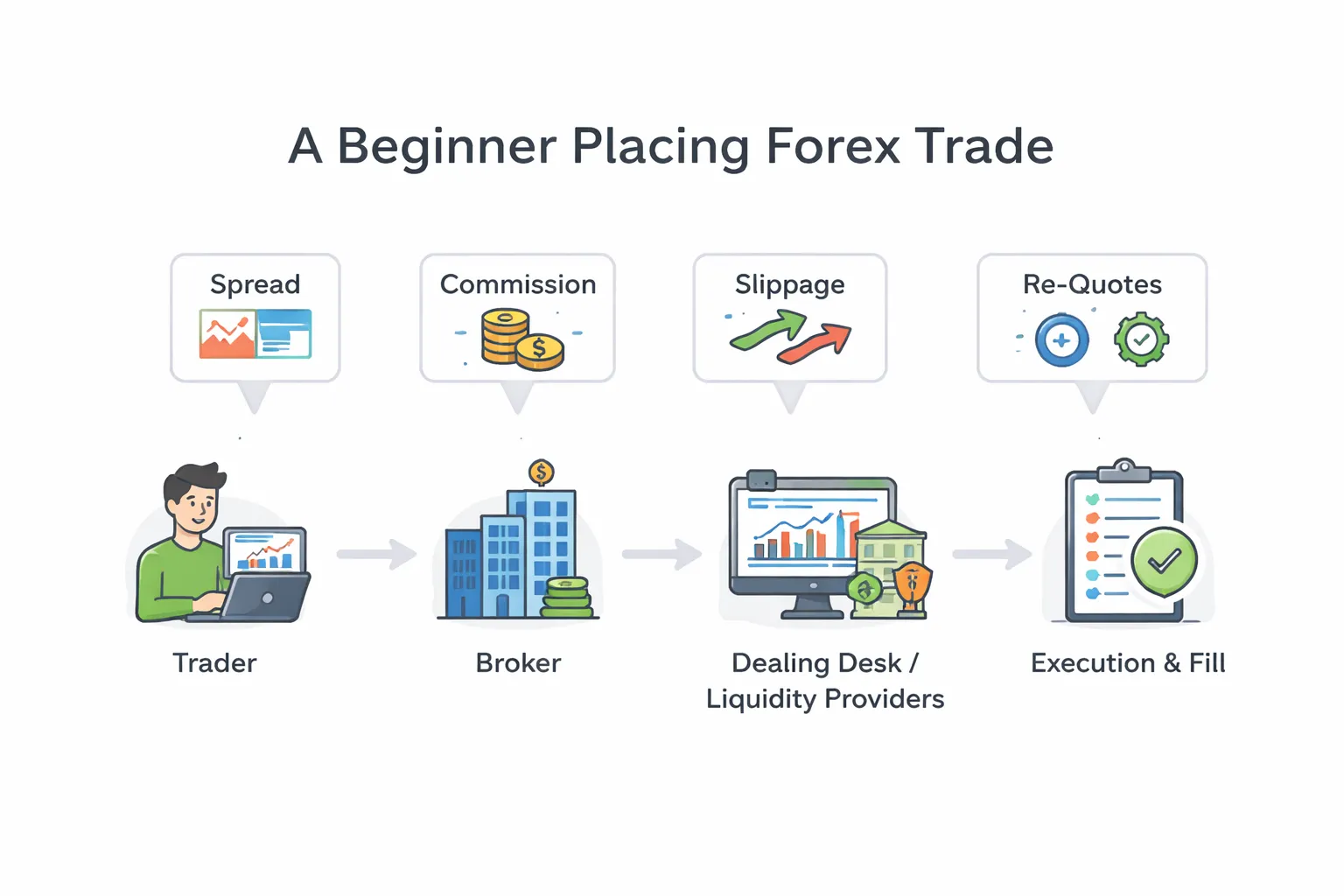
Broker vs platform vs liquidity provider, the roles explained in plain English
A forex broker gives you a trading account, sets your trading conditions, takes your orders, and routes them for execution. It also handles deposits, withdrawals, statements, and compliance checks.
A trading platform is the software you use to place trades and manage risk. MT4, MT5, cTrader, and web apps are platforms. The platform is not the broker. Two brokers can offer the same platform and still give you different pricing and execution.
A liquidity provider is a bank or trading firm that streams prices and takes the other side of trades, or matches them, depending on the setup. Many brokers use several liquidity providers and choose the best available quote at that moment.
Beginners mix these up. They pick a platform and assume the broker quality matches it. They also assume every broker sends every trade to the market. Some do, some do not.
How your order is routed, why it affects fills, spreads, and re-quotes
When you click buy or sell, your order goes through steps that change your result. Routing decides your fill price, your spread, and whether you get a re-quote or slippage.
- You send an order. Market, limit, or stop. Your order size and order type matter.
- The broker checks it. Margin, max lot limits, and risk rules. Some brokers add dealing checks that slow execution.
- The broker routes it. To internal matching, to a dealing desk, or to external liquidity. The route can change by account type and market conditions.
- You get a fill. You get the best available price at that moment, or you get a re-quote if the broker uses instant execution rules.
Key effects you will see:
- Spreads change by route. Tighter quoted spreads can come with higher commissions or worse slippage.
- Slippage is normal. Fast markets move. You can get positive or negative slippage. If you only see negative slippage, treat that as a warning.
- Re-quotes signal a problem for beginners. They often appear on instant execution setups, during news, or when the broker throttles fills.
- Partial fills can happen. More common on large sizes or low liquidity pairs.
Common beginner traps, chasing low spreads, ignoring fees, and skipping regulation checks
- Chasing the lowest spread on a screenshot. Brokers advertise minimum spreads, not typical spreads. Your cost comes from the spread you get during your trading hours. Check typical spreads, session spreads, and news-time widening. Compare the all-in cost, spread plus commission. Use spread vs commission to do that math.
- Ignoring non-trading fees. Many beginners track entry and exit costs and miss the slow leaks. Watch for inactivity fees, withdrawal fees, currency conversion fees, and charges tied to payment methods.
- Missing swap and financing costs. Holding overnight can cost you more than the spread. Check swaps for the pairs you trade, and confirm the broker’s swap-free rules if you use them.
- Skipping regulation checks. A website badge is not proof. Verify the broker on the regulator’s register, match the legal entity name, and confirm your account falls under that entity. If the broker pushes you to an offshore entity for higher leverage, you take on more risk.
- Assuming the broker works the same on every account. A broker can offer different execution and pricing by account type. Read the execution policy, order handling, and “best execution” language.
- Trusting promos over terms. Bonuses, rebates, and “zero spread” claims often come with volume targets and withdrawal limits. If you cannot withdraw freely, you do not control your funds.
Step 1 — Confirm safety: regulation, trust, and client-fund protection
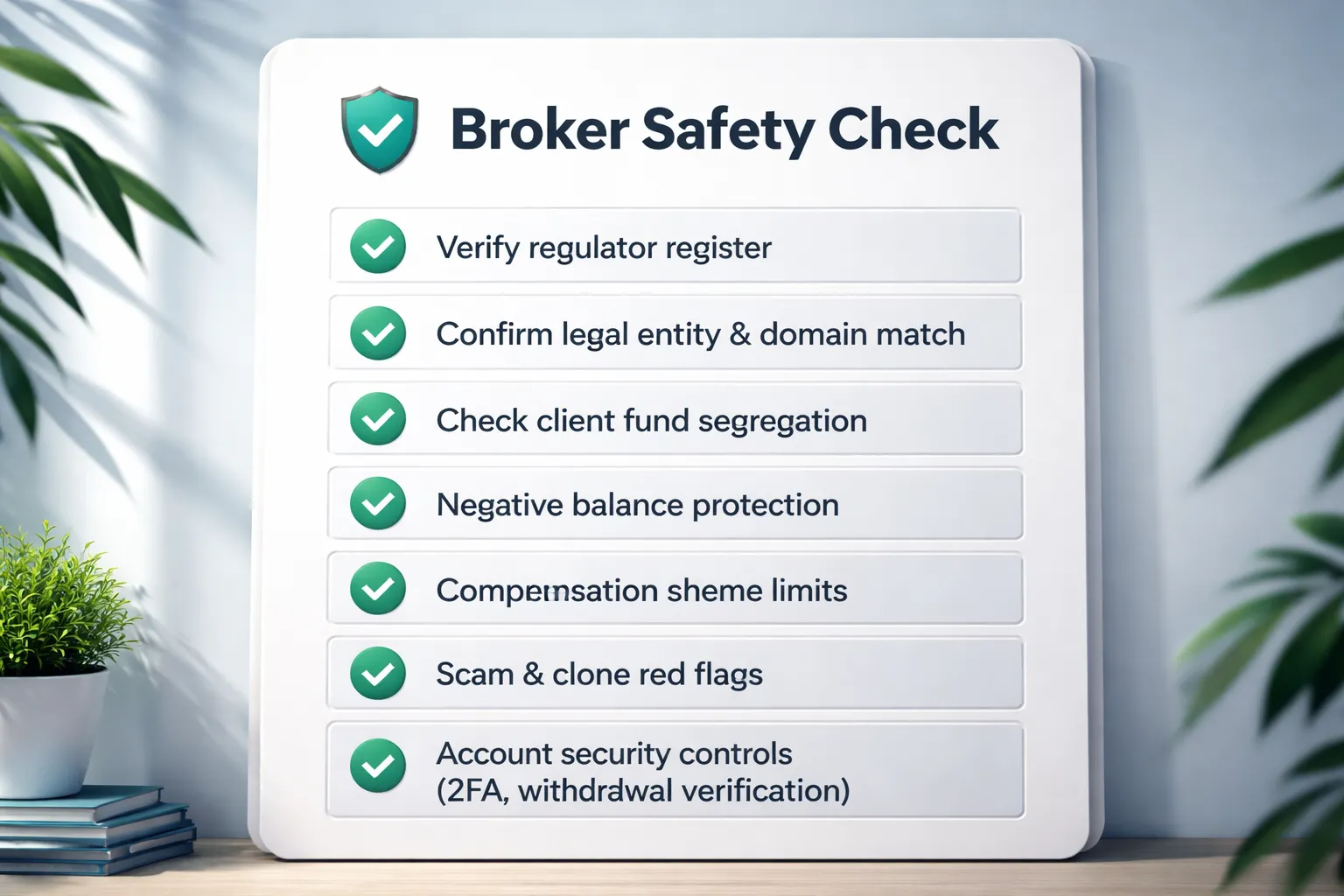
Step 1, Confirm safety: regulation, trust, and client-fund protection
Your first filter is safety. Skip spreads and platforms until you confirm the broker holds a real license, follows client-money rules, and gives you basic account protections.
Which regulators matter and what they usually require
Strong regulators force brokers to meet capital rules, separate client funds from company funds, and submit to ongoing supervision. Many also limit leverage and restrict how brokers market to retail traders.
| Regulator | Where it applies | Common protections you can expect |
|---|---|---|
| FCA (UK) | United Kingdom | Client money rules, segregation, regular reporting, conduct rules, leverage limits for retail, complaint process, access to FSCS compensation for eligible clients. |
| ASIC (Australia) | Australia | Client money rules, segregation, supervision and reporting, retail leverage limits, product intervention powers. No standard national compensation scheme like the UK. |
| CySEC (Cyprus, EU) | EU via MiFID framework | Segregation, capital requirements, audits, leverage limits under ESMA style rules, access to ICF compensation for eligible clients. |
| NFA, CFTC (US) | United States | High compliance burden, strict reporting, leverage limits, strong enforcement. Fewer brokers qualify. |
| FINMA (Switzerland) | Switzerland | Bank level oversight for some entities, strict supervision. Offerings vary by license type. |
| MAS (Singapore) | Singapore | Strong licensing, conduct rules, supervision and reporting. Retail leverage and product access depend on classification. |
Offshore regulators can still be legal, but they often give you weaker enforcement, looser marketing rules, and limited recourse if the broker blocks withdrawals. Treat them as higher risk.
How to verify a license yourself
- Start on the regulator site, not the broker site. Use the official register search.
- Match the legal entity name, not the brand name. Brands change, licenses attach to companies.
- Match the license number shown on the broker site to the register entry.
- Match the website domain listed on the register. If the register lists no domain, treat that as a risk and contact the regulator or the broker for written confirmation.
- Match the address and phone. Small mismatches happen, big mismatches do not.
- Check permissions. Some firms hold a license but cannot deal in derivatives or offer CFDs to retail clients.
- Check status. Avoid entries marked suspended, revoked, or under restrictions.
Red flags during verification include a register page that does not list the trading brand, the broker pushing you to a different entity after signup, or the broker claiming regulation in a country where the register shows nothing.
Negative balance protection
Negative balance protection stops your account from going below zero after a gap, spike, or major news move. Without it, you can owe the broker money.
- Confirm it applies to your entity and your account type.
- Confirm it applies to all instruments, not only FX majors.
- Read the wording for exceptions, such as extreme volatility clauses.
- Confirm the broker states the policy in the client agreement, not only in marketing pages.
Investor compensation schemes, what they cover
Compensation schemes can help if a regulated firm fails and cannot return your cash. They usually do not cover trading losses.
- They cover insolvency, not bad trades, slippage, or platform outages.
- They may cover cash held in client money accounts. They may not cover open positions or unrealized P and L.
- They have eligibility rules. Professional clients often get less protection.
- They have limits. The cap can fall well below your account balance, and payouts can take time.
Use compensation as a backup, not a reason to deposit more than you can afford to lock up for months.
How to spot scams and clone firms
Clone firms copy a real broker or a real license number, then route your deposit to an unregulated entity. You can catch many of them with simple checks.
- Domain mismatch, the broker advertises regulation, but the regulator register lists a different website.
- Lookalike domains, extra words, hyphens, or slight misspellings.
- New domain age for a broker claiming a long history.
- Generic contact details, no verifiable address, only chat apps, or only web forms.
- Pressure to deposit, time limits, deposit bonuses, or staff pushing crypto deposits.
- Withdrawal friction, extra KYC after profit, surprise fees, or forced trading volume targets.
- Entity switching, the signup flow moves you from a regulated entity to an offshore affiliate without clear consent.
If you want to understand how execution models affect conflicts and risk controls, read ECN vs STP vs market maker brokers.
Data security basics you should require
A safe broker also protects your account access. Poor security leads to account takeovers and payment fraud.
- Two factor authentication for login and withdrawals. App based 2FA beats SMS.
- Encryption on all pages that collect personal data. Check for HTTPS and a valid certificate.
- Withdrawal controls, name matching, saved beneficiary rules, and withdrawal confirmation steps.
- Session controls, login alerts, device management, and forced logout options.
- Access limits for API keys, platform passwords, and read only investor passwords when supported.
Step 2 — Understand broker types and execution quality
Dealing desk vs agency, STP, ECN. What the labels mean in practice.
Broker labels sound precise. In real trading, they mainly describe who takes the other side of your trade and how orders route.
- Dealing desk, market maker. The broker can internalize your order. Your trade may offset against other clients, the broker inventory, or external liquidity. Quotes come from the broker stream. Execution often uses a requote or last look style model.
- Agency, STP, NDD. The broker routes orders to one or more liquidity providers. Your fills depend on that pool. The broker earns from markup, commission, or both. Some brokers still internalize part of the flow, even with STP branding.
- ECN. You trade in a matching environment where multiple liquidity sources can compete. Many retail “ECN” accounts are really aggregated liquidity with commission pricing. Treat ECN as a pricing and routing model, not a guarantee.
Action step. Ask the broker which model applies to your exact account type, not the brand. Ask who provides liquidity, whether they internalize flow, and how they handle partial fills.
Conflicts of interest and how reputable brokers mitigate them
Any broker can face conflicts. A dealing desk can profit when you lose. An agency broker can still profit from worse execution if you do not measure it.
- Clear pricing. Separate commission and spread where possible. If the broker uses markup, they should disclose typical markups and average spreads by session.
- Execution policies in writing. Look for a published order execution policy that covers slippage, rejections, partial fills, and last look.
- Best execution monitoring. Strong brokers track execution quality and publish stats or provide trade reports you can audit.
- Risk controls without games. They limit leverage and exposure in extreme markets, but they avoid surprise rule changes and retroactive fills.
- Account structure options. Some brokers offer both market maker and commission accounts. This reduces pressure to push one model for every client.
If the broker refuses to explain routing and execution in plain terms, treat that as a signal.
Execution metrics to compare. Spreads, fill rate, speed, slippage distribution.
Do not judge execution from one tight spread screenshot. Compare measurable outputs.
- Average spread by instrument and session. Ask for averages during London and New York, plus rollover. Compare majors and the pairs you plan to trade. Use the same trade size.
- All in cost. Combine spread plus commission. A low spread account can cost more after commission. See spread vs commission when you compare pricing models.
- Fill rate. Track how many orders fill versus reject. Separate market orders, limits, and stops.
- Execution speed. Measure order to fill time. Use your platform logs if available. Compare during calm markets and during scheduled news.
- Slippage distribution. Look at the spread of outcomes, not just the average. Track percent of fills with positive slippage, zero slippage, and negative slippage. A broker that never gives positive slippage can still market itself as “fast.”
Action step. Run a small sample test on a demo and then a small live account. Use identical order types and sizes. Record at least 100 trades before you judge patterns.
Guaranteed stop loss orders, when they are worth paying for
A GSLO locks your worst case exit price. You pay a premium or wider cost for that insurance.
- Worth it. When you hold through major events, weekends, or thin liquidity sessions. When a gap can skip your stop and create a loss beyond your plan.
- Less useful. For tight intraday trading on liquid majors during normal hours, where standard stops usually fill close to price.
- What to check. Minimum distance from price, which instruments support GSLO, the premium size, and refund rules if the GSLO never triggers.
If you rely on strict downside limits, GSLO can matter more than a slightly lower spread.
News trading and volatility. Rules that can impact fills.
High volatility exposes broker rules. Read them before you trade events.
- Freeze levels. Some brokers block order changes near current price. This can stop you from moving stops or placing tight pending orders during fast markets. Check the freeze distance and when it applies.
- Maximum deviation, slippage tolerance. Platforms may let you set how much price can move before the order rejects. Tight deviation settings can cause more rejections during news.
- Requote and rejection policy. Dealing desk models may requote. Agency models may reject if liquidity disappears. Either way, you need to know what happens when price moves.
- Stop and limit behavior. Stops can fill worse than requested in gaps. Limits can miss fills if price touches briefly and liquidity is thin.
- Trading restrictions. Some brokers widen spreads aggressively, raise margin, or block certain order types around events. Check the contract specs and any “execution only” disclaimers.
Action step. Test the broker during one high impact event with small size. Record spreads, rejections, and slippage. Keep screenshots or platform logs for proof.
Step 3 — Compare the full cost of trading (not just the spread)
Pricing models, spread-only vs raw spread plus commission
Brokers sell the same trade in different wrappers. Your job is to compare the wrapper cost.
- Spread-only account. You pay a wider spread. No separate commission line.
- Raw spread plus commission. You pay a tighter spread, then a fixed commission per lot per side, or per round turn.
Do not compare spreads from ads. Compare average spreads during your trading hours, then add commission and any extra markups.
If you need a quick primer on account pricing, read spread vs commission.
Calculate your all-in cost per trade
Use a single formula. Convert everything to money, then to pips if you want.
- All-in cost (money) = spread cost + commission + other ticket fees.
- Spread cost (money) = spread in pips x pip value x lots.
Simple example. EURUSD trade, 1.00 lot. Assume pip value is $10 per pip.
| Item | Spread-only | Raw plus commission |
|---|---|---|
| Average spread | 1.2 pips | 0.2 pips |
| Spread cost | 1.2 x $10 = $12 | 0.2 x $10 = $2 |
| Commission | $0 | $7 round turn |
| All-in cost | $12 | $9 |
| All-in cost in pips | 1.2 pips | 0.9 pips |
Repeat this for your usual pairs and position sizes. Some brokers price majors well and minors badly. Your mix matters.
Overnight financing, swaps and rollover
If you hold trades past the broker rollover time, you pay or receive swap. Swap can wipe out a small edge.
- Day traders. Swap matters less, but it still hits you if you hold through rollover by accident.
- Swing traders. Swap can become your biggest cost after spreads.
- Wednesday triple swap. Many brokers charge or credit three days of swap midweek. Know the schedule on your platform.
Check swap rates inside the trading platform and in the contract specs. Track them on a demo and a small live account. Some brokers change swaps fast when funding conditions change.
Quick profit check for swing trades. If your average trade targets 40 pips and you often hold 5 nights, a 0.8 pip per night swap cost becomes 4 pips. That is 10 percent of your target. That shifts your break-even and your required win rate.
Non-trading fees that change your net results
Many beginners ignore these. They show up later as friction.
- Deposit fees. Card and e-wallet deposits can add a percentage fee. Bank wires can add fixed fees.
- Withdrawal fees. Some brokers charge per withdrawal or restrict free withdrawals to certain methods.
- Inactivity fees. You pay monthly after a period of no trading. This can drain small accounts.
- Currency conversion. If your account currency differs from your deposit or from the instrument P and L, you may pay a conversion spread.
- Platform and data fees. Some brokers charge for premium platforms, VPS, or market data packages.
Write these fees into your checklist and confirm them in the broker legal pages, not the sales page. Save screenshots.
Promotions and bonuses, why they can cost you more
Bonuses often come with strings. Those strings can block withdrawals or force high volume.
- Withdrawal limits. Some terms lock your balance until you meet a trading volume target.
- Higher effective risk. A bonus can push you to trade larger than your plan.
- Hidden pricing. A broker can fund promotions by widening spreads, adding slippage, or charging higher non-trading fees.
If you take any promotion, read the bonus terms line by line. If the terms restrict withdrawals, skip it.
Step 4 — Check products, leverage, and risk controls for your strategy
Step 4, Check products, leverage, and risk controls for your strategy
Currency pairs coverage and liquidity
Start with majors. They trade the most volume. You usually get tighter spreads and cleaner execution.
- Majors, EUR/USD, USD/JPY, GBP/USD, USD/CHF, AUD/USD, USD/CAD, NZD/USD. Best for learning. Lower typical spread. More stable fills.
- Minors, pairs that do not include USD, like EUR/GBP or AUD/JPY. Spreads often widen outside active sessions.
- Exotics, like USD/TRY or USD/ZAR. Spreads can jump fast. Swaps can be large. Slippage can be common during news.
Check the broker’s typical spread by session, not just the minimum. A tight minimum spread means little if your average spread doubles at rollover or during your trading hours.
If you plan to trade news, check if the broker shows widened spreads and rejects during high volatility. Many do, even with “fast execution” marketing.
CFDs beyond forex, when variety helps and when it distracts
Extra markets help when they match a clear plan. Extra markets hurt when they pull you into random trades.
- Indices CFDs help if you want liquid instruments with clear trends. Check typical spread and overnight financing.
- Commodities CFDs help if you trade macro themes. Watch contract specs, spread, and swap.
- Crypto CFDs can bring weekend trading and high volatility. They also bring wide spreads, large gaps, and higher margin rules.
If you only plan to trade EUR/USD, you do not need 1,000 symbols. Pick the broker that prices your few instruments well and executes them cleanly.
Leverage and margin requirements
High leverage does not make you profitable. It makes mistakes fatal.
- Choose lower leverage if you can. It forces smaller positions and reduces margin call risk.
- Check margin per lot for the pairs you trade. The broker should show it in the platform before you place an order.
- Know the broker’s margin call level and stop out level. Example, margin call at 100 percent, stop out at 50 percent. Lower stop out levels can close trades fast in a spike.
- Ask how margin changes during news, weekends, and holidays. Some brokers raise margin requirements without much warning.
For beginners, keep a large buffer. If your free margin stays tight, one normal swing can trigger a margin call.
Risk management features to look for
Your broker should make risk control easy, fast, and hard to bypass.
- Partial close. Lets you reduce risk without closing the whole trade.
- Trailing stop. Helps protect gains if price moves in your favor. Check if it runs on server side or only when your platform stays open.
- OCO orders, one cancels the other. Useful for breakout setups where you set both sides and let price decide.
- Price alerts on desktop and mobile. You need alerts for levels, not just “trade ideas.”
Also check if the broker offers guaranteed stop loss. Some regions and brokers do, usually with a fee or wider spread. If you trade gaps, that feature can matter.
Position sizing tools and margin calculators
Beginner friendly means the broker helps you size trades with numbers, not hope.
- Built-in position size calculator that uses your stop loss distance and account currency.
- Margin calculator that shows required margin before you send the order.
- Swap and financing display per symbol, so you see holding costs upfront.
- Contract specs in plain view, lot size, pip value, minimum trade size, and trading hours.
If the broker hides these details or spreads them across PDFs, treat it as a warning sign. For more safety checks, read regulated forex broker red flags.
Step 5 — Evaluate platforms, tools, and trading experience
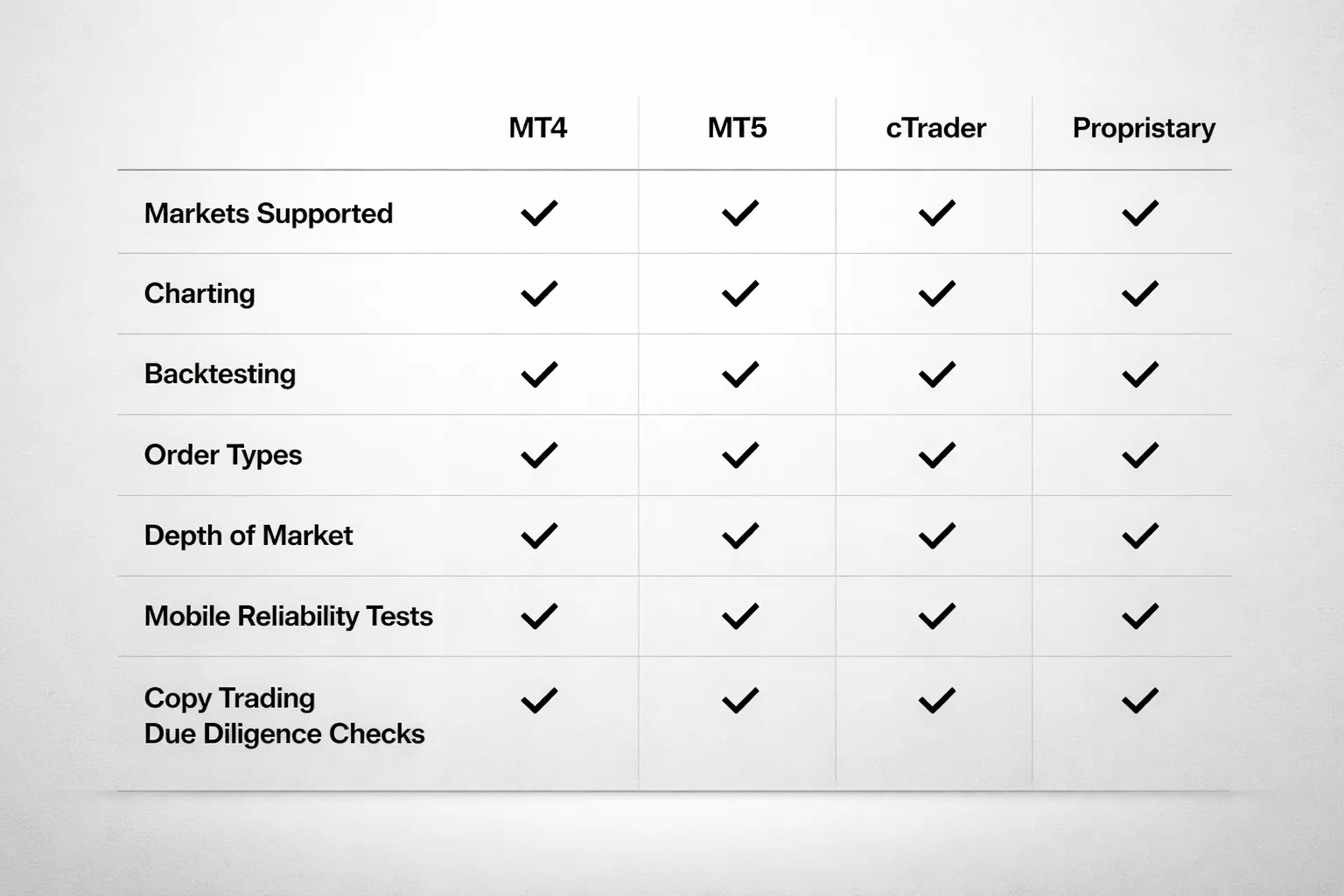
Step 5, Evaluate platforms, tools, and trading experience
Your platform is your workbench. It controls what you can trade, how you place orders, and how fast you can react. Test the platform on a demo before you fund. Use the same device and internet you will use live. For practice rules and setup, use this forex demo account guide.
Choose between MT4, MT5, cTrader, and proprietary platforms
- MT4, best if you trade spot forex and you want the widest support for indicators and Expert Advisors. It feels dated. Many brokers still run it well.
- MT5, best if you want more markets in one terminal, better strategy testing than MT4, and a cleaner framework for multi asset trading. MT5 can run hedging or netting depending on the broker setup.
- cTrader, best if you care about depth of market views, clean order controls, and fast manual execution. Many traders prefer its interface for day trading. Algo trading uses cAlgo, now branded as cTrader Automate.
- Proprietary platforms, best if you want a simple UI, broker research, and built in risk tools. Treat lock in as a cost. Check if you can export trade history, and if the broker offers API access or platform backups.
Charting, indicators, and backtesting, minimum toolset
You do not need hundreds of indicators. You need a small set that works, and data you can trust.
- Chart basics, multiple timeframes, clean zoom, crosshair, and quick symbol search.
- Drawing tools, trendlines, horizontal levels, channels, and Fibonacci.
- Indicators, moving averages, ATR, RSI or stochastic, volume or tick volume, and a session separator.
- Templates and layouts, save chart templates, sync watchlists across devices, and restore workspaces after updates.
- Backtesting, at minimum you need tick based modeling options, spread control, and a report that shows drawdown, win rate, average win and loss, and trade list export.
- Data checks, confirm the platform shows server time, and that historical candles do not change after you refresh.
Order types and functionality that matter
Order handling decides your fills. Check what the platform supports per instrument, not just in marketing copy.
- Core orders, market, limit, stop. You need these everywhere.
- Stop limit, useful when you want price confirmation and you want to cap slippage. Many platforms label it differently.
- Time in force, GTC, day, IOC, FOK. These matter for news trading and thin markets.
- Partial fills, see if the platform shows partial execution and the average fill price.
- One click trading, check if you can set default lot size, default SL and TP, and a max deviation or slippage control.
- Depth of market, useful for some CFDs and for execution insight. Confirm it shows executable liquidity, not just a visual ladder.
- Risk controls, position size calculator, price alerts, and clear margin impact before you place the order. Link this to your pricing model, since spread and commissions change break even distance. See spread vs commission.
Mobile trading reliability, what to test
Mobile breaks when brokers cut corners. Test it for a week on demo.
- Login stability, biometric login works, sessions do not drop, and re login does not reset charts.
- Latency feel, quotes update smoothly, order tickets open fast, and order confirmations arrive without delay.
- Crash rate, keep the app open during active hours. Watch for freezes when you switch apps, rotate the screen, or open chart tools.
- Notifications, price alerts, margin alerts, and order fill alerts arrive on time. Test with phone on silent and with battery saver on.
- Chart usability, you can place and edit SL and TP from the chart. You can drag levels without mis taps. You can see spreads and swap on the symbol.
- Account controls, deposits, withdrawals, and statement exports work inside the app or via secure web flow.
Copy trading, signals, and social features, due diligence
Copy features do not remove risk. They add platform risk and provider risk. Vet the data like you would vet a broker.
- Track record source, prefer verified records tied to a real trading account. Avoid screenshots and unverified claims.
- History length, look for at least 12 months. Short records can hide tail risk.
- Drawdown and leverage, check max drawdown, average holding time, and typical leverage. High returns with high leverage often end fast.
- Trade style fit, scalpers can fail on your account due to spread, commission, and execution differences.
- Costs, performance fees, subscription fees, markups, and wider spreads on copy accounts. Confirm the full fee stack before you link funds.
- Control settings, you need an equity stop, max lot cap, and the ability to pause copying instantly.
- Execution mismatch, check if the system uses proportional sizing, fixed lot sizing, or risk based sizing. Confirm how it handles partial fills and slippage.
Step 6 — Funding, withdrawals, and account terms that impact beginners
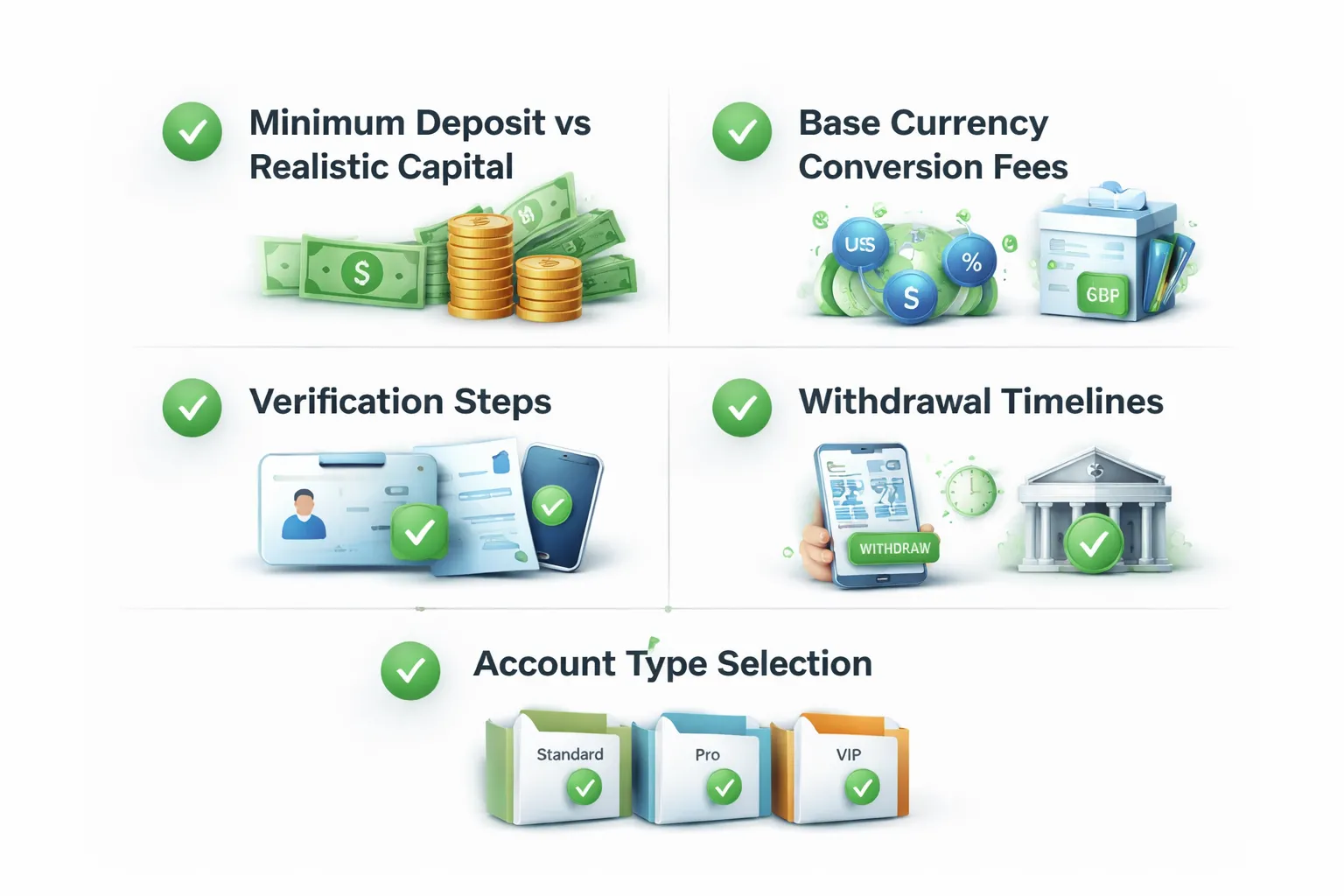
Minimum deposit vs realistic starting capital
Brokers market low minimum deposits, sometimes $0 to $50. That number does not tell you what you can trade safely.
Start from your risk limit, then work backward. If you cap risk at 1% per trade, a $100 account means $1 risk. With typical stop sizes, that forces tiny position sizes. You will hit platform minimum lot limits fast.
- Check minimum trade size. Many brokers set 0.01 lots as the floor. Some offer micro or cent accounts that let you size smaller.
- Check margin per position. High leverage reduces margin, but it does not reduce losses. It only increases how fast you can blow up.
- Plan for drawdowns. If you cannot handle a normal losing streak without cutting size below the minimum, your starting capital is too small for your method.
Base currency options and conversion costs
Your account base currency drives your hidden FX costs. If you deposit in one currency and your account runs in another, the broker converts it. The same happens on withdrawals.
- Pick a base currency that matches your income currency. This cuts conversion events.
- Ask how the broker converts. Some use a markup on the mid rate. Some route conversions through a wider spread.
- Watch non-USD traders. Many brokers default to USD accounts. That can create conversion fees on every deposit and withdrawal.
If you want the full cost breakdown across spreads, commissions, swaps, and funding fees, see Forex broker fees explained.
Withdrawal speed and friction
Fast withdrawals matter more than fast deposits. Deposits rarely fail. Withdrawals fail when your documents, name match, or method rules do not line up.
- Verify before you fund. Complete ID and address checks first. Ask what documents they accept and the file limits.
- Match names. Your trading account name must match your bank or card name. Third party withdrawals usually fail.
- Know method rules. Many brokers send withdrawals back to the original funding source up to the deposited amount. Profits then go by bank transfer.
- Check limits and fees. Look for minimum withdrawal amounts, monthly free withdrawal limits, and bank wire fees.
- Track processing time vs bank time. Broker processing might be 1 to 2 business days. Your bank can add 1 to 5 more.
Account types (standard, raw, micro or cent, Islamic)
Pick the account type that matches your trade frequency and position size needs. Do not pick based on marketing names.
| Account type | Typical pricing | Best fit for beginners | What to check |
|---|---|---|---|
| Standard | Spread only | Simple cost model, low activity | Average spread on your pairs, spread stability in news |
| Raw | Tight spread plus commission | Higher frequency, tighter entries | Commission per lot, minimum commission, commission on partial lots |
| Micro or cent | Varies | Small accounts, testing risk control with real money | Contract size, minimum lot, whether spreads differ from standard |
| Islamic | No swap, may use admin fee | Traders who need swap-free terms | Admin fee schedule, time limits, which symbols qualify |
If you scalp or trade around news, raw pricing can look cheaper. It can still cost more if commissions and slippage stack up. Run the math on your typical trade size and frequency.
Demo account realism
A demo helps you learn the platform. It can mislead you on costs and fills.
- Match the account type. Demo a raw account if you plan to trade raw. Demo a standard account if you plan to trade standard.
- Check spreads and commissions. Some demos show fixed or tighter spreads than live. Some ignore commissions.
- Test execution conditions. Place market orders and stop orders during active sessions and during news. Watch slippage and requotes.
- Confirm data source and liquidity. Ask if the demo uses the same price feed and execution model as live.
- Use realistic balance and leverage. If you demo with $100,000 and trade 5 lots, you train the wrong habits.
Step 7 — Customer support and education: how to assess real quality
Support availability and channels, what to test
Good support solves account and platform issues fast. Bad support costs you trades.
- Live chat: Best for urgent platform and execution issues. Test it during London and New York sessions.
- Phone: Best for account access, withdrawals, and identity checks. Confirm the phone number works from your country.
- Email or ticket: Best for detailed cases. Use it to test how they handle proof and follow ups.
Run simple tests before you deposit.
- Ask where the broker is regulated and which entity will hold your account. Match the answer to the legal name shown on the website.
- Ask for the exact margin call level and stop out level for your account type.
- Ask how to submit a withdrawal and the typical processing time, broken down by broker time and bank time.
- Ask if negative balance protection applies to your entity and your instrument set.
- Ask how slippage and requotes work on market orders and stops. Request a link to the execution policy.
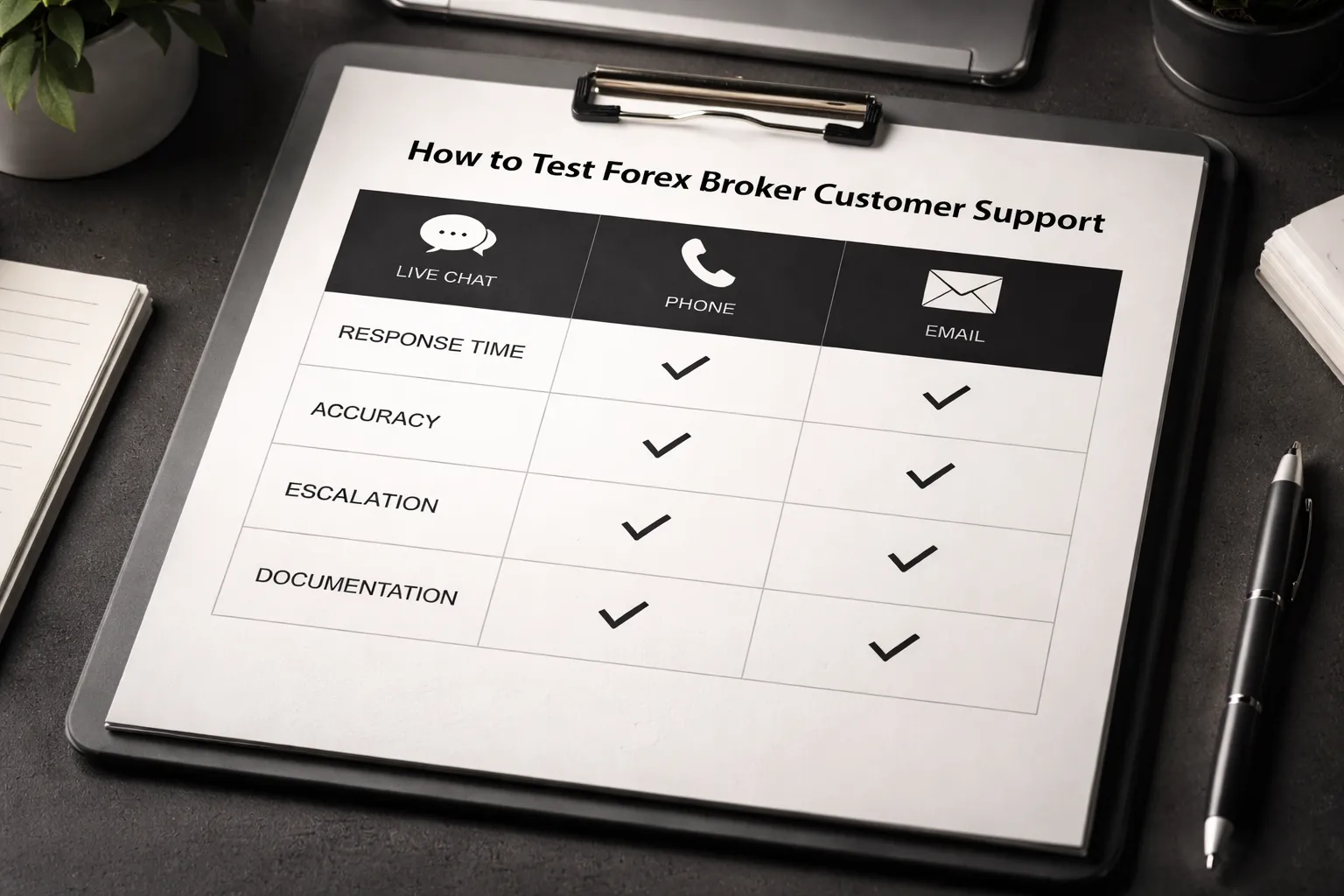
Quality signals, response time, accuracy, escalation, documentation
Speed matters, but accuracy matters more. Track both.
| What to check | Good signal | Bad signal |
|---|---|---|
| First response time | Live chat under 2 minutes, email under 24 hours | Long waits, no clear queue, no ticket ID |
| Answer quality | Specific numbers, policy links, and steps you can follow | Vague claims, marketing language, no sources |
| Consistency | Same answer across chat and email | Contradictions between agents |
| Escalation | Agent escalates to dealing desk or compliance, gives a reference | Agent refuses escalation or ends chat to reset the queue |
| Written documentation | Clear legal docs, execution policy, and fee schedule you can download | Hidden PDFs, missing dates, broken links |
Save transcripts and emails. If support cannot explain key rules in writing, treat that as a risk. Use this along with your safety checks from regulated broker basics.
Beginner education that actually helps
Education should reduce avoidable mistakes. Ignore content that pushes you to trade more.
- Platform tutorials: You need order types, stop loss setup, position sizing, and how to view swap, margin, and contract specs.
- Risk modules: Look for leverage examples, drawdown math, and how margin works during volatility.
- Structured courses: Short lessons with checkpoints. Clear learning path from basics to execution.
- Instrument specs: Each pair should show contract size, pip value method, trading hours, swap method, and margin rules.
Check if the broker provides a position size calculator and a margin calculator. Verify the numbers match the platform.
Community and market research, daily briefs, calendars, analyst transparency
Research should help you plan risk. It should not act like a signal service.
- Daily briefs: You want a short summary, key levels, and a clear risk note. You do not need hype.
- Economic calendar: Confirm time zone, impact rating method, and whether it includes central bank events and data revisions.
- Analyst transparency: Check author names, timestamps, and whether they explain the basis for a view. Avoid anonymous notes.
- Conflicts: Look for clear disclosures on whether the broker makes a market in the products discussed.
Use research as context. You still manage entries, exits, and position size.
A practical checklist: score a forex broker in 15 minutes
Quick pre-screen, regulation proof, country eligibility, product fit
- Regulation proof: Find the broker’s legal entity name and license number. Verify it on the regulator’s register, not on the broker site. Match the website domain, address, and entity name.
- Client classification: Confirm you open as a retail client, unless you qualify for professional status and accept weaker protections.
- Country eligibility: Confirm your country is accepted for onboarding and funding. Check the restricted countries list and the supported base currencies.
- Product fit: Confirm you can trade the pairs you need. Check typical trade size limits, margin rules, and whether they offer spot FX CFDs, FX futures, or a true spot account, depending on your region.
- Account type fit: List the available pricing models, spread-only, commission plus raw spread, or tiered. Use spread vs commission to map your trading style to the right account.
- Leverage and margin: Check max leverage by asset and whether margin changes during news, weekends, or low liquidity.
Cost scorecard, spreads, commissions, swaps, non-trading fees
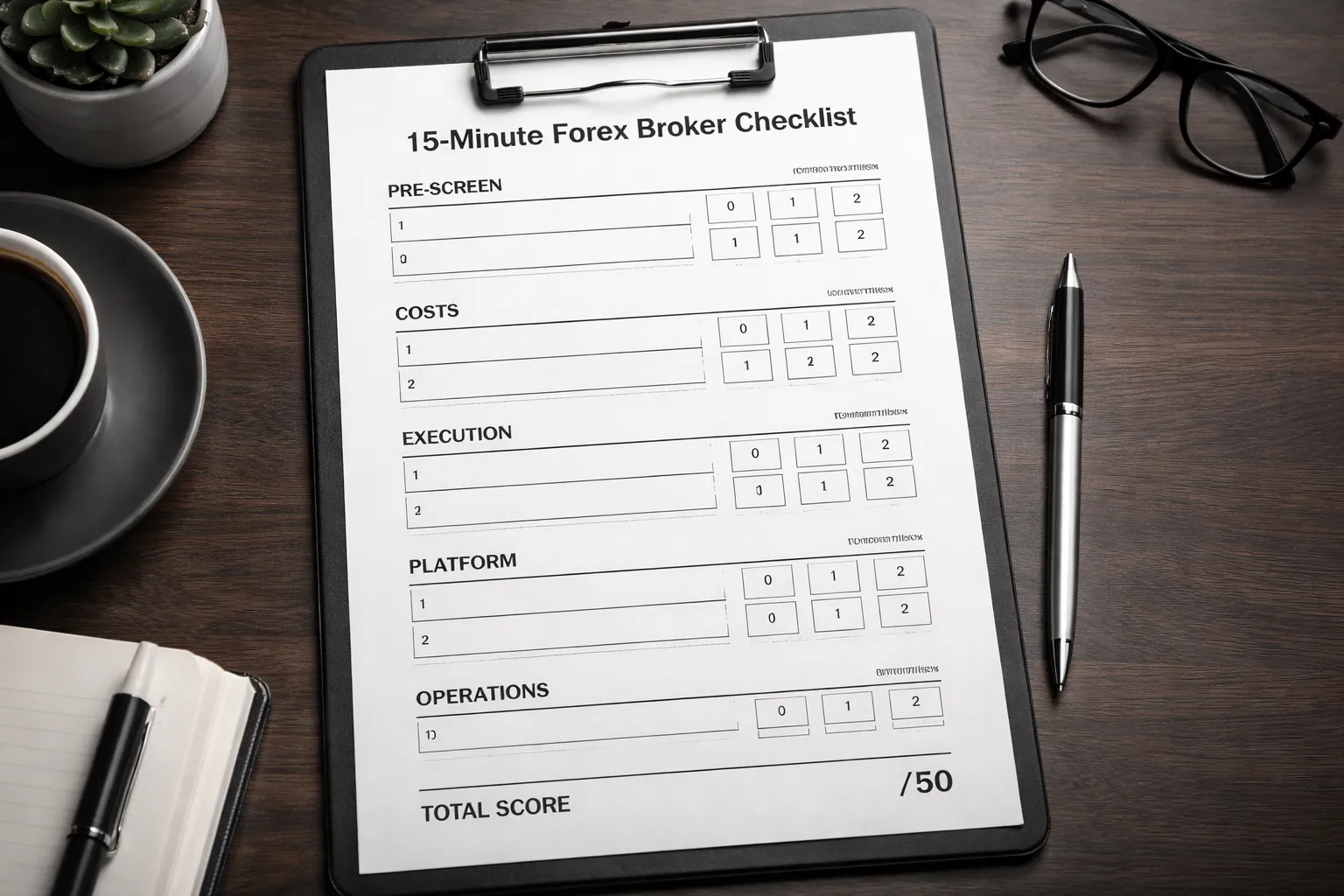
Score each item 0 to 2. Total out of 10.
| Cost item | What to check | Score |
|---|---|---|
| Typical spreads | Look for typical, not minimum. Check EURUSD and your main pairs across liquid and off-hours. | 0 to 2 |
| Commission | Confirm per side or round turn, and per lot size. Check if it changes by volume tier. | 0 to 2 |
| All-in cost math | Calculate all-in cost per round trip for your usual trade size. Include spread plus commission. | 0 to 2 |
| Swaps and financing | Check long and short swap on your pairs. Check triple-swap day, and whether rates change without notice. | 0 to 2 |
| Non-trading fees | Deposit, withdrawal, inactivity, currency conversion, and platform fees. Check fee caps and minimums. | 0 to 2 |
- Red flags: They show only minimum spreads, hide swap tables, or bury withdrawal fees in a PDF.
- Fast test: Open the contract specs page for one pair. You should see tick size, contract size, margin, trading hours, and swap rates in one place.
Execution scorecard, order types, slippage policies, published stats
Score each item 0 to 2. Total out of 10.
| Execution item | What to check | Score |
|---|---|---|
| Order types | Market, limit, stop, stop-limit. Check if you can set stop-loss and take-profit at entry. | 0 to 2 |
| Slippage policy | Confirm they pass on positive slippage. Confirm they do not requote in fast markets, or they define when requotes happen. | 0 to 2 |
| Execution method disclosure | They explain routing, liquidity sources, and whether they internalize flow. They disclose if they act as principal. | 0 to 2 |
| Published metrics | Look for fill rates, execution speed, rejection rates, and slippage distribution by order type. | 0 to 2 |
| Trade protections | Negative balance protection where required. Margin closeout rules, and how they handle gaps and outages. | 0 to 2 |
- Fast test: Search the help center for “slippage”, “requote”, “order execution”, and “best execution”. If you cannot find clear policies, score lower.
- Red flags: “No slippage” claims, no mention of positive slippage, or vague execution language.
Platform scorecard, tools, automation, mobile performance
Score each item 0 to 2. Total out of 10.
| Platform item | What to check | Score |
|---|---|---|
| Stability and speed | Platform uptime record, incident history, and how they communicate outages. Check if they post status updates. | 0 to 2 |
| Charting and execution workflow | One-click trading, bracket orders, hotkeys, and clear position and risk views. | 0 to 2 |
| Automation | EAs, APIs, or scripts if you need them. Check limits, VPS options, and whether automated trading is restricted. | 0 to 2 |
| Mobile performance | Order entry speed, chart usability, alerts, and whether you can manage stops and limits without friction. | 0 to 2 |
| Data and records | Trade history export, statements, and tax reports. Check if they provide execution logs and price improvement data. | 0 to 2 |
- Fast test: Install the mobile app and place a demo trade. Time how long it takes to set entry, stop-loss, and take-profit.
Operational scorecard, deposits, withdrawals, support, account protections
Score each item 0 to 2. Total out of 10.
| Operational item | What to check | Score |
|---|---|---|
| Funding methods | Bank transfer, card, local rails, and supported wallets. Check base currency options to reduce conversion costs. | 0 to 2 |
| Withdrawal rules | Processing time, fees, minimums, and name matching. Check if they require withdrawal back to source first. | 0 to 2 |
| KYC clarity | Document list, review times, and what triggers extra checks. Look for clear timelines and escalation paths. | 0 to 2 |
| Support quality | Hours, channels, and response times. Test with one precise question on swaps, margin, or slippage policy. | 0 to 2 |
| Account protections | Segregated funds claims with entity details. Compensation scheme eligibility where applicable. Clear complaints process. | 0 to 2 |
- Fast test: Read the withdrawal page and the client agreement sections on client money and complaints. If you cannot find them in two minutes, score lower.
- Red flags: Unclear entity handling your account, vague segregation language, or support that avoids direct answers.
How to use your scores: Add the five totals. Maximum score is 50. Treat anything under 35 as a fail for beginners. Put extra weight on regulation proof, withdrawal rules, and slippage policy. Costs matter, but you cannot trade if you cannot fund or withdraw.
Beginner workflow: how to choose safely without analysis paralysis
Shortlist 3 to 5 brokers
Start with a short list. You want fewer options and cleaner decisions.
- Use regulator registers first. Verify the broker name, license number, and domain. Use the regulator site, not screenshots.
- Use comparisons only to find candidates. Treat tables and “top broker” lists as leads, then confirm every claim on the broker’s legal pages.
- Pull documents from the source. Read the client agreement, execution policy, and fees page. Save PDFs or screenshots with dates.
- Ignore rankings based on bonuses. Bonuses, “VIP” tiers, and deposit contests push you to overtrade.
- Ignore raw minimum spread claims. “From 0.0” means little. You need typical spreads, commissions, and a clear slippage policy. Use your cost score and your own demo logs. For account cost math, see spread vs commission.
- Ignore platform hype. MT4, MT5, cTrader, or a proprietary platform can all work. Your priority is execution quality, withdrawals, and support.
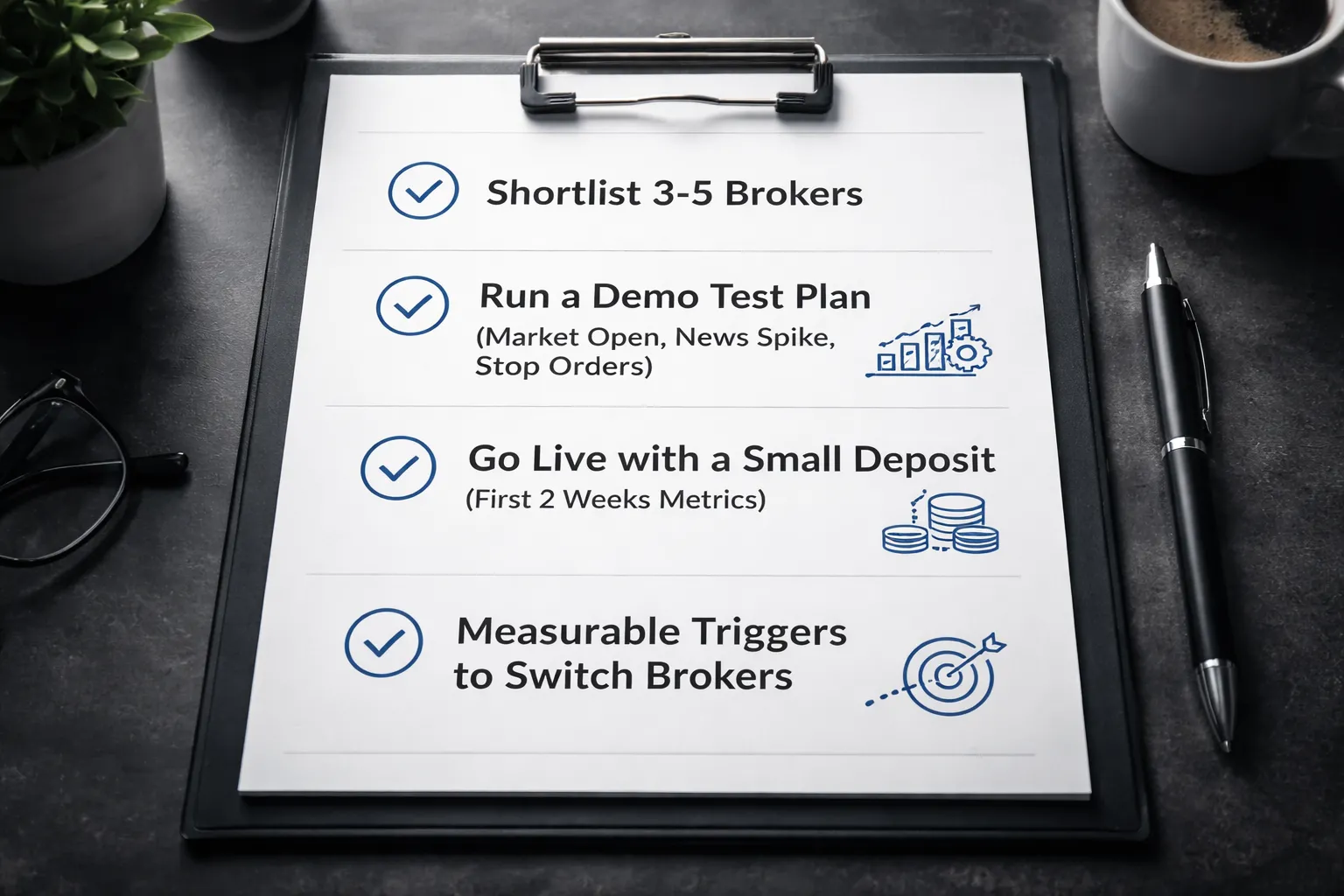
Stop research when you have 3 to 5 brokers that score 35 or higher on your checklist. Do not add more.
Run a demo test plan
Use the same test on every broker. Log results in a simple table. Keep it to 30 to 60 minutes per broker per day for 3 days.
- Market open test. Trade the first 15 minutes of London open or New York open. Record spread range, requotes, and order delays.
- News spike test. Place small market orders around a scheduled high impact release. Record fill time, slippage, and any “off quotes” errors.
- Stop order test. Place a stop loss and a take profit on a live moving market. Then trigger a stop entry order. Record whether stops fill near your price and how often slippage runs against you.
- Limit order test. Place a limit entry and cancel it. Check if cancel happens fast and if pending orders behave as expected.
- Partial close and modify test. Modify stop loss and take profit during fast moves. Record if the platform rejects changes.
- Swap test. Hold one position over rollover. Compare swap shown in platform to the broker’s published swap rates.
Your goal is not perfect fills. Your goal is consistent behavior and clear rules when the market moves fast.
Go live with a small deposit, measure the first 2 weeks
Demo tests platform behavior. Live tests the full system. Fund small. Trade small. Treat it as an audit.
- Deposit time and method reliability. Record funding time from your bank or card to the trading account.
- Withdrawal process. Submit one withdrawal in week one. Do not wait. Track required documents, approval time, fees, and money arrival time.
- Effective trading cost. For each trade, log spread at entry, commission, and slippage. Compute average all in cost per trade.
- Execution stability. Count rejected orders, freezes, disconnects, and price gaps between chart and fill.
- Support quality. Ask two direct questions, one about slippage policy, one about withdrawal limits. Grade how specific the answers are.
- Rule changes. Watch for new fees, new limits, or changed leverage. Save the notice.
If the broker fails withdrawals or changes rules without clear notice, stop trading and pull funds.
When to switch brokers, use measurable triggers
- Withdrawal friction. Extra document requests after approval, unexplained delays, or partial payouts. One serious incident triggers a switch.
- Cost drift. Your average spread plus commission rises by more than 20 percent versus your first two week baseline for the same session and pairs, for 10 trades or more.
- Execution change. Negative slippage frequency jumps and stays high. Track it as a rate. If it doubles versus baseline across similar market conditions, switch.
- Platform instability. Repeat outages at key sessions, or order errors that block exits. Two incidents in a month triggers a switch.
- Policy mismatch. The broker applies a rule you cannot find in writing, or support refuses to cite the exact clause. Switch.
- Entity confusion. Your account entity changes, or you cannot confirm which regulated firm holds your account. Switch.
Do not “wait and see” with access to your money. Keep a backup broker on your shortlist and retest once per quarter.
Common mistakes when choosing a forex broker (and how to avoid them)
Picking the highest leverage
High leverage cuts your margin for error to near zero. A small move against you can trigger a margin call, force a stop out, or liquidate your position.
- Why it raises failure risk: your position size grows faster than your account. A 1 percent price move can translate into a double digit swing in equity at high leverage.
- How brokers market it: they highlight maximum leverage, not the stop out mechanics that close your trades when margin drops.
- How to avoid it: pick a broker for execution quality and costs, then set your own leverage cap. Use smaller position sizes. Know the margin call level and stop out level before you fund.
Falling for “lowest spread” marketing
Many brokers advertise minimum spreads. You trade the average spread, plus slippage, plus commission if the account uses it.
- Minimum spread: the best case snapshot, often during liquid hours.
- Average spread: what you are more likely to pay over time, including normal volatility.
- How to avoid it: ask for average spreads by instrument and session, shown across a full month. Compare total cost per round turn on your main pairs. Use a cost table, not an ad banner. For deeper cost breakdowns, see spread vs commission.
Ignoring swaps and holding costs
Swaps can wipe out an edge on longer holds. Some strategies die on financing costs alone.
- What you pay: overnight swap rates, triple swap on the rollover day, plus any markups the broker adds.
- When it hurts most: carry trades, swing trades, and positions held through rate changes or volatile periods.
- How to avoid it: check swap rates for your instruments before you trade. Verify if the broker shows live swap values inside the platform. Compare swap tables across brokers using the same account type and base currency.
Overlooking jurisdiction rules
Protections depend on the regulated entity that holds your account. The same brand can offer different rules under different entities.
- What changes by region: leverage caps, negative balance protection, segregation rules, complaint paths, and compensation schemes.
- Common trap: you sign up on the global site and get routed to an offshore entity with weaker protections.
- How to avoid it: confirm the exact legal entity name, regulator, and license number before you deposit. Match them to the regulator register. Save the legal documents that apply to your entity.
Confusing popularity with safety
Reviews do not prove safety. Many lists rank brokers by affiliate payouts, not by client protection and execution quality.
- What to distrust: star ratings with no data, “best broker” pages with identical talking points, and review spikes that appear in a short window.
- What to check instead: regulator license status, entity details, client money handling rules, years in operation under the same license, and clear policies on withdrawals and complaints.
- How to avoid it: treat reviews as lead generation, then verify everything. Use support chats to ask for exact clauses. If support cannot cite policy terms in writing, move on.
FAQ
What regulation should you look for in a forex broker?
Check the exact legal entity and license number. Verify it on the regulator site. Confirm client money segregation, negative balance protection, and complaint process. Avoid brokers that route you to an offshore entity without clear protections.
How do you compare spreads and commissions the right way?
Compare average spreads, not minimum. Add commission to get total round turn cost. Check your typical pairs and trading hours. Review an independent spread history if available. For deeper cost breakdowns, see Forex Broker Fees Explained.
What is a good “all-in” cost for EUR/USD?
It depends on account type and market conditions. Use your broker’s average spread and add round turn commission. Many competitive accounts land around 0.6 to 1.2 pips all-in during liquid hours. Verify with live quotes.
How do you check if a broker has hidden fees?
Read the full fee schedule. Look for deposit, withdrawal, inactivity, and conversion fees. Check swap tables and how the broker calculates rollover. Confirm if fees change by payment method or account type.
What are swaps, and when do they matter?
Swaps are overnight financing charges or credits. They matter if you hold trades past rollover time. Check swap rates for your pairs, long and short. Confirm triple swap day and the broker’s rollover timestamp.
How do you test withdrawals before you fund big?
Start small. Deposit, place a small trade, then withdraw part of your balance. Track processing time, fees, and required documents. Save screenshots and emails. If the broker delays or changes rules, stop funding.
What platform should a beginner use, MT4, MT5, or a broker platform?
Use the platform you can execute cleanly on. Check order types, one-click trading, and mobile stability. Confirm it supports your broker’s account. Test charting and alerts. Demo first, then trade small live.
How do you evaluate execution and slippage?
Review the broker’s execution policy. Test with a small live account. Trade during normal and volatile sessions. Compare requested vs filled price. Watch stop-loss behavior. Large, frequent negative slippage signals weak execution.
Should you choose a market maker or ECN style account?
Choose based on total cost and execution quality. Market maker accounts often bundle costs in spread. Commission accounts separate spread and fees. Compare all-in cost, slippage, and fills on your pairs. Ignore labels, verify results.
What leverage should a beginner use?
Use low leverage until you can control risk. High leverage increases the speed of losses. Size trades so a stop-loss hit costs a small, fixed percent of your account. If you cannot calculate this fast, reduce size.
Can you trust broker review sites and rankings?
Treat them as leads, not proof. Check for affiliate disclosures and sponsored placements. Verify regulation, fees, and policies on the broker site and regulator register. Use your own withdrawal test and live spread checks.
Conclusion
Conclusion
Pick a broker like you pick a bank. Start with regulation. Confirm the license on the regulator register, then match the legal entity to your account paperwork.
Then price it. Track live spreads during your trading hours, add commission, add swap, then compare the all-in cost across the pairs you trade.
Then test operations. Deposit small. Place a few trades. Withdraw. Judge speed, rules, and support based on what happens during that process.
Use a shortlist of two or three brokers. Run the same tests on each. Keep the one that executes clean, pays out fast, and states its policies in plain language.
If you still feel unsure about costs, read spread vs commission and choose the account type you can measure and control.
- Non-negotiables: top-tier regulation, clear entity details, segregated client funds where required.
- Cost check: spreads plus commission plus swap, measured on your symbols, during your hours.
- Execution check: limit and stop behavior, slippage notes, requote frequency, fill speed.
- Practical test: small withdrawal test before you scale.
- Risk rule: size trades so one stop-loss costs a small, fixed percent of your account.
-
Spread vs Commission: Which Forex Account Type Is Cheaper?
1 month ago -
Regulated Forex Brokers Explained: Licenses, Safety & Red Flags
1 month ago -
Forex Broker Fees Explained: Spreads, Commissions, Swaps & More
1 month ago -
Best Forex Brokers for Beginners (Top Picks + What to Look For)
1 month ago -
How to Open a Forex Trading Account (Step-by-Step for Beginners)
1 month ago
-
- Dealing desk vs agency, STP, ECN. What the labels mean in practice.
- Conflicts of interest and how reputable brokers mitigate them
- Execution metrics to compare. Spreads, fill rate, speed, slippage distribution.
- Guaranteed stop loss orders, when they are worth paying for
- News trading and volatility. Rules that can impact fills.
-
- Step 5, Evaluate platforms, tools, and trading experience
- Choose between MT4, MT5, cTrader, and proprietary platforms
- Charting, indicators, and backtesting, minimum toolset
- Order types and functionality that matter
- Mobile trading reliability, what to test
- Copy trading, signals, and social features, due diligence
-
- Quick pre-screen, regulation proof, country eligibility, product fit
- Cost scorecard, spreads, commissions, swaps, non-trading fees
- Execution scorecard, order types, slippage policies, published stats
- Platform scorecard, tools, automation, mobile performance
- Operational scorecard, deposits, withdrawals, support, account protections
-
- What regulation should you look for in a forex broker?
- How do you compare spreads and commissions the right way?
- What is a good “all-in” cost for EUR/USD?
- How do you check if a broker has hidden fees?
- What are swaps, and when do they matter?
- How do you test withdrawals before you fund big?
- What platform should a beginner use, MT4, MT5, or a broker platform?
- How do you evaluate execution and slippage?
- Should you choose a market maker or ECN style account?
- What leverage should a beginner use?
- Can you trust broker review sites and rankings?
-
- Dealing desk vs agency, STP, ECN. What the labels mean in practice.
- Conflicts of interest and how reputable brokers mitigate them
- Execution metrics to compare. Spreads, fill rate, speed, slippage distribution.
- Guaranteed stop loss orders, when they are worth paying for
- News trading and volatility. Rules that can impact fills.
-
- Step 5, Evaluate platforms, tools, and trading experience
- Choose between MT4, MT5, cTrader, and proprietary platforms
- Charting, indicators, and backtesting, minimum toolset
- Order types and functionality that matter
- Mobile trading reliability, what to test
- Copy trading, signals, and social features, due diligence
-
- Quick pre-screen, regulation proof, country eligibility, product fit
- Cost scorecard, spreads, commissions, swaps, non-trading fees
- Execution scorecard, order types, slippage policies, published stats
- Platform scorecard, tools, automation, mobile performance
- Operational scorecard, deposits, withdrawals, support, account protections
-
- What regulation should you look for in a forex broker?
- How do you compare spreads and commissions the right way?
- What is a good “all-in” cost for EUR/USD?
- How do you check if a broker has hidden fees?
- What are swaps, and when do they matter?
- How do you test withdrawals before you fund big?
- What platform should a beginner use, MT4, MT5, or a broker platform?
- How do you evaluate execution and slippage?
- Should you choose a market maker or ECN style account?
- What leverage should a beginner use?
- Can you trust broker review sites and rankings?
-
Forex Lot Size Calculator: How to Use It to Size Trades Correctly
1 month ago -
How to Calculate Position Size in Forex (Position Sizing Formula + Examples)
1 month ago -
Forex Leverage Explained: How It Works, Pros, Cons & Examples
1 month ago -
Margin vs Leverage in Forex: What’s the Difference?
1 month ago -
What Is Forex Trading? A Beginner’s Guide to How It Works
1 month ago
-
Forex Trading Platforms Comparison: MetaTrader vs cTrader vs TradingView
1 month ago -
Forex Market Hours & Trading Sessions Explained (Best Times to Trade)
1 month ago -
Forex Leverage Explained: How It Works, Pros, Cons & Examples
1 month ago -
Is Forex Trading Legal in the United States? Rules, Regulators & What to Know
1 month ago -
What Is a Lot Size in Forex? Lot Types + Quick Examples
1 month ago