Forex Trading Journal: How to Keep One That Actually Improves Results

Your P&L shows what happened. Your journal shows why it happened.
A forex trading journal is a log of each trade and the decisions behind it. You record the setup, entry, stop loss, take profit, position size, execution quality, and the result. You also record what you followed and what you broke.
This guide shows you how to keep a journal that improves results. You will learn what to track, how to structure your entries, and how to review data to find patterns in wins, losses, and errors. You will also learn how to turn notes into rules you can follow on the next trade. For a full checklist and starter layouts, use this guide on how to journal forex trades.
- In het kort: Track the same core data on every trade so you can compare results.
- In het kort: Log your plan and your execution, then mark every rule you followed and broke.
- In het kort: Review weekly and monthly to spot patterns in setups, timing, and mistakes.
- In het kort: Turn repeat errors into one clear rule for the next trade.
- In het kort: Keep it simple. If it takes too long, you will stop.
Key takeaways
- Journal every trade, win or loss. Missing data hides the real pattern.
- Record pre trade inputs, pair, timeframe, setup name, bias, key levels, entry trigger, stop, target, and planned R.
- Record execution data, entry type, slippage, spread, exit reason, partials, final R, and time in trade.
- Capture context, session, news risk, volatility, and market regime. Keep it in fixed fields.
- Write one short note on psychology. Use tags like FOMO, revenge, boredom, fear, overconfidence.
- Save proof, chart screenshot at entry and exit, mark levels and invalidation.
- Grade each trade on process, not P and L. Use a simple A to F or 1 to 5.
- Run reviews on a schedule. Weekly for errors and rule breaks, monthly for edge stats.
- Measure what matters, win rate, average win, average loss, expectancy, max drawdown, and rule break rate.
- Convert findings into action, one change at a time, with a clear trigger and a clear stop.
- Use a consistent template so entries stay fast. Start with this guide on how to journal forex trades.
What a Forex Trading Journal Is (and What It Isn’t)
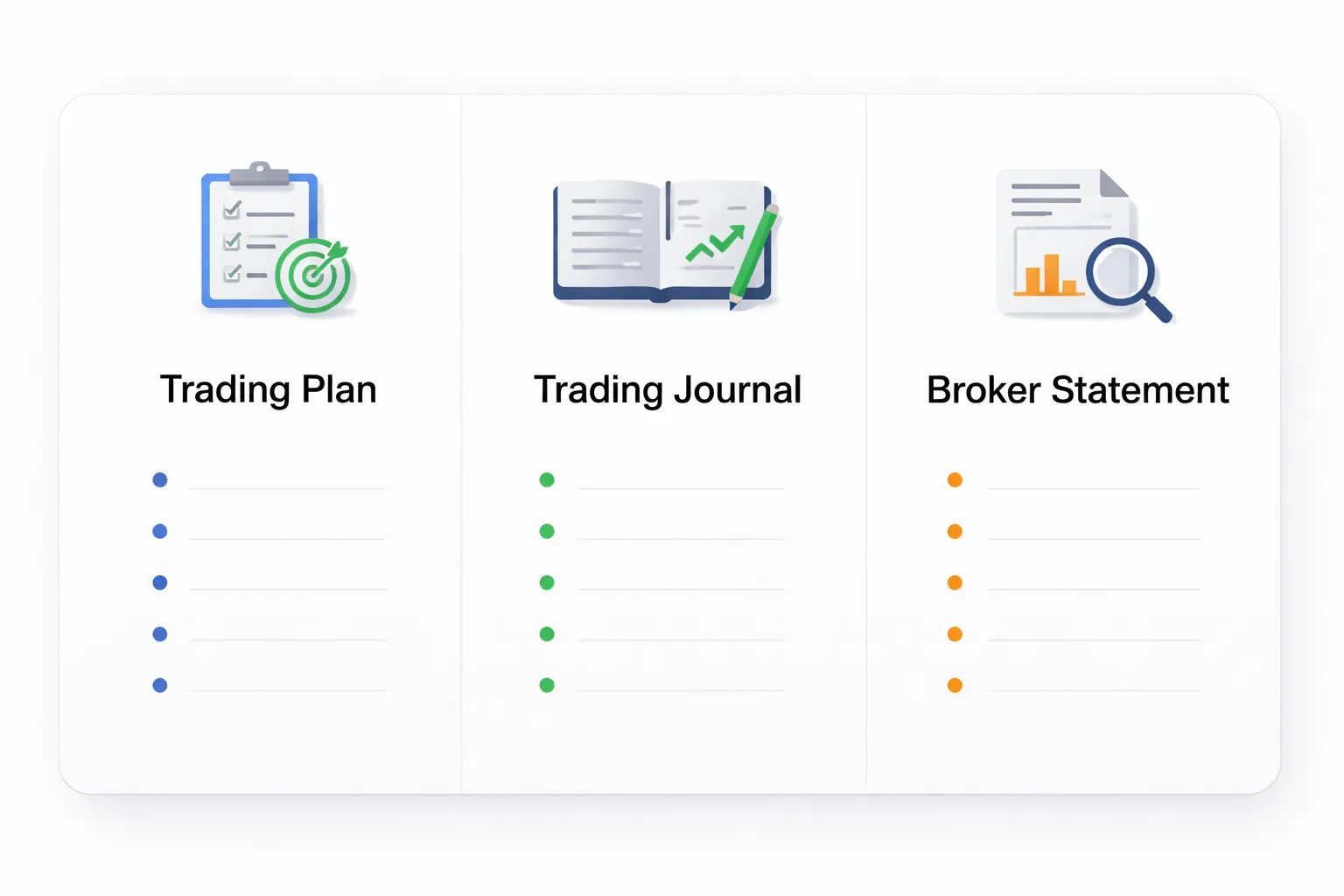
Trading journal vs trading plan vs broker statement
A forex trading journal is your decision log. You record what you planned, what you did, and why. You track the conditions you traded and whether you followed your rules.
A trading plan is your rule set. It defines your edge, your risk limits, your setups, and your execution steps. The plan tells you what to do. The journal shows what you actually did.
A broker statement is your transaction record. It shows fills, costs, and P and L. It does not show intent, context, or rule compliance.
- Journal: process and behavior. Inputs, execution, outcomes, mistakes.
- Plan: rules and constraints. What qualifies as a trade, and how you manage it.
- Statement: facts from the broker. Times, prices, swaps, commissions.
If you only use the statement, you will optimize for P and L noise. If you only write feelings, you will miss patterns. Your journal must connect rules to results.
Why most journals fail, too much data, too little insight
Most journals turn into storage. They collect fields that never drive a change.
- Too many columns. You spend time logging and skip review.
- No clear definitions. You change tags and criteria midstream.
- No link to rules. You track outcomes but ignore rule breaks.
- No schedule. You never run weekly and monthly reviews.
- No action loop. You note issues but do not test fixes.
Data only helps when it answers a decision. Keep each field only if it supports one of these jobs, qualify the setup, size the risk, verify execution, grade rule compliance, measure expectancy drivers.
Use a consistent template and keep entry time short. If you need a starting structure, use this guide on how to journal forex trades.
What “improves results” actually means, better decisions, then better performance
A journal improves results by improving decisions first. Performance follows after repetition.
| Journal output | Decision you change | Performance effect |
|---|---|---|
| Rule break rate by type | Stop breaking one rule with a trigger and a fix | Lower drawdown, cleaner stats |
| Expectancy by setup and session | Trade fewer low edge conditions | Higher average R, better consistency |
| Average loss vs planned risk | Enforce exits and reduce slippage errors | Smaller losses, tighter risk control |
| Mistake tags with frequency | Remove one repeat error at a time | Higher win rate or smaller losses |
| Screenshot review of entries and exits | Improve timing rules, avoid late entries | Better reward to risk |
Define “better” in numbers you can track, rule break rate, max drawdown, average loss, average win, and expectancy. Then tie each change to a test period and a stop condition. That is how a journal moves from notes to results.
Why Keeping a Journal Improves Forex Results
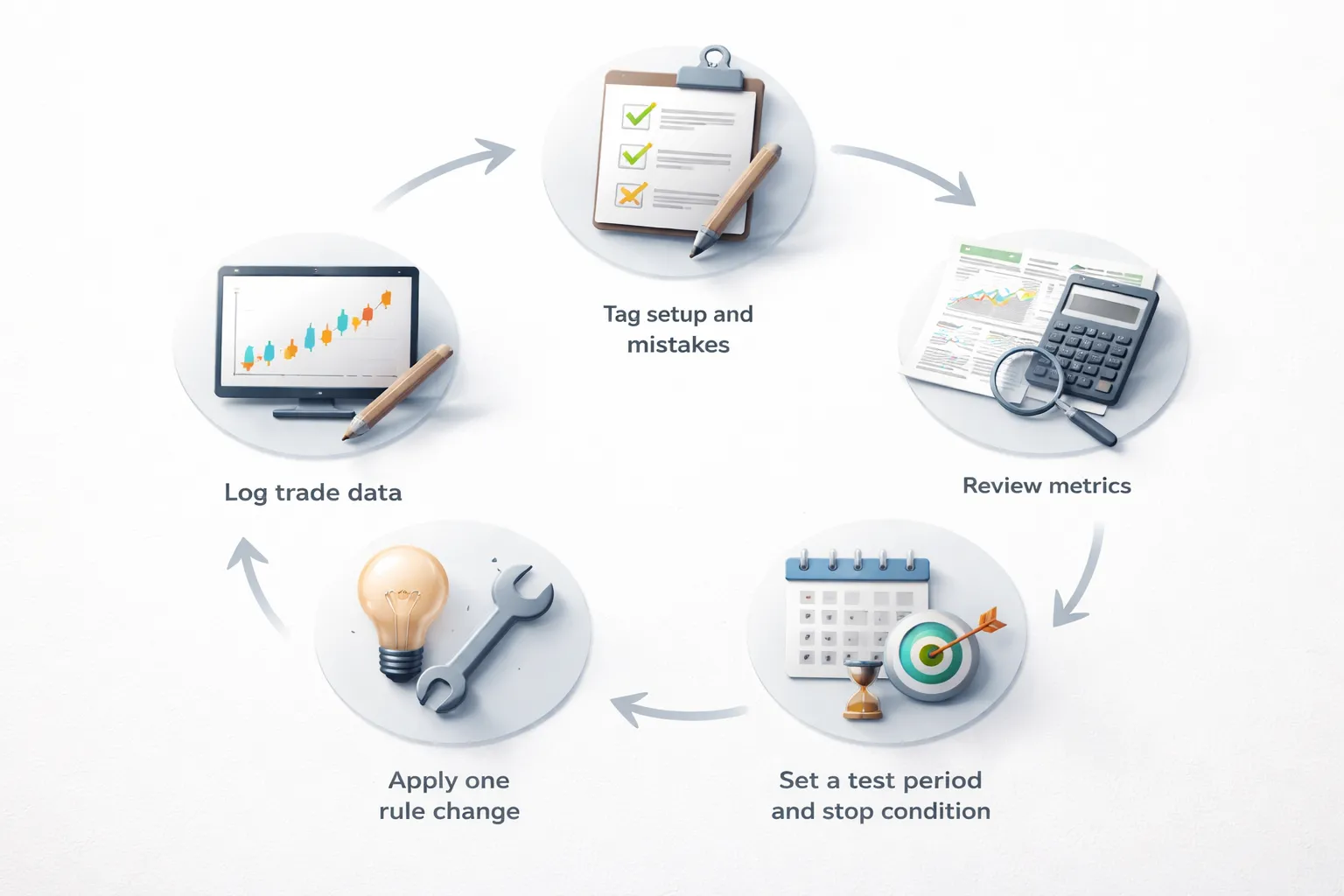
Turning randomness into feedback loops, edge discovery
Without a journal, each trade stands alone. You feel patterns, but you cannot prove them.
With a journal, you turn trades into a system. You tag setups, sessions, pairs, timeframes, and market conditions. You then measure what pays and what leaks.
Track results by tag. Use numbers that force clarity.
- Expectancy: (Win rate x average win) minus (Loss rate x average loss).
- Win rate: wins divided by total trades.
- Average win and average loss: in R or pips, not feelings.
- Profit factor: gross profit divided by gross loss.
- Max drawdown: peak to trough in your equity curve.
Run one change at a time. Set a test period, like 30 to 50 trades for one setup. Define a stop condition, like max drawdown hits 2R for the test, or rule break rate goes above 10 percent. This is how you find edge without guessing.
Reducing repeat mistakes through accountability
Your journal makes mistakes expensive in a different way. You see them. You count them. You stop pretending they are rare.
Log every rule break as its own event. Give it a label.
- Late entry.
- Moved stop.
- Skipped stop.
- Added to a loser.
- Revenge trade.
- Oversized position.
Track a single metric, rule break rate, rule breaks divided by total trades. Tie rule breaks to outcome. You will usually find your biggest losses cluster around the same two or three behaviors.
Set a hard line. Example, if rule break rate rises above 5 percent in a 20 trade block, you cut size in half for the next 20 trades. If it stays above 10 percent, you stop trading live and switch to demo until it drops.
Building confidence with evidence, sample size and consistency
Confidence comes from repeatable stats. You do not need a big win. You need a stable process.
Use sample size rules. Small samples lie.
- Judge a setup after at least 30 trades.
- Judge a full strategy after 100 trades, or 3 months, whichever is longer.
- Compare periods by the same risk per trade.
Focus on consistency metrics.
- Weekly R: total R gained or lost per week.
- Average loss: should stay close to your planned stop in R.
- Standard loss control: how often losses exceed 1R because you broke rules.
When your data shows stable expectancy and controlled drawdowns across multiple periods, you trust your plan more. You hesitate less. You stop changing rules mid week.
Separating strategy issues from execution issues
Many traders blame the strategy when the real problem is execution. A journal lets you split them.
Record two versions of each trade.
- Planned trade: entry, stop, target, setup tag, risk in R, reason.
- Executed trade: actual entry, actual stop, actual exit, mistakes.
Then run two performance views.
- As executed: your real results.
- As planned: results if you followed your rules, based on your screenshots and levels.
If as planned has positive expectancy but as executed does not, your fix is behavior. If both are negative, your fix is the strategy rules, market filter, or risk model. For position size errors, use a consistent sizing method, and calculate it the same way every time with a forex lot size calculator.
| Problem you see in the journal | What it usually means | What to change next |
|---|---|---|
| Average loss larger than planned | Stop discipline or slippage from bad entries | Hard stop rule, entry trigger rule, reduce size during news |
| Win rate stable, expectancy drops | Wins got smaller or losses got bigger | Review exits, partials, trailing rules, late entries |
| High drawdown with same strategy | Regime mismatch or overtrading | Add market filter, limit trades per session, pause after X losses |
| Big red days follow rule breaks | Emotional trading | Daily loss limit, cooldown rule, pre trade checklist |
Choose the Right Journal Format for Your Workflow
Spreadsheet vs app vs Notion vs paper
Your journal format should match how you trade. Speed matters. Consistency matters more.
| Format | Strengths | Trade-offs | Best use |
|---|---|---|---|
| Spreadsheet | Fast to edit, flexible fields, easy math, full control, works offline. | Manual entry, you must build structure, screenshots need extra steps, can get messy over time. | Most retail traders who want clean stats and simple reviews. |
| Journal app | Auto-import trades, charts, screenshots, built-in metrics, fast filtering, fewer errors. | Subscription cost, locked features, vendor risk, sometimes weak support for custom rules. | High trade volume, fast feedback loops, traders who hate data entry. |
| Notion | Tagging, rich notes, linked pages, templates, databases, dashboards. | Setup time, easy to overbuild, slower on mobile, charts require workarounds. | System traders who want process logs and structured reflections. |
| Paper | Zero distractions, strong habit anchor, quick mindset notes, good for pre trade plans. | No automatic stats, hard to search, hard to backtest patterns, no easy backups. | Discipline work, rule tracking, emotions and decision quality. |
Best option for beginners: frictionless and fast
Pick the format you will fill out after every trade. Avoid complex setups.
- Start with a spreadsheet or a simple app. Use a one screen template.
- Limit fields. If you track too much, you stop journaling.
- Use checkboxes. “Followed plan,” “entry rule met,” “exit rule met,” “risk within limit.”
- Log in under two minutes. If it takes longer, you will skip trades.
- Review weekly. Daily reviews often turn into noise when you have low sample size.
If you need a simple structure, use this guide on how to journal forex trades and copy the core fields.
Best option for advanced traders: tags, dashboards, automation
When you trade enough volume, your edge comes from fast pattern detection.
- Use tags that answer real questions. Session, setup type, regime, pair group, news proximity, execution quality.
- Separate strategy tags from behavior tags. “Breakout,” “pullback,” “mean reversion” versus “late entry,” “moved stop,” “revenge trade.”
- Build dashboards tied to decisions. Expectancy by setup, win rate by session, average R by exit type, drawdown after rule breaks.
- Automate what you can. Auto-import fills, auto-calc R multiple, auto time stamps, auto position size fields from your platform export.
- Keep notes structured. Use short sentences. Use the same headings every time.
Privacy, backups, and data portability
Your journal holds your edge. Treat it like an asset.
- Backups. Keep at least two copies, local and cloud. Schedule weekly exports.
- Portability. Prefer CSV exports. Avoid formats you cannot move.
- Access control. Use strong passwords and two factor authentication on any cloud tool.
- Vendor risk. If you use an app, confirm export options and keep raw trade files from your broker.
- Screenshots. Store them in dated folders and link them in your journal. Keep naming consistent.
Pick one format and commit for 30 trades. Then adjust the template. Do not change tools every week.
The Minimum Data to Record for Every Forex Trade
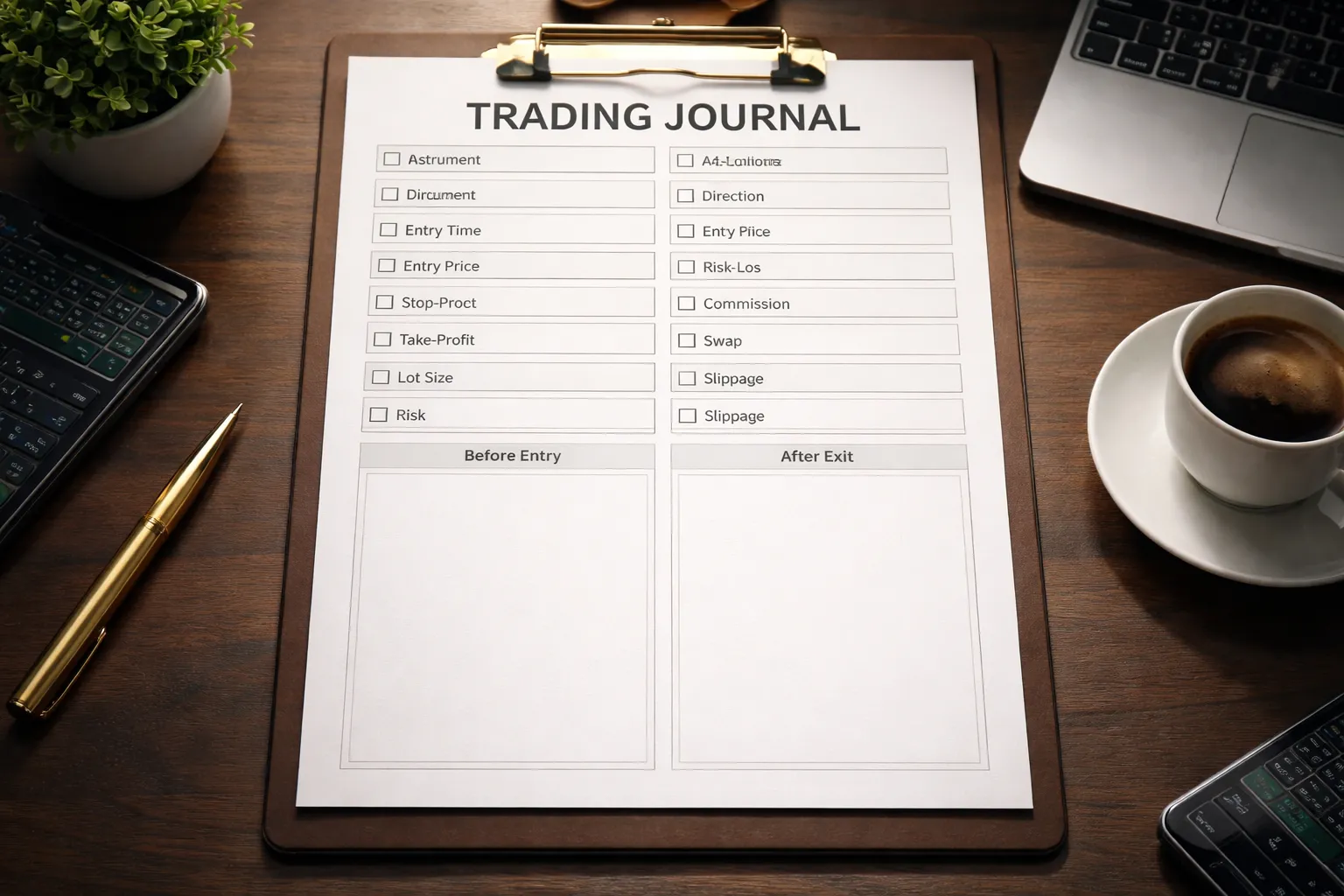
Core trade details you must log
Record the same fields for every trade. This keeps your stats clean and your review fast.
- Instrument, pair or symbol. Example, EURUSD.
- Direction, long or short.
- Date and time, entry time and exit time. Use one time zone.
- Session, Asia, London, New York, or overlap.
- Timeframe used for the setup, the chart that triggered the trade. Example, M15.
- Entry type, market or limit or stop.
- Setup tag, one short label. Example, breakout, pullback, range.
- Reason for entry, one sentence. Keep it factual.
Entry, exit, stop, target, and sizing inputs
Log the numbers that define your risk. If you skip this, you cannot trust your results.
- Entry price.
- Stop-loss price.
- Take-profit price, or your planned exit rule if you do not use a fixed target.
- Exit price, the actual fill.
- Position size, lots or units.
- Account size used, balance or equity at the time of entry.
- Risk per trade, percent and currency amount.
- Stop distance, in pips.
- Planned R multiple, based on your stop and target.
- Result, profit or loss in currency and in R.
- Rule compliance, yes or no. If no, state what you broke. Many errors match the patterns in common forex trading mistakes beginners make.
Costs that change your math
Gross P and L lies. Costs decide if your edge is real. Record them per trade.
- Spread paid, in pips. Use the spread at entry, and at exit if it mattered.
- Commission, total for the round trip.
- Swap or rollover, charged or credited. Note the number of nights held.
- Slippage, planned price versus fill price. Track it in pips.
Screenshot checklist
Two screenshots cover most reviews. Save them with the trade ID, then link them in your journal.
- Before entry, show the setup and your levels.
- Before entry annotations, entry line, stop line, target line, key support and resistance, session and time, news marker if relevant.
- After exit, show the full move and your exit.
- After exit annotations, fill prices, where you moved stops if you did, partial exits, notes on execution issues, and one line on what you will repeat or fix.
| Field | Minimum to record |
|---|---|
| Trade ID | Unique number or broker ticket |
| Instrument | Pair or symbol |
| Direction | Long or short |
| Entry | Time, price, order type |
| Stop | Price, pip distance |
| Target | Price or rule |
| Exit | Time, price |
| Sizing | Lots, risk percent, risk amount |
| Costs | Spread, commission, swap, slippage |
| Outcome | P and L, R multiple, rule compliance |
| Evidence | Before and after screenshots with annotations |
The “Edge” Fields Most Traders Forget to Journal
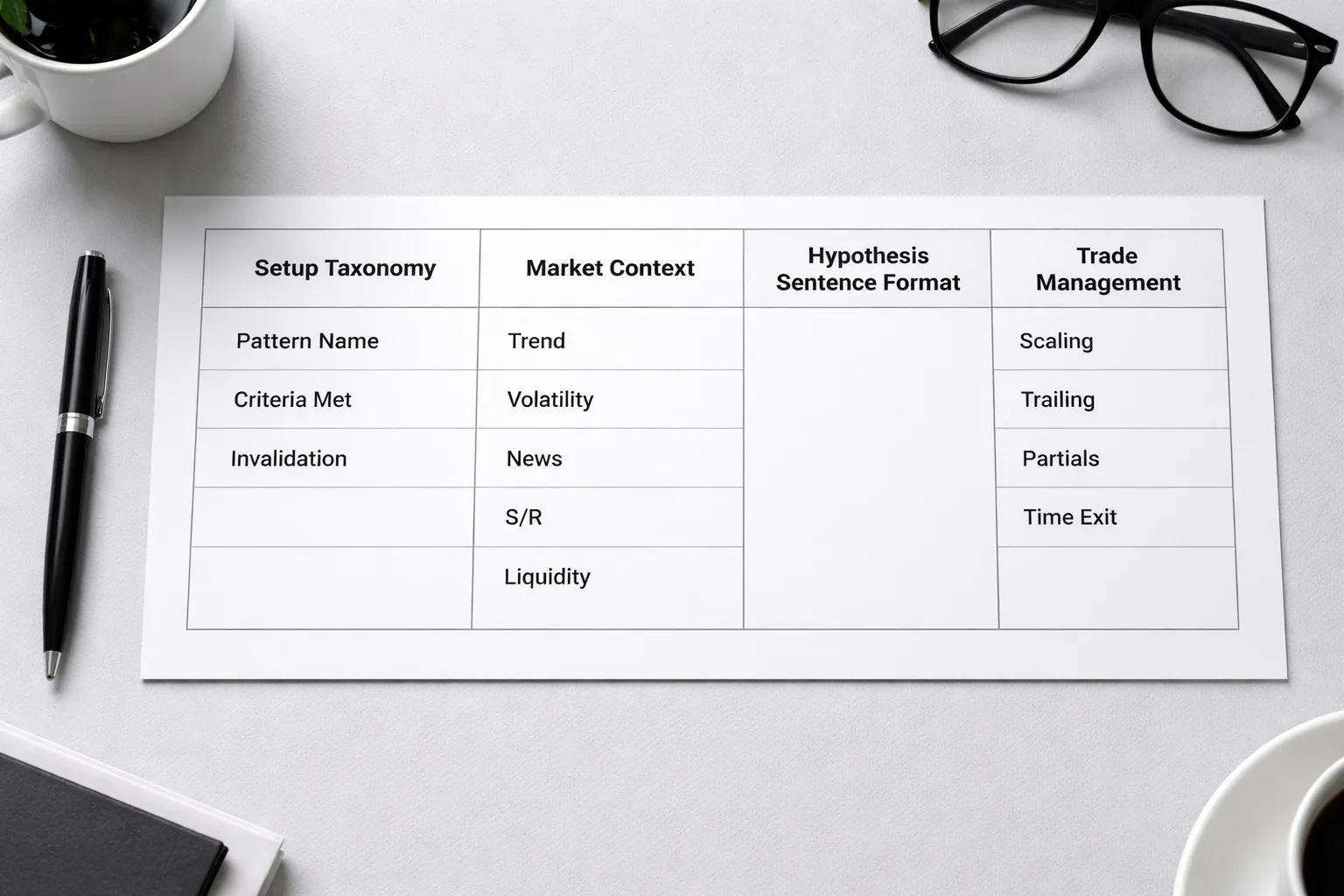
Setup taxonomy, the labels that make your data usable
If you do not name setups the same way every time, you cannot compare them. You get opinions, not stats.
- Pattern name: Use one short label. Example, “London breakout pullback,” “Range fade at weekly level,” “Trend continuation after retest.”
- Criteria met: Write a checklist you can mark yes or no. Keep it tight. Example, HTF trend aligned, level within X pips, trigger candle type, session window, spread under X, minimum RR planned.
- Invaldiation rules: Define what proves you wrong. Example, close below level, break of structure, ATR spike beyond X, news in next X minutes, spread widens above X.
Use the same fields on every trade. You will spot which criteria matter, and which ones you keep “seeing” after the fact.
Market context, the filter that saves you from random trades
Most journal entries ignore the environment. That is why the same setup works one week and fails the next.
- Trend: State the timeframe and direction. Example, H4 uptrend, M15 pullback.
- Volatility: Record ATR, or simple range in pips for the last X candles. Note if volatility is expanding or contracting.
- News: List high impact events for the pair and the time window. Note if you traded before, during, or after.
- Support and resistance: Mark the nearest levels above and below entry. Write the distance in pips.
- Liquidity: Note session, overlap, and whether price sat at equal highs or lows, prior day high or low, weekly high or low.
Reason for entry, one sentence in hypothesis form
Write one sentence that you can later grade as true or false.
- Format: “If X happens at Y level in Z context, then price should do W, because Q.”
- Example: “If M15 retests the broken Asian range high during London with H1 uptrend intact, then price should push to the prior day high, because stops sit above and volatility is rising.”
This forces clarity. It also exposes trades you took for comfort, boredom, or revenge.
Trade management decisions, the part that changes outcomes most
Entry gets the attention. Management controls your R.
- Scaling in: Record the rule. Example, add only after new structure break, add only on retest, max adds. Log the added size and new average price.
- Trailing stops: Record the method. Example, trail behind last swing, trail by ATR multiple, trail after candle close. Log when you started trailing and why.
- Partials: Record the levels, percent closed, and reason. Example, take 50 percent at 1R to cover costs, take 30 percent at weekly level.
- Time based exits: Record the time limit and trigger. Example, exit if no movement after 60 minutes, exit before NY close, exit before scheduled news.
- Plan vs. execution: Mark each decision as planned or discretionary. Discretion is not bad, but you must label it.
Keep these fields and your journal stops being a diary. It becomes a system audit. If you want a simple structure for these fields, use this forex trade journaling template guide.
How to Journal Emotions Without Turning It Into Therapy
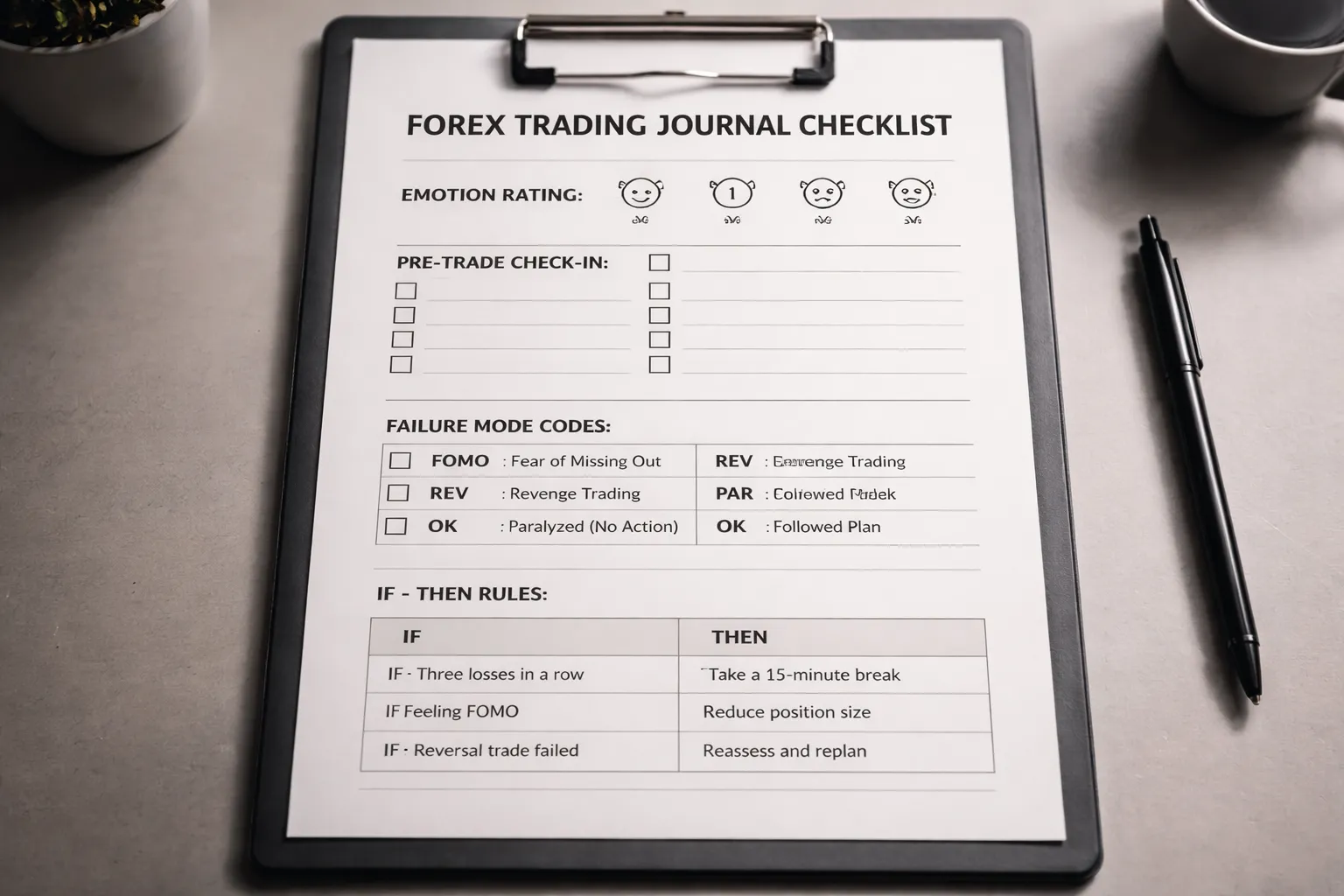
Pre-trade and in-trade emotional check-ins
You do not need paragraphs. You need a quick read on state, before it leaks into decisions.
Use a simple 0 to 3 scale. Log it fast.
- 0, calm, patient, following plan.
- 1, slight pressure, still in control.
- 2, tense, impulse risk is high.
- 3, emotional, you will likely break rules.
Record two timestamps.
- Pre-trade, right before you place the order.
- In-trade, at first management decision, move stop, partial, add, close.
Add one trigger tag. Keep tags consistent so you can filter later.
- Trigger tags, loss streak, missed move, news anxiety, time pressure, boredom, overconfidence.
Common psychological failure modes to track
Track the pattern. Do not analyze your childhood.
- FOMO, you enter late, you widen stops, you chase after a missed setup.
- Revenge trading, you increase size, you take lower quality setups, you skip your entry trigger after a loss.
- Paralysis, you hesitate, you miss planned entries, you exit early to avoid being wrong.
Log the mode as a code. One per decision point.
- Mode codes, FOMO, REV, PAR, OK.
Link emotions to behaviors
Emotions are noise. Behaviors are data. Write what you did.
- Bad, felt anxious, felt greedy.
- Good, moved stop to break-even early, entered without trigger, doubled risk, closed before target, skipped A setup.
Add one field that forces accountability.
- Rule broken, yes or no.
- Which rule, entry trigger, stop placement, risk cap, time stop, news rule.
Include risk context so you can spot escalation. If emotions lead to oversizing, your risk rules failed. Fix sizing with a tool and lock it into your process using a forex lot size calculator.
Create if-then rules to prevent repeats
Turn the emotion log into action. Use implementation intentions. Short and specific.
| Failure mode | If | Then |
|---|---|---|
| FOMO | Price moved without your entry trigger | Do not enter. Set an alert at the next planned level. Wait for the next setup. |
| Revenge | You close a losing trade and feel urgency level 2 or 3 | Stop trading for 20 minutes. Next trade must be A-quality or no trade. |
| Paralysis | Your setup triggers and you hesitate | Place the order within 30 seconds or cancel and mark it as a missed planned trade. |
| Escalation | You want to increase size after a loss | Cap risk at your base risk for the rest of the session. No exceptions. |
| Early exit | You feel fear and want to close before your plan | Reduce position by a fixed partial rule only. Do not close full unless exit rule triggers. |
Review these rules weekly. Keep the ones that reduce rule breaks. Delete the ones you do not follow.
Step-by-Step: Forex Trading Journal How to Keep One (Daily Workflow)
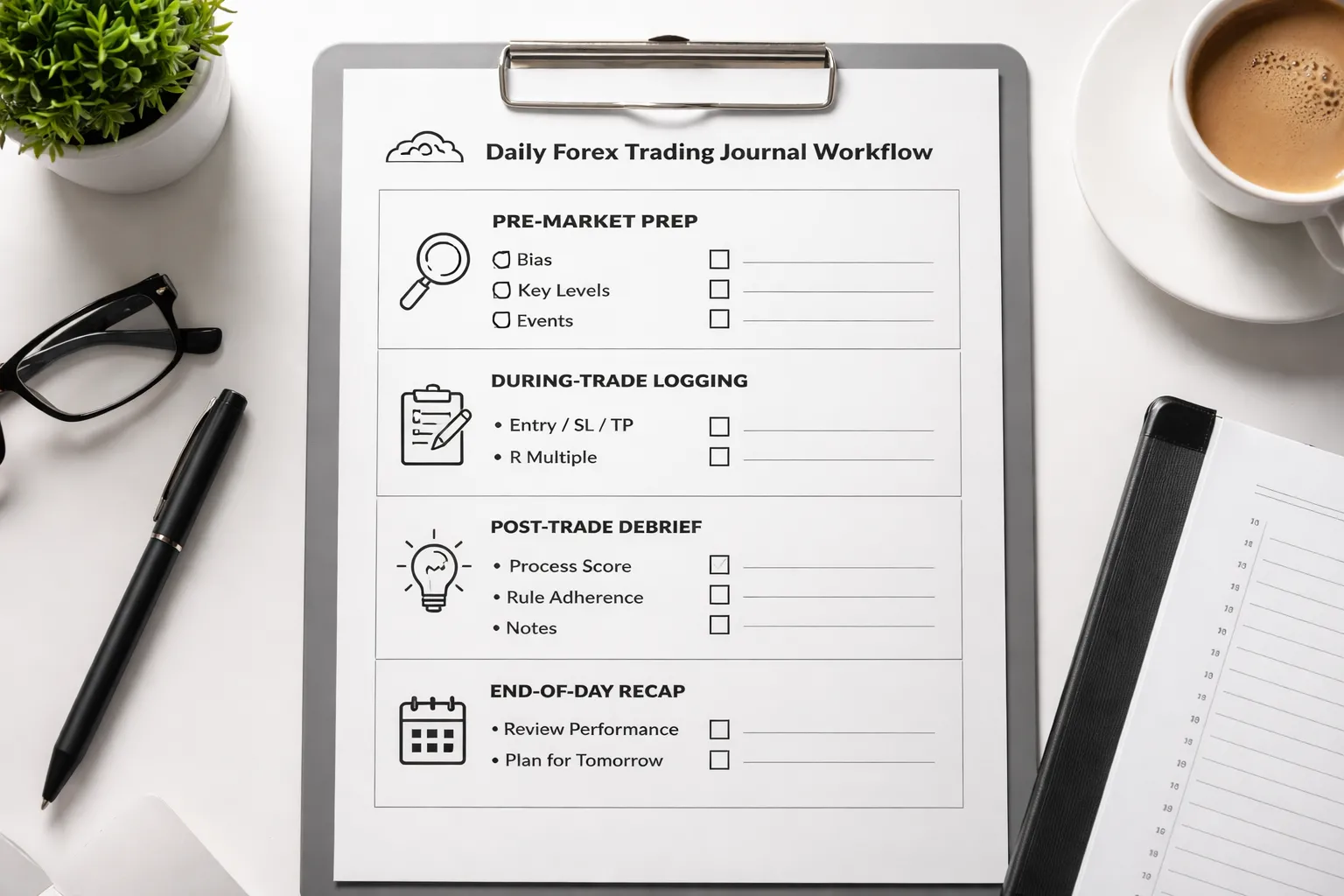
Pre-Market Prep Entry, 5 to 10 Minutes
Do this before you place any trade. Keep it short. Write facts, not hopes.
- Date, session, pairs: London, NY, or overlap. List 1 to 3 pairs you will trade.
- Higher time frame bias: Bull, bear, or range. Add one line on why, trend, structure, or key moving average you use.
- Key levels: Mark 3 to 6 levels. Prior day high and low, weekly open, major swing high and low, session high and low, supply and demand zones if you use them.
- High-impact events: List the time and currency. Note your rule, no trades X minutes before and after. Write the exact window.
- Risk settings: Base risk per trade, max trades per day, max daily loss, and any reduce-risk rule after a loss.
- A setups only: Write 1 to 2 valid setup types. Add the trigger and invalidation for each.
- Plan: “If price reaches level A and shows trigger B, I enter. Stop goes at C. Target at D. Manage with rule E.”
| Field | Example entry |
|---|---|
| Bias | EURUSD range, price inside last week high and low |
| Key levels | PDH 1.0908, PDL 1.0861, weekly open 1.0884 |
| Event risk | USD CPI 13:30, no new trades 13:00 to 14:00 |
| Risk | 0.5% per trade, max 2 losses then stop |
During-Trade Logging, 30 Seconds Per Decision
Log while the trade runs, but do not write essays. Capture decisions and state. One line per event.
- Time and price: Entry time, entry price, stop, target.
- Setup tag: The exact setup name from your plan. If it is not in the plan, tag it as “off-plan.”
- Reason in 10 words: Level plus trigger. Example, “retest of PDL, rejection candle, trend flat.”
- Risk and size: R risk, lot size, and account risk percent.
- Trade management actions: Move stop, partial, add, or cancel. Record the rule that allowed it.
- Mistake flags: One word tags. “FOMO,” “late,” “revenge,” “moved stop,” “early exit.”
- Emotion score: 0 to 5. 0 calm, 5 rushed. Add one cause, “news,” “missed entry,” “loss.”
| When | What you write |
|---|---|
| At entry | 09:42, sell 1.0882, SL 1.0894, TP 1.0862, Setup A1, risk 0.5%, emo 1 |
| At change | 10:05 moved SL to BE by rule, partial 50% at +1R |
| If you break a rule | 10:11 early partial, fear tag, emo 4 |
Post-Trade Debrief, 3 Minutes
Separate outcome from process. A good trade can lose. A bad trade can win.
- Result: Win or loss, R multiple, and pips. Note slippage and spread if it mattered.
- Process score: 0 to 2. 2 means followed plan, 1 means small deviation, 0 means off-plan.
- Entry quality: On-time, late, or early. One reason.
- Exit quality: Followed rule, or closed from fear, or moved stop. One reason.
- Market condition: Trend, range, high volatility, low liquidity, news.
- One improvement action: One change you will test next time. Keep it specific.
| Debrief prompt | Example |
|---|---|
| Outcome | -1R, stopped on spike before CPI |
| Process | 1, entered per setup, but ignored event window rule |
| Next action | Add hard “no-entry” timer 30 minutes before red news |
End-of-Day Recap, 5 Minutes
End the day with a scoreboard. This is where the journal improves results.
- Totals: Trades taken, net R, win rate, average win R, average loss R.
- Best trade: The trade with the best process, not the biggest profit. Write why it was correct.
- Worst trade: The trade with the worst rule break. Write the trigger that caused it.
- Rule adherence score: 0 to 100. Start at 100, subtract points per rule break. Use the same penalties daily.
- Top mistake: One mistake that cost the most.
- Fix for tomorrow: One rule or constraint. Keep it binary and easy to follow.
- Save evidence: Link or attach screenshots for each trade. One before, one after.
| Rule break | Penalty |
|---|---|
| Traded during banned news window | -25 |
| Moved stop further away | -30 |
| Off-plan entry | -20 |
| Early full exit without rule | -15 |
| Increased risk after a loss | -30 |
If you need a tool to speed this workflow up, use a structured journal from forex trading journal tools and keep your fields consistent.
Review Process: Turn Journal Entries Into Measurable Improvements
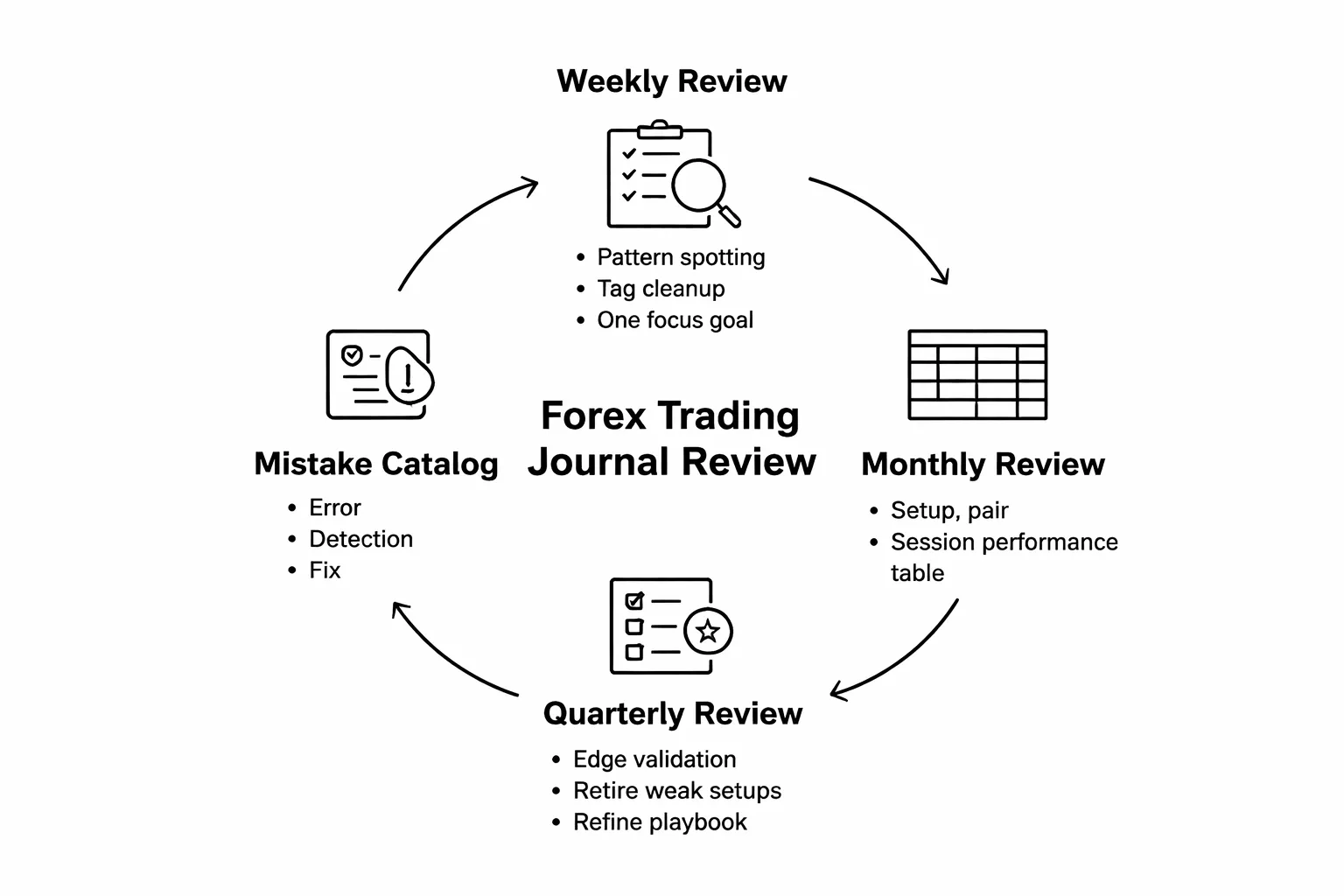
Weekly Review: Pattern Spotting, Tagging Cleanup, One Focus Goal
Block 30 to 45 minutes. Same day each week. No chart scrolling. Use your journal data.
- Pull the week. Filter to trades closed this week. Export if needed.
- Check volume. Count trades. If the sample is small, focus on execution, not strategy conclusions.
- Sort by outcome and by rule score. Look at the worst 20 percent first. They show the fastest leaks.
- Spot patterns. Track three numbers: win rate, average R, and percent of trades with any rule break.
- Clean your tags. Fix missing setup tags, session tags, and mistake tags. Delete duplicate tags. Keep one naming standard.
- Write one focus goal. One rule to protect, one behavior to stop, one checklist item to add. Keep it measurable.
Examples of weekly focus goals: “Zero trades during banned news window.” “No stop moves away from risk.” “Max two trades per session.”
Monthly Review: Strategy Performance by Setup, Pair, and Session
Run this like a report. You want segments that tell you where you make money and where you bleed.
- Group by setup. Compute trades, win rate, expectancy in R, and max drawdown in R.
- Group by pair. Same metrics. Cut pairs that add noise and low expectancy.
- Group by session. London, New York, Asia, overlap. Track your rule breaks by session too.
- Separate A trades from B and C. If you do not grade trades, start now. Many bad “strategies” come from bad trade selection.
| Segment | Trades | Win % | Avg R | Expectancy (R) | Rule Break % |
|---|---|---|---|---|---|
| Setup: Pullback | 24 | 46 | 0.35 | 0.12 | 21 |
| Pair: GBPJPY | 10 | 30 | -0.40 | -0.28 | 40 |
| Session: NY Open | 18 | 55 | 0.50 | 0.22 | 11 |
Make one decision per segment. Keep, reduce, or pause. Do not tweak rules mid-month. Log the change, then test it next month.
Quarterly Review: Validate Edge, Retire Weak Setups, Refine Playbook
Quarterly review stops you from trusting a hot streak or blaming a cold streak.
- Validate your edge. Use at least 30 to 50 trades per setup if possible. Compare expectancy and variance. Focus on R, not pips.
- Retire weak setups. Pause any setup with negative expectancy and high rule break rate. If the setup loses even when executed well, drop it.
- Split execution vs strategy. Create two buckets. “Followed plan” trades and “broke rules” trades. Your edge lives in the first bucket.
- Refine your playbook. Update entry rules, invalidation, target logic, and no-trade filters. Keep screenshots of the best examples. Remove vague rules.
- Set one process KPI. Examples: “Rule break rate under 10 percent.” “Pre-trade checklist completed 100 percent.”
If risk sizing causes most damage, fix that first. Use a consistent calculator and cap risk per trade. Link your process to one sizing method and stick to it.
Mistake Catalog: Top Recurring Errors and the Fix for Each
Keep a running list of your top mistakes. Rank them by total R lost. Attach one fix. Test the fix for four weeks.
| Mistake | How to detect it in your journal | Fix |
|---|---|---|
| Traded during banned news window | Entry timestamp falls inside your “no trade” block | Add a calendar check to your pre-trade checklist. Set platform alerts 30 minutes before red news. Auto-block trading times if your platform supports it. |
| Moved stop further away | Stop change increases initial risk after entry | Lock stops after entry. Allow only rule-based reductions. If you want flexibility, use a wider initial stop and smaller size, decided before entry. |
| Off-plan entry | Setup tag missing or “Other”. Notes show no checklist match | Require a setup tag and checklist tick box before order placement. If either is missing, you do not trade. |
| Early full exit without rule | Exit reason not tied to your plan. Screenshot shows no invalidation | Define one valid early-exit rule. Example: “Close if structure breaks on execution timeframe.” Anything else counts as a rule break. |
| Increased risk after a loss | Risk percent rises after a losing trade sequence | Set a hard risk cap per trade and per day. After a loss, enforce a cooldown. Use a fixed position sizing method from a tool you trust. |
If you want software that makes these reviews faster, compare options in forex trading journal tools and pick one that supports filtering, tagging, and exports.
What to Measure: Metrics That Matter More Than Win Rate
R-multiple tracking, standardize your performance
Win rate lies when your wins and losses have different sizes. Track R instead. R equals your profit or loss divided by your initial risk.
- +1R means you made the same amount you risked.
- -1R means you lost what you planned to risk.
- +3R means you made three times your planned risk.
R makes every trade comparable across pairs, timeframes, and account sizes. It also exposes risk creep. If your losses cluster at -1.4R, your stops slip or your execution fails.
- Log planned R and realized R for every trade.
- Review your average R, median R, and largest loss in R.
- Separate results by setup tag and market condition tag.
Expectancy per setup and per market condition
Expectancy tells you what one trade is worth over a large sample. Calculate it in R so position size does not distort the result.
Expectancy (in R) = (Win% × Avg Win in R) − (Loss% × Avg Loss in R)
Run this per setup, then split again by condition. You want to know where your edge holds and where it disappears.
- Setup tags, breakout, pullback, reversal, news fade.
- Condition tags, trending, range, high volatility, low volatility, session, news window.
- Minimum sample, aim for 30 trades per bucket before you trust the number.
Cut what shows negative expectancy. Reduce size or tighten rules on buckets that swing between positive and negative. Many traders bleed from avoidable mistakes in rule selection and context, review common Forex trading mistakes and map each one to a journal tag.
MAE and MFE, improve stops and take profits
MAE and MFE show how price moved while you held the trade.
- MAE, maximum adverse excursion. Worst move against you during the trade.
- MFE, maximum favorable excursion. Best move in your favor during the trade.
Track both in pips and in R. Then compare them to your stop and target.
- If winners show large MFE but you exit early, your take profit logic cuts your edge.
- If losers show small MAE then hit full stops, your entry timing or stop placement fails.
- If MAE often exceeds your stop by a small margin before reversing, your stop sits at an obvious level.
Basic review steps you can repeat each week.
- For each setup, chart MAE distribution of winners and losers.
- Check how often trades reach +1R before stopping out.
- Record whether you moved stops or targets, and how that changed MAE and realized R.
Risk of ruin and drawdown tracking
Profit means little if your risk can wipe you out. Track drawdown and run simple risk of ruin checks.
- Max drawdown in percent and in R.
- Average drawdown and recovery time, number of trades to new equity high.
- Loss streaks, longest streak, average streak length, and worst week.
Keep risk of ruin simple and practical.
- Define your fail line, the drawdown where you must stop trading, for example 20 percent.
- Use your journal to estimate win rate and average win and loss in R.
- Reduce risk per trade until your worst historical streak stays well above the fail line.
Also track risk used per day. Many accounts break from one bad day, not one bad trade.
Process KPIs, measure what you control
Process metrics predict future results. Log them with simple flags so you can filter and count.
- Plan adherence, yes or no. Your entry, stop, target, and reason match the written plan.
- Impulsive entries, yes or no. You entered without a valid setup tag.
- Rule violations, list the rule. Late entry, widened stop, revenge trade, doubled risk.
- Missed trades, yes or no. Valid setup appeared and you did not take it.
- Execution quality, planned entry price versus filled price, in pips and in R.
Review these weekly with counts and percentages.
Set targets you can execute. Raise plan adherence. Cut impulse rate. Track missed trades to find fear, hesitation, or unclear rules.
Templates and Examples You Can Copy
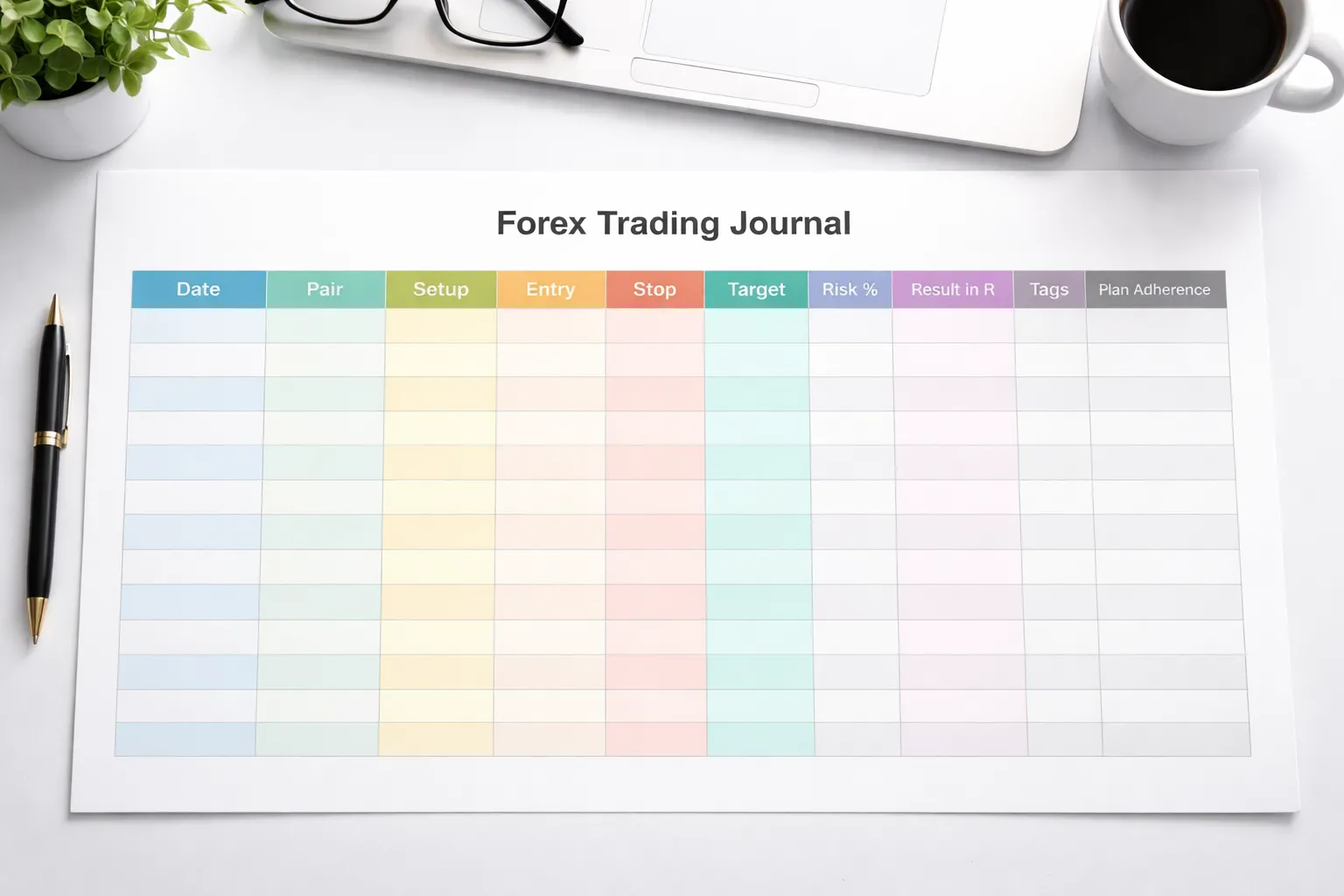
Beginner Template, 10 Fields Only (Fast and Sustainable)
Use this when you want consistency. Keep it lean. Ten fields. Every trade.
| Field | What you write |
|---|---|
| 1) Date, time | YYYY-MM-DD, session, time |
| 2) Pair | EURUSD, GBPJPY, etc. |
| 3) Direction | Long or short |
| 4) Setup name | One of your defined setups |
| 5) Entry | Price |
| 6) Stop | Price, placed by rule |
| 7) Target | Price or R multiple plan |
| 8) Risk | % of account or $ risked |
| 9) Result | +R or -R, optional pips |
| 10) One-line review | Plan followed, yes or no, plus one fix |
Rule: if a field feels hard to fill, your rules are unclear. Fix the rules. Do not “wing” the journal.
If you want a ready-to-copy sheet, use this guide with free template ideas.
Intermediate Template, Tags Plus Screenshots Plus Management Notes
This template shows you why you win and why you lose. It captures context and execution. It stays readable.
- Add tags. Use 3 to 8 tags per trade. Keep a fixed list.
- Add two screenshots. One before entry. One after exit. Name files with date, pair, setup, R.
- Add management notes. You track what you changed after entry and why.
| Block | Fields to add |
|---|---|
| Tags | Session, trend, volatility, news, A+ or B, entry type, exit type, error type |
| Screenshots | Pre-entry chart, post-exit chart, mark entry, stop, target, and key levels |
| Trade management | Did you move stop, scale out, add, reduce size, exit early, hold through news |
| Execution quality | Slippage, spread, missed fill, late entry, platform issues |
| Plan adherence | Yes or no, plus the exact rule you broke or followed |
Start your tag list with these and adjust:
- Setup: pullback, breakout, reversal, range, continuation
- Market: trending, ranging, high-vol, low-vol
- Context: at level, mid-range, post-news, pre-news
- Execution: on-time, late, chased, limit fill, market fill
- Mistake: oversized, early exit, moved stop, no stop, impulse
Keep tags factual. Avoid emotion tags like “felt good.” Log what happened, then review patterns.
Advanced Template, Dashboards, Pivots, Conditional Formatting
This is for volume and decision support. You stop reading single entries. You read the data.
Build three sheets.
- Trades. One row per trade. All fields, all tags.
- Tag map. One tag per column, use 1 or 0 so pivots work clean.
- Dashboard. Pivots, charts, and key ratios.
Trades sheet columns you should include:
- ID, date, pair, session, setup, direction
- Planned entry, actual entry
- Planned stop, actual stop
- Planned target, actual exit
- Risk %, R result, pips
- Plan followed (1 or 0), impulse (1 or 0), missed setup (1 or 0)
- Mistake code (one primary code), notes (short)
Pivot tables to build:
- R by setup. Rows: setup. Values: avg R, total R, win rate, count.
- R by pair. Find pairs you trade poorly.
- R by session. Spot time-of-day leaks.
- Mistake impact. Rows: mistake code. Values: avg R, total R, count.
- Plan adherence trend. Rows: week. Values: adherence %, impulse %, miss %.
Conditional formatting rules that pay off:
- Plan followed = 0 highlights in red.
- Impulse = 1 highlights in red.
- R < -1 highlights in red. R > +2 highlights in green.
- Late entry tag highlights in amber.
- Moved stop against rule highlights in red.
Dashboard metrics to show at the top:
- Total R (week, month).
- Avg R per trade.
- Win rate.
- Profit factor.
- Plan adherence rate, impulse rate, miss rate.
- Top 3 setups by avg R and worst 3.
Rule: do not add more metrics until you act on the current ones.
Sample Filled-Out Entry, What “Good Journaling” Looks Like
This example shows clarity. It names the setup. It records the plan. It documents execution. It ends with one fix.
| Field | Example entry |
|---|---|
| Date, time | 2026-02-06, London, 09:15 |
| Pair | EURUSD |
| Direction | Long |
| Setup | Pullback to H1 level with M15 break and retest |
| Context | H1 uptrend, price pulled back into prior support, no high-impact news next 60 min |
| Planned entry | 1.08420 on M15 retest |
| Planned stop | 1.08350, below M15 swing low, 7 pips |
| Planned target | 1.08560 (2R), next H1 resistance |
| Risk | 0.50% (position sized to 7-pip stop) |
| Actual execution | Entered 1.08424. Stop set 1.08350. No changes. Exit 1.08562 at target. |
| Tags | London, trending, at-level, A+, limit fill, no-news, clean execution |
| Result | +2.0R, +14 pips |
| Plan adherence | Yes |
| One-line review | Good trade. Kept stop fixed and took target. Next time, add a pre-trade checklist box to confirm “no news in 60 min” before entry. |
Notice what is missing. No excuses. No long story. You can audit the trade in 20 seconds.
Automation and Tools to Make Journaling Effortless
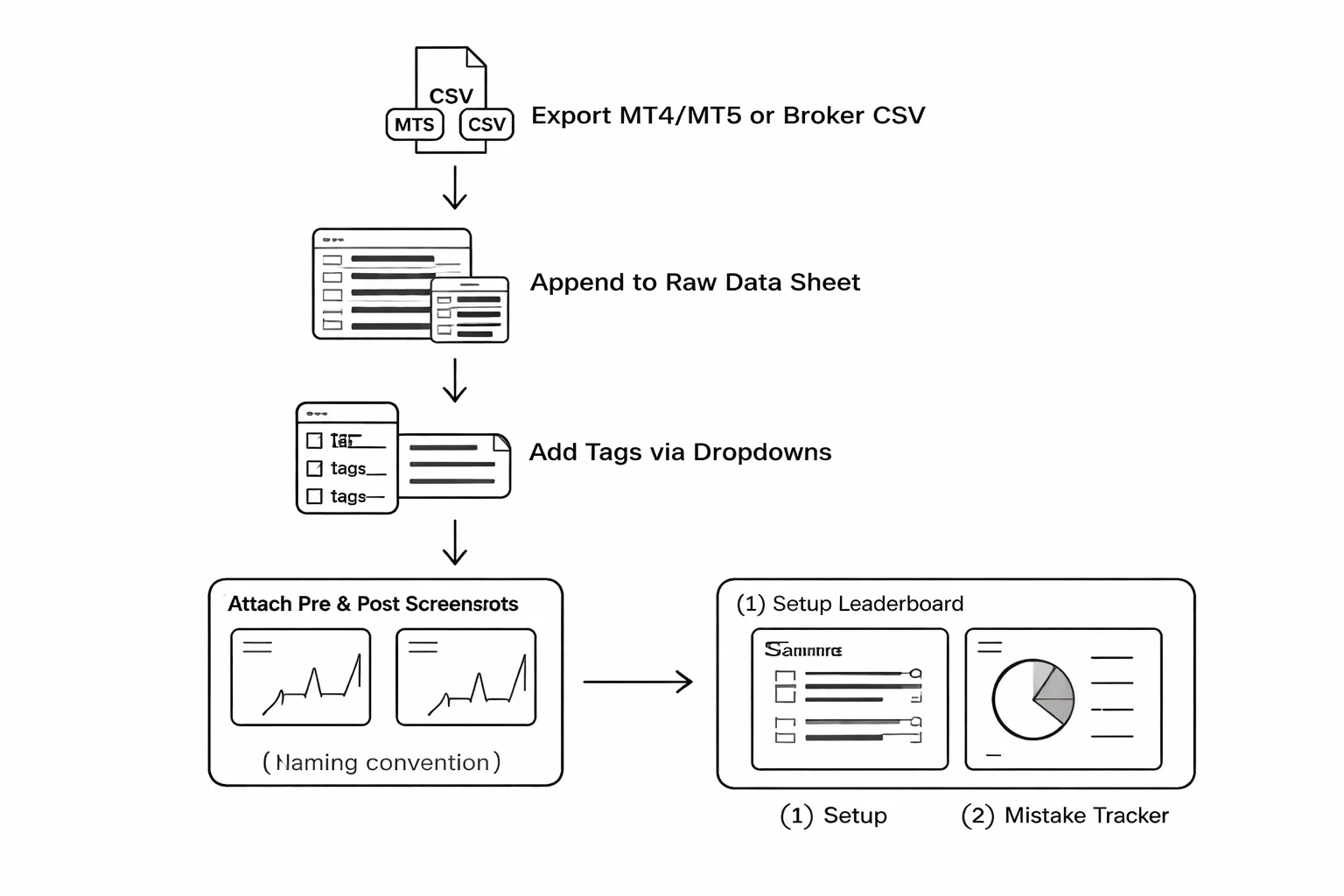
Import trades from MT4, MT5, or broker exports
Typing trades by hand breaks consistency. Import them.
- MT4 or MT5 history export, open Account History, select the date range, export as CSV or HTML. Convert HTML to CSV if needed.
- Broker statement export, download fills or transactions as CSV. Use the fills report, not the summary.
- One master file, keep a single CSV as your raw data source. Do not edit the raw file. Create a second sheet or table for your journal fields.
Use a simple CSV workflow.
- Step 1, export fills weekly. Same day and time each week.
- Step 2, paste into your raw data tab. Append only.
- Step 3, normalize columns, symbol, open time, close time, side, size, entry, exit, fees, swap.
- Step 4, calculate R and pips with formulas. Do not hand-calc per trade.
- Step 5, link each trade row to your notes fields, tags, checklist, and screenshots.
| Raw export column | Journal column | Rule |
|---|---|---|
| Ticket | Trade ID | Unique key, never change it. |
| Symbol | Pair | Standardize names, EURUSD not EUR/USD. |
| Type | Side | Buy or sell only. |
| Volume | Lots | Keep numeric, no text. |
| Open Time | Entry time | Use one timezone across the journal. |
| Open Price | Entry | Decimal format consistent. |
| Close Price | Exit | Decimal format consistent. |
| Commission, Swap | Costs | Track costs per trade, not per day. |
Use tags, drop-downs, and forms to reduce typing
Free text creates noise. Standard fields create patterns.
- Tags, keep them short and fixed. Example, London, NY, Asia, trending, range, A+, B, at-level, breakout, pullback, limit, market, no-news, red-news.
- Drop-downs, use them for any field you want to filter later. Session, setup type, grade, entry type, news check, adherence.
- Checkboxes, use them for your pre-trade and post-trade checklist. Yes or no only.
- One-line review, cap it at 120 characters. You want a verdict, not a diary.
Build a form view if you journal in a spreadsheet or database tool.
- Required fields, pair, setup, grade, planned stop, planned target, entry type, news check, adherence.
- Optional fields, feelings, external notes. Hide them by default.
- Validation, block empty grades and missing stop values. Missing risk data makes the trade unusable.
If you want a dedicated platform, use a tool from this forex trading journal tools comparison. Still keep your tags and dropdown rules the same.
Screenshot organization system that stays clean
Screenshots matter. Random files kill review speed.
Use a strict naming convention.
- Format, YYYY-MM-DD, Pair, Session, Setup, Direction, ResultR, TradeID.
- Example, 2026-02-07_EURUSD_London_AtLevel_Long_+2.0R_1847261.png
Use a simple folder structure.
- Root, /Journal_Screens/
- Year, /2026/
- Month, /2026-02/
- Trade, keep 2 files per trade, one before entry, one after exit.
- Entry screenshot, add _PRE at the end.
- Exit screenshot, add _POST at the end.
- Markups, keep them minimal. Circle entry, stop, target, key level.
Link screenshots in your journal using the Trade ID. One click should open the files.
Build simple dashboards, setup leaderboard and mistake tracker
Dashboards stop you from cherry-picking stories. They force totals.
Start with two views.
- Setup leaderboard, which setup makes money in R, with enough samples.
- Mistake tracker, which rule breaks cost you the most R.
Keep the leaderboard basic.
| Setup | Trades | Avg R | Total R | Win rate |
|---|---|---|---|---|
| At-level | 40 | +0.35 | +14.0 | 47% |
| Breakout | 28 | -0.20 | -5.6 | 39% |
Use rules for sample size.
- Minimum trades, do not trust a setup under 20 trades.
- Same risk model, compare like with like. Fixed R works best.
Track mistakes as costs, not feelings.
| Mistake tag | Count | Total R lost | Fix |
|---|---|---|---|
| Moved stop | 6 | -5.0R | Hard rule, no stop edits after entry. |
| Traded into red news | 3 | -3.2R | Checklist box, “no news in 60 min”. |
Review these two dashboards weekly. Change one rule or one filter at a time. Then measure the next 20 trades.
Common Mistakes When Keeping a Forex Trading Journal (and Fixes)
Logging Only Winners or Only Losers (Selection Bias)
If you only log winners, you miss your real leak points. If you only log losers, you miss what you should repeat. Your data becomes useless.
- Mistake: You journal “interesting” trades and ignore the rest.
- Cost: Win rate, expectancy, and mistake counts get distorted.
- Fix: Log every trade. Same fields, same format, same day.
- Control: Add a required field called Trade logged, yes or no. Your goal is 100%.
Changing Strategy Too Often Before Enough Samples
Small samples lie. Ten trades prove nothing. Your journal becomes a record of random changes, not performance.
- Mistake: You change entries, exits, timeframes, or pairs after a few losses.
- Cost: You cannot isolate what caused results. You reset your edge each week.
- Fix: Lock rules for a minimum sample, then review.
- Baseline: Test one change at a time. Measure the next 20 trades. Keep the rest fixed.
- Journal field: Version (A, B, C). No version change without a dated note.
Obsessing Over P&L Instead of Decision Quality
P&L mixes skill and variance. Decision quality shows what you control.
- Mistake: You rate trades as “good” if they win and “bad” if they lose.
- Cost: You reinforce bad habits that happened to pay once.
- Fix: Score execution, not outcome.
| Decision metric | How to log it | Target |
|---|---|---|
| Rule compliance | Yes or No for each rule | 95%+ |
| Entry quality | A, B, C based on your checklist | More A than C |
| Stop discipline | Moved stop, yes or no | Zero |
| Position sizing | Planned R risked vs actual | Match plan |
If your sizing is inconsistent, fix that first. Use a forex lot size calculator and log the planned lot size next to the executed lot size.
Overcomplicating the Journal and Quitting After a Week
If it takes too long, you stop. Then you lose the only dataset that matters, your own trades.
- Mistake: You build a journal with 40 fields, screenshots, and long notes for every trade.
- Cost: Low completion rate. Missing data. No weekly review.
- Fix: Cut to the minimum fields that drive decisions.
- Minimum log: date, pair, session, setup tag, entry, stop, target, R planned, R result, mistake tags, one sentence note.
- Time limit: 2 minutes per trade, 15 minutes per weekly review.
- Rule: If a field does not change a rule or filter, delete it.
Not Defining Setups, So Analysis Becomes Meaningless
If you cannot name the setup, you cannot measure it. “I saw a signal” is not a setup.
- Mistake: You log trades with vague labels like breakout, reversal, trend.
- Cost: You mix different trade types in one bucket. Your stats blur.
- Fix: Define 3 to 5 setups. Write hard rules for each one.
| Setup element | Write it as |
|---|---|
| Market condition | Trend, range, compression, post-news |
| Trigger | Close above level, break and retest, sweep and reclaim |
| Invalidation | Stop location rule, no exceptions |
| Target logic | Next level, fixed R, partial rules |
| Filters | Time window, spread limit, news block |
Give each setup a short tag. Example, BRK-RT for break and retest. Then your weekly review can answer one question per setup, expectancy, win rate, and top mistake tags.
Compliance, Ethics, and Realistic Expectations (E-E-A-T Notes)
Risk disclaimer, a journal improves process, not profits
A trading journal supports decision quality. It does not guarantee profits.
Your results depend on your edge, execution, position sizing, costs, and market conditions. A clean journal helps you measure those factors and spot failures fast.
Write down your risk rules and enforce them. Log your actual risk, not your planned risk. If you cannot size correctly, fix sizing before you judge any setup. Use a calculator and record the inputs. Link your journal to your sizing method so every trade has a repeatable risk profile.
If you need a sizing reference, see this forex lot size calculator guide.
- Do not use the journal to justify revenge trades.
- Do use the journal to reduce rule breaks and tighten risk control.
- Expect variance. Even a good setup can lose many times in a row.
Keeping records for taxes and audits, what to store and how long
Assume you will need to prove what happened. Store records that let you reconstruct each trade and your year-end totals.
- Broker statements, monthly and annual.
- Trade confirmations, fills, timestamps, instrument, size, price.
- Deposits and withdrawals, including fees and conversions.
- Platform logs if available, order IDs help match fills.
- Your journal export, CSV or spreadsheet, with final numbers.
- Adjustment notes for errors, corrections, or reconciliations.
Keep the original files. Also keep a read-only backup. Use clear filenames by year and month.
Retention depends on your country and tax status. Many traders keep records for at least 5 to 7 years. If your rules differ, follow your local requirement. When in doubt, keep more, not less.
How to avoid hindsight bias when reviewing charts
Hindsight bias ruins learning. You start grading trades by the outcome, not the decision.
Force separation between decision-time data and review-time data.
- Screenshot at entry, before price moves. Include time, timeframe, and visible levels.
- Screenshot at exit, after you close. No extra zooming to make it look clean.
- Lock your thesis, one sentence. Example, “BRK-RT long, reclaim plus stop below retest low.”
- Record invalidation as a price level. No vague language.
- Tag mistakes from a fixed list. Example, “LATE-ENTRY”, “WIDEN-STOP”, “NEWS-VIOLATION”.
- Score the process first. Then record P and L. Keep them as separate fields.
During weekly review, evaluate each setup tag on rule adherence, then on expectancy. If a setup loses money but you execute it cleanly, you test it longer. If a setup wins money but you break rules, you fix behavior first.
When to seek mentorship or professional help, psychology and risk
Seek help when the problem stops being technical.
- Risk control fails, you increase size after losses, you ignore stops, you cannot follow your risk cap.
- Emotions run trades, you trade to feel relief, you cannot stop after hitting limits.
- Life impact shows up, sleep issues, persistent stress, conflict, or financial pressure drives decisions.
- You cannot diagnose leaks, the journal shows repeated patterns but you do not know how to change them.
Mentorship helps when you need structure, accountability, and feedback on your system and execution. Professional mental health support helps when anxiety, compulsion, or depression shows up. Use a licensed professional for mental health issues. Use a qualified tax professional for tax questions. Do not outsource accountability, but do not try to brute-force serious issues alone.
FAQ
How often should you update your forex trading journal?
Update it after every trade. Do the quick fields in 2 minutes. Do a weekly review for patterns. Do a monthly review for rule changes. If you skip entries, your stats lie and your fixes miss the real problem.
What should you track in every trade, minimum?
Pair, date, session, setup name, entry, stop, target, position size, risk in dollars and R, result in R, screenshot, and rule compliance. Add a short note on why you took it. Keep it consistent so you can filter and compare.
Should you use a spreadsheet, an app, or a notebook?
Use the format you will keep daily. Spreadsheets work if you want custom fields and control. Apps work if you want automation and charts. Notebooks work for mindset notes, but make stats hard. Hybrid works, log stats digitally and write notes on paper.
How do you measure performance beyond win rate?
Track expectancy, average win in R, average loss in R, profit factor, and max drawdown. Track rule compliance rate. A high win rate can still lose money if your average loss is larger than your average win.
How many trades do you need before you trust the data?
Start analysis at 30 trades. Make decisions at 100 trades per setup. Use rolling windows, last 20, 50, and 100 trades. Small samples swing hard, so avoid changing rules after a short streak.
How do you journal when you scale in or out?
Journal it as one trade with multiple fills. Record each entry and exit price, size, and time. Calculate the weighted average entry and exit. Track total R for the full position and note the rule for partials.
How do you journal missed trades and impulse trades?
Log them as separate entries. Mark them as missed, late, or unplanned. Add a screenshot and the trigger that caused it. Track frequency per week. Your biggest gains often come from cutting these events, not from finding new setups.
What is the fastest weekly review process?
Sort trades by setup and by compliance. List top two mistakes by count and by cost in R. Write one fix for each mistake. Pick one metric to improve next week, like stop placement or time filter. Then stop reviewing.
What if journaling makes you overthink?
Reduce fields. Journal only compliance, R result, and one sentence on execution. Review once per week, not daily. Use the journal to enforce rules, not to micro optimize. If anxiety spikes, step back and simplify your trading plan.
Can journaling help with risk management?
Yes. Track planned risk versus actual risk, stop distance, and position size errors. Log every time you moved a stop or added size. Your journal should show if you break risk rules and how much it costs. Fix that before any strategy changes.
Where can you get a free template and a track list?
Use this guide on how to journal forex trades for fields, examples, and free template ideas you can copy into a spreadsheet or app.
Conclusion
Conclusion
A forex journal only works if it changes your behavior. Keep it simple. Track the few numbers that drive outcomes. Entry, exit, setup, market context, stop, target, position size, and R multiple. Add a short note on why you took the trade and why you managed it the way you did.
Review on a schedule. Pick one day each week. Pull your last 20 to 50 trades. Sort by setup and session. Check three things. Expectancy, win rate, and average R. Then check rule breaks. Late entries. Moved stops. Oversized positions. These errors usually explain your biggest drawdowns.
Your final step is one change at a time. Choose the single rule that cost you the most R last week. Write it at the top of your journal. Track it on every trade for the next 10 trades. Do not add new filters. Fix execution first.
If you need a clean structure you can copy, use this guide on how to journal forex trades.
-
Best Forex Trading Journal Tools (Top Picks Compared)
8 months ago -
Forex Lot Size Calculator: How to Use It to Size Trades Correctly
8 months ago -
How to Journal Forex Trades (What to Track + Free Template Ideas)
8 months ago -
Common Forex Trading Mistakes Beginners Make (And How to Avoid Them)
8 months ago
-
- How often should you update your forex trading journal?
- What should you track in every trade, minimum?
- Should you use a spreadsheet, an app, or a notebook?
- How do you measure performance beyond win rate?
- How many trades do you need before you trust the data?
- How do you journal when you scale in or out?
- How do you journal missed trades and impulse trades?
- What is the fastest weekly review process?
- What if journaling makes you overthink?
- Can journaling help with risk management?
- Where can you get a free template and a track list?
-
- How often should you update your forex trading journal?
- What should you track in every trade, minimum?
- Should you use a spreadsheet, an app, or a notebook?
- How do you measure performance beyond win rate?
- How many trades do you need before you trust the data?
- How do you journal when you scale in or out?
- How do you journal missed trades and impulse trades?
- What is the fastest weekly review process?
- What if journaling makes you overthink?
- Can journaling help with risk management?
- Where can you get a free template and a track list?
-
How to Place a Forex Trade Step by Step (Your First Trade Explained)
6 months ago -
Forex Trading vs Crypto Trading: Which Market Is Better for Beginners?
6 months ago -
Forex Lot Size Calculator: How to Use It to Size Trades Correctly
8 months ago -
How to Calculate Position Size in Forex (Position Sizing Formula + Examples)
8 months ago -
Forex Leverage Explained: How It Works, Pros, Cons & Examples
8 months ago
-
Forex Trading Platforms Comparison: MetaTrader vs cTrader vs TradingView
8 months ago -
Stop Loss vs Take Profit: Differences, Examples & Best Practices
8 months ago -
Is Forex Trading Legal in the United States? Rules, Regulators & What to Know
8 months ago -
Understanding Forex Candlestick Charts (Beginner Guide)
8 months ago -
Forex Market Hours & Trading Sessions Explained (Best Times to Trade)
8 months ago