cTrader vs MetaTrader: Which Forex Platform Is Better?

cTrader and MetaTrader dominate retail forex trading. Your platform choice affects spreads, execution tools, charting speed, and how you automate trades. It also affects which brokers you can use.
This guide compares cTrader vs MetaTrader using the points that matter in live trading. You will learn how they differ on order types, charting, indicators, copy trading, algorithmic trading, and mobile apps. You will also see which platform fits common trader profiles, from manual day trading to EA driven systems.
If you need a faster overview first, read our MetaTrader vs cTrader comparison.
Key Takeaways
- In het kort: Pick cTrader if you want cleaner execution tools, strong built in charting, and easier manual order control.
- In het kort: Pick MetaTrader if you want the widest EA ecosystem, the biggest indicator marketplace, and maximum broker support.
- In het kort: Your broker matters more than the platform, spread, commissions, execution model, and server quality set your real costs.
- In het kort: For automation, MetaTrader wins on availability and community, cTrader wins if you prefer C# and a modern API.
- In het kort: For mobile, both work, but layout and chart workflow differ, test both with your exact strategy.
cTrader fits you best if: you trade manually, you use depth of market and advanced order types, you want strong charting without add ons, you care about fast trade management.
MetaTrader fits you best if: you run EAs, you rely on custom indicators, you want the largest library of tools, you need a platform that almost every broker offers.
Before you choose: compare total trading cost on your broker, spread plus commission plus swaps. Check slippage during news. Confirm order types you need. Test your setup on demo with the same symbol specs and contract sizes.
If you want a wider platform view, use our platform comparison to benchmark cTrader and MetaTrader against TradingView.
cTrader vs MetaTrader for Forex: What Each Platform Actually Is
Where cTrader Fits in Your Trading Stack
cTrader is a broker platform built by Spotware Systems.
Spotware develops the core software. Your broker hosts the trading servers, sets symbol specs, and routes your orders to its liquidity and execution setup.
You use cTrader through a desktop app, web platform, or mobile app. You log in with your broker account. You trade the symbols your broker lists.
- Vendor: Spotware
- Access: Only through brokers that offer cTrader
- Connectivity: Broker-operated servers and broker liquidity relationships
- What changes by broker: spreads, commissions, swaps, execution quality, symbol list, max leverage, trading hours
MetaTrader Lineup Explained: MT4 vs MT5 and Why It Matters
MetaTrader is a platform family from MetaQuotes. Forex brokers often offer MT4, MT5, or both.
MT4 is the older forex-first platform. MT5 is the newer multi-asset platform. Many brokers run different server setups, symbol catalogs, and account types across MT4 and MT5.
For forex trading, the platform choice changes what you can run and what you can connect to.
- Automation language: MT4 uses MQL4. MT5 uses MQL5. Indicators and bots do not port 1:1.
- Order handling: MT5 adds more native features around depth of market and modern execution workflows, but your broker still controls execution rules.
- Broker support: Some brokers prioritize MT5 accounts, symbols, and pricing. Others keep MT4 as the main forex offering.
If you need help deciding between the two, use our MT4 vs MT5 forex guide.
Pricing Model and Access: What You Pay, What Your Broker Controls
You do not buy cTrader, MT4, or MT5 as a retail trader. Your broker pays the platform license and gives you access.
Your real platform cost sits inside your trading costs and your workflow costs.
- Trading costs: spread, commission, swaps, and slippage. These depend on the broker account type, not the platform brand.
- Features: order types, depth of market, partial fills, and reporting can differ by broker configuration.
- Add-ons: many MetaTrader setups rely on third-party tools for trade management, analytics, and copy trading. cTrader has its own ecosystem, but brokers can still restrict or bundle features.
- Hosting: if you run algos, you may pay for a VPS. Platform choice affects what VPS images and tooling you can use.
Who Typically Chooses Each Platform
| Trader type | More common pick | Why |
|---|---|---|
| Beginner | MetaTrader | More brokers offer it. More tutorials. More ready-made indicators and templates. |
| Discretionary trader | Either | Pick the one that matches your charting workflow and your broker execution. Test order entry speed and chart usability on demo. |
| Scalper | Either, broker matters more | Execution and slippage dominate. You need stable fills, fast routing, and tight effective spreads on your exact symbols. |
| Algo trader | MetaTrader or cTrader | MetaTrader has a larger bot marketplace. cTrader uses C# and a cleaner API feel for many developers. Your broker VPS and execution setup decide real performance. |
Quick Comparison Table: Best Platform by Trader Type
Quick Comparison Table: Best Platform by Trader Type
| Trader type | Best pick | Why it fits | Watch out for |
|---|---|---|---|
| Discretionary charting and manual execution | cTrader | Cleaner charts, quick order entry, strong built-in tools. You spend less time fighting the UI. | Your broker’s symbol set and pricing still decide results. Test your exact instruments on demo. |
| Scalping and depth-of-market workflows | Either, broker matters more | Execution and slippage dominate. You need stable fills, fast routing, and tight effective spreads. | Platform features do not fix slow servers or weak liquidity. Measure real spreads and fill quality at your trade size. |
| Algorithmic trading and strategy development | MetaTrader or cTrader | MetaTrader has the larger EA and indicator ecosystem. cTrader uses C# and many developers prefer its API flow. | Your VPS, latency, and broker execution decide live performance more than language choice. |
| Copy trading and social features | MetaTrader, or your broker’s copy hub | MetaTrader support stays widespread. Many brokers integrate copying around it, plus a large signal marketplace. | Signal quality varies. Check track record length, max drawdown, and whether results include fees and realistic slippage. |
| Beginners and simplest learning curve | cTrader | Modern layout and clearer order tickets. You can find core features faster and make fewer setup mistakes. | You still need to learn order types, sizing, and risk. Platform simplicity does not reduce trading risk. |
If you want a broader platform shortlist, use this Forex platforms comparison to see where TradingView fits.
User Interface, Usability, and Learning Curve
Workspace layout, navigation, and day-to-day ergonomics
cTrader uses a modern layout. It groups watchlists, charts, and order controls in clear panels. You reach common actions in fewer clicks. Order tickets show key fields in one place, so you confirm size, stop loss, and take profit faster.
MetaTrader (MT4 and MT5) uses an older, menu heavy layout. You rely more on toolbars, right click menus, and separate windows. It works fine once you build muscle memory, but your first hours feel slower.
- Finding symbols: cTrader search feels direct. MetaTrader often pushes you to Market Watch, then Show All, then hunt.
- Placing orders: cTrader order ticket stays readable. MetaTrader can split actions across New Order, one click trading, and chart trading, depending on your setup.
- Reading positions: cTrader presents positions and orders cleanly. MetaTrader can look cramped if you stack many trades.
Customization of watchlists, templates, and hotkeys
Both platforms let you save chart templates and reuse layouts. The difference is speed and consistency.
- Watchlists: cTrader makes list building and sorting simple. MetaTrader works, but you spend more time enabling symbols and managing groups.
- Templates: MetaTrader templates and profiles are powerful, but easy to misuse. You can overwrite a clean setup without noticing. cTrader templates feel harder to break.
- Hotkeys: MetaTrader supports many shortcuts and scripts, but they depend on your broker build and add ons. cTrader gives you solid defaults and cleaner workflows for common actions.
Multi-monitor and multi-chart workflows
If you trade multiple pairs, layout control matters more than extra indicators.
- cTrader: You can run multi-chart workspaces with clear tiling. It suits two screens, one for charts and one for orders and depth of market.
- MetaTrader: You can open many charts, but window management feels dated. Profiles help, but you often spend time resizing and re-stacking after reconnects or template changes.
For both platforms, set one standard layout for execution and one for analysis. Keep them separate. It reduces errors when markets move fast.
Mobile vs desktop usability differences (iOS and Android experience)
Mobile apps help you manage trades, not build complex analysis.
- cTrader mobile: Clean design. Fast symbol search. Order entry stays readable on small screens. You can manage stops and limits with less friction.
- MetaTrader mobile: Stable and widely supported by brokers. Charts work, but the interface packs many controls into tight spaces. You can mis-tap order size or order type if you rush.
Use desktop for planning and new entries. Use mobile for monitoring, partial closes, and emergency risk changes.
Common beginner mistakes on each platform and how to avoid them
- MetaTrader mistake: Trading the wrong symbol, like EURUSD vs EURUSDm, or a broker suffix you did not notice. Fix: Right click Market Watch, show only the symbols you trade, then hide the rest.
- MetaTrader mistake: Confusing lots with units, then oversizing a position. Fix: Set a position size rule in lots, test it on a demo, and use the same risk percent each trade.
- MetaTrader mistake: Leaving one click trading enabled without a confirmation habit. Fix: Use chart trading only if you always set SL and TP before you click buy or sell.
- cTrader mistake: Switching between order types too fast, then placing a market order when you wanted a limit. Fix: Lock in one entry method per strategy, market or pending, and keep it consistent.
- cTrader mistake: Misreading the order ticket fields when you change from pips to price based inputs. Fix: Choose one input mode and stick with it. Double check SL distance before you confirm.
- Both platforms mistake: Adding too many indicators and templates, then losing track of your base setup. Fix: Keep one primary template. Save a backup copy and do not edit it.
If you use MT5, follow a step by step walkthrough in this MT5 beginner guide before you trade live.
Charting and Technical Analysis Capabilities
Built-in indicators, drawing tools, and chart types
Both platforms cover the basics, moving averages, RSI, MACD, Bollinger Bands, ATR, and common oscillators. The real difference is workflow.
- cTrader: Clean chart UI, fast access to indicators and objects, easy template management. You can detach charts, tile layouts, and keep workspaces organized.
- MetaTrader (MT4, MT5): Large built-in set plus a massive third party library. You get more community indicators, scripts, and templates, but you also get more junk and duplicates.
Drawing tools are strong on both. Trendlines, channels, Fibonacci tools, rectangles, text, and basic shapes work well. cTrader feels quicker for placement and editing. MetaTrader feels more rigid, but consistent once you build a routine.
Chart types depend on broker and version, but you can expect candlesticks, bars, and line on both. MT5 typically offers more native chart options than MT4. cTrader often feels smoother when you switch layouts and instruments.
Timeframes, zooming, and chart responsiveness under load
You can trade any common timeframe on both platforms. The difference shows up when you run many charts, many indicators, and multiple watchlists.
- cTrader: Fast zoom and scroll, clean scaling, strong multi chart performance for most retail setups.
- MetaTrader: Can slow down when you stack indicators, EAs, and tick heavy symbols, especially in MT4. MT5 handles load better than MT4 in many cases, but your broker feed and your VPS matter more than the app version.
If your charts lag, fix the cause. Reduce indicator count, cut unused symbols from Market Watch, limit history depth, and avoid running heavy scripts on every chart.
Creating and managing custom indicators (C# vs MQL)
This is where the ecosystems split.
- cTrader: You code indicators and bots in C#. You get a modern language, strong tooling, and cleaner project structure. If you already know C#, you build faster and debug easier.
- MetaTrader: You code in MQL4 or MQL5. You get the biggest marketplace and the largest pool of ready made indicators and EAs. You also inherit version differences. MQL4 and MQL5 are not drop in compatible.
Practical rule: if you plan to buy or rent tools, MetaTrader gives you more options. If you plan to build and maintain your own stack, cTrader with C# can feel easier to manage long term.
Alerts, notifications, and signal workflows
Both platforms support price alerts and indicator based alerts, but your workflow matters more than the feature list.
- MetaTrader: Strong ecosystem for alert indicators, scripts, and push notifications to mobile via the MetaQuotes ID. Many traders run simple alert tools that fire on level touch, MA cross, or session times.
- cTrader: Solid built-in alert handling and clean chart based setup. If you use cBots, you can turn any rule into an alert and route it to your preferred channel, depending on your broker and setup.
Keep your signals narrow. One entry trigger. One filter. One exit rule. If an alert does not lead to a clear action, delete it.
How to evaluate indicator reliability and avoid overfitting (practical checklist)
- Start with a purpose: Define what the indicator does, trend filter, momentum trigger, volatility sizing, or mean reversion signal. Do not mix roles.
- Limit parameters: Use as few settings as possible. Every extra setting increases curve fit risk.
- Test across symbols: Validate on at least 3 to 5 pairs. If it only works on one pair, treat it as fragile.
- Test across regimes: Check a trend period and a range period. Confirm it does not collapse outside one market state.
- Use out of sample checks: Split your data. Tune on one period. Validate on a later period you did not touch.
- Watch trade count: Avoid conclusions from small samples. A few wins prove nothing.
- Measure slippage and spread impact: Recheck results with realistic spreads and execution delay. Many indicators fail once costs apply.
- Prefer simple triggers: Price level breaks, ATR based stops, and clear structure rules hold up better than stacked oscillators.
- Keep one baseline template: Compare any new indicator against your baseline. If it does not improve a clear metric, remove it.
- Document rules: Write the exact entry, stop, and exit logic. If you cannot write it in one short paragraph, it is too complex.
Order Types, Execution Tools, and Trade Management
Core Order Types and Advanced Behaviors
Both platforms cover the basics, market, limit, stop, and stop limit, depending on your broker and account type.
- MetaTrader (MT4, MT5): Market Execution and Instant Execution exist, but your broker decides which you get. Instant Execution can produce requotes. Market Execution fills at the next available price and can slip.
- cTrader: Built around market-style execution. You usually see clearer controls for protection settings and order placement from the chart and DOM.
- Stop loss and take profit: Both support SL and TP on entry and after entry. Your broker still enforces minimum stop distance and freeze levels.
- Time in force: You can use Good Till Cancelled. Some brokers also expose Day and other policies. This varies more by broker than by platform.
- Netting vs hedging: MetaTrader depends on version and account mode. MT4 is typically hedging. MT5 can run netting or hedging. cTrader commonly supports both modes, but your broker config decides.
Depth of Market (DOM) and Level II-Style Tools
DOM matters when you scalp, scale in, or manage slippage around news. In spot forex, DOM reflects your broker liquidity pool, not a single centralized order book.
- cTrader: Strong DOM focus. You get ladder-style order entry and quick volume-based placement. This helps when you trade fast and need fewer clicks.
- MetaTrader: MT5 includes DOM. MT4 usually relies on broker plug-ins or third-party tools. If DOM is core to your workflow, verify what your broker supports on your exact platform build.
One-Click Trading, Quick Reversals, and Partial Closes
Speed features save time, but they also increase error risk. Set fixed default lot sizes and confirm your one-click settings before live trading.
- One-click trading: Both platforms support one-click entry from the chart and watchlist. cTrader tends to make fast order entry more visible by default.
- Reverse position: cTrader commonly offers a direct reverse function, depending on layout and broker settings. In MetaTrader, you often close and reopen in the other direction, or use scripts, EAs, or netting behavior in MT5.
- Partial close: Both support partial closes. MetaTrader partials often require editing position size or closing part of the order. cTrader typically exposes partial close controls more directly in the position line.
- Scale in and out: Both handle multi-entry trade management. On hedging accounts, you manage multiple tickets. On netting accounts, you manage one net position, and the platform aggregates fills.
Trailing Stops, Break-Even Rules, and Bracket-Style Risk Controls
Risk tools define your floor. Check what runs on the server versus your device. This changes how the trade behaves if your platform disconnects.
- Trailing stops: On many brokers, trailing stops run client-side on both platforms. If your terminal or VPS drops, trailing may stop updating. Treat it as a convenience, not a guarantee.
- Break-even rules: Neither platform enforces break-even logic as a universal server feature. You usually need built-in advanced protection tools offered by the broker, or you use an EA or automation rule to move the stop.
- Bracket-style controls: Both let you attach SL and TP when you enter. True OCO style brackets depend on broker implementation. Confirm whether your SL and TP behave as linked orders or as separate instructions on your broker.
- Execution constraints: Stop levels, freeze levels, and minimum modification steps come from the broker. The platform can show them, but it cannot remove them.
Slippage, Requotes, and Execution Transparency
Your platform does not control fills. Your broker, liquidity, and market conditions do. The platform controls how clearly you see what happened.
- Slippage: You can get positive or negative slippage on market and stop orders. This increases during low liquidity and high volatility. Limits reduce slippage risk, but you may miss the fill.
- Requotes: MetaTrader can show requotes on Instant Execution accounts. If you want fewer interruptions, choose Market Execution where available. Your broker decides what you can use.
- Fill policy: MT5 exposes fill types like Fill or Kill and Immediate or Cancel when the broker supports them. cTrader also exposes execution and protection parameters, but the broker still sets the hard rules.
- Transparency: Both provide trade logs and timestamps. cTrader typically surfaces execution details and order workflow more directly in the UI. MetaTrader gives you the full record in the Terminal and Journal, but you may need to dig.
If you need MT5 features like deeper order handling and native DOM, use the right MetaTrader version, not just the right broker. See MetaTrader 4 vs MetaTrader 5 before you decide.
Algorithmic Trading: EAs (MetaTrader) vs cBots (cTrader)
Programming languages and developer experience
MetaTrader EAs use MQL4 or MQL5. MQL looks like C and it is purpose built for trading. You get many trading-specific functions out of the box. You also inherit older patterns, especially in MQL4, and you manage more platform quirks yourself.
cTrader cBots use C# on .NET. You write in a mainstream language with strong tooling. You can use common C# structures, async patterns, and mature testing habits. You still need to learn the cTrader API, but the core language skill transfers beyond trading.
- Pick MetaTrader if you want the biggest EA ecosystem and you plan to reuse existing MQL code.
- Pick cTrader if you already code in C# or you want a modern language and broader dev skills.
Development environments and debugging workflow
MetaTrader development runs through MetaEditor. You compile, then attach to a chart, then test in Strategy Tester. MT5 gives you a stronger tester than MT4, including multi-threaded optimization and better modeling options, but your results still depend on the broker feed and symbol settings.
cTrader development runs through cTrader Automate. You edit, build, and run cBots in the same platform. The workflow feels closer to standard software development. Debugging and logs tend to be easier to read and manage, especially when you structure your code like a normal C# project.
- In both platforms, you should version your code in Git and keep parameters in config files or input groups.
- In both platforms, you should separate strategy logic from execution logic. It speeds up debugging.
Code portability, libraries, and community examples
MetaTrader wins on volume. You find more public EAs, indicators, snippets, and forum fixes. That helps when you troubleshoot edge cases. The downside is quality variance. Many examples include unsafe order handling and weak risk controls.
cTrader wins on language ecosystem. You can use a wider set of proven C# libraries for math, data handling, and architecture patterns, as long as the platform allows the dependencies you need. Porting code between brokers stays limited on both platforms because symbols, contract specs, and execution rules vary.
- Porting MQL4 to MQL5 can require meaningful rewrites, especially around order handling.
- Porting between cTrader and MetaTrader is usually a full rewrite. The APIs and event models differ.
Signal generation, order routing logic, and risk modules
Most profitable automation fails on execution and risk, not on indicators. Use a simple architecture and keep it consistent.
- Signal layer. Produces long, short, or flat based on your rules. Keep it stateless when possible. Cache indicator values.
- Risk layer. Calculates position size from account equity, stop distance, and max risk per trade. Enforces daily loss limits and max open exposure.
- Execution layer. Places, modifies, and closes orders. Handles requotes, partial fills, and retries. Applies slippage and spread filters.
- State and recovery. Rebuilds state on restart. Reconciles open positions with your intended state. Prevents duplicate entries.
- Monitoring. Logs every decision, every order action, and every reject reason with timestamps.
MetaTrader often pushes you toward order-centric code, especially in MT4. MT5 supports position-centric handling depending on account type. cTrader cBots tend to encourage cleaner separation between signals and execution, but you still need to design it that way.
Common pitfalls in live deployment
- Latency and VPS setup. Your fills change when you move from backtest to live. Use a VPS near your broker and measure execution time per order.
- Tick data differences. Backtests often use modeled ticks or different liquidity than live. Validate on a small live account before scaling.
- Symbol and contract rules. Min lot, lot step, stop level, freeze level, and margin rules break EAs and cBots. Check them on every symbol you trade.
- Spread and session shifts. Spreads widen at rollover, news, and illiquid hours. Add spread and volatility guards in your execution layer.
- Order type mismatches. Hedging vs netting changes how you manage trades. Align your logic to your account mode.
- Requotes, rejects, and partial fills. Your code must handle failure paths. If an order fails, log the reason and exit the decision loop cleanly.
- Time and timezone bugs. Broker server time differs from your local time. Base session logic on server time and log both.
- Over-optimization. A perfect backtest often means curve fit. Use out-of-sample tests and forward testing.
If you build on MetaTrader, learn the platform mechanics first. Use this MT5 walkthrough for beginners to get your testing, logs, and order settings right before you trust an EA with size.
Backtesting, Strategy Optimization, and Data Quality
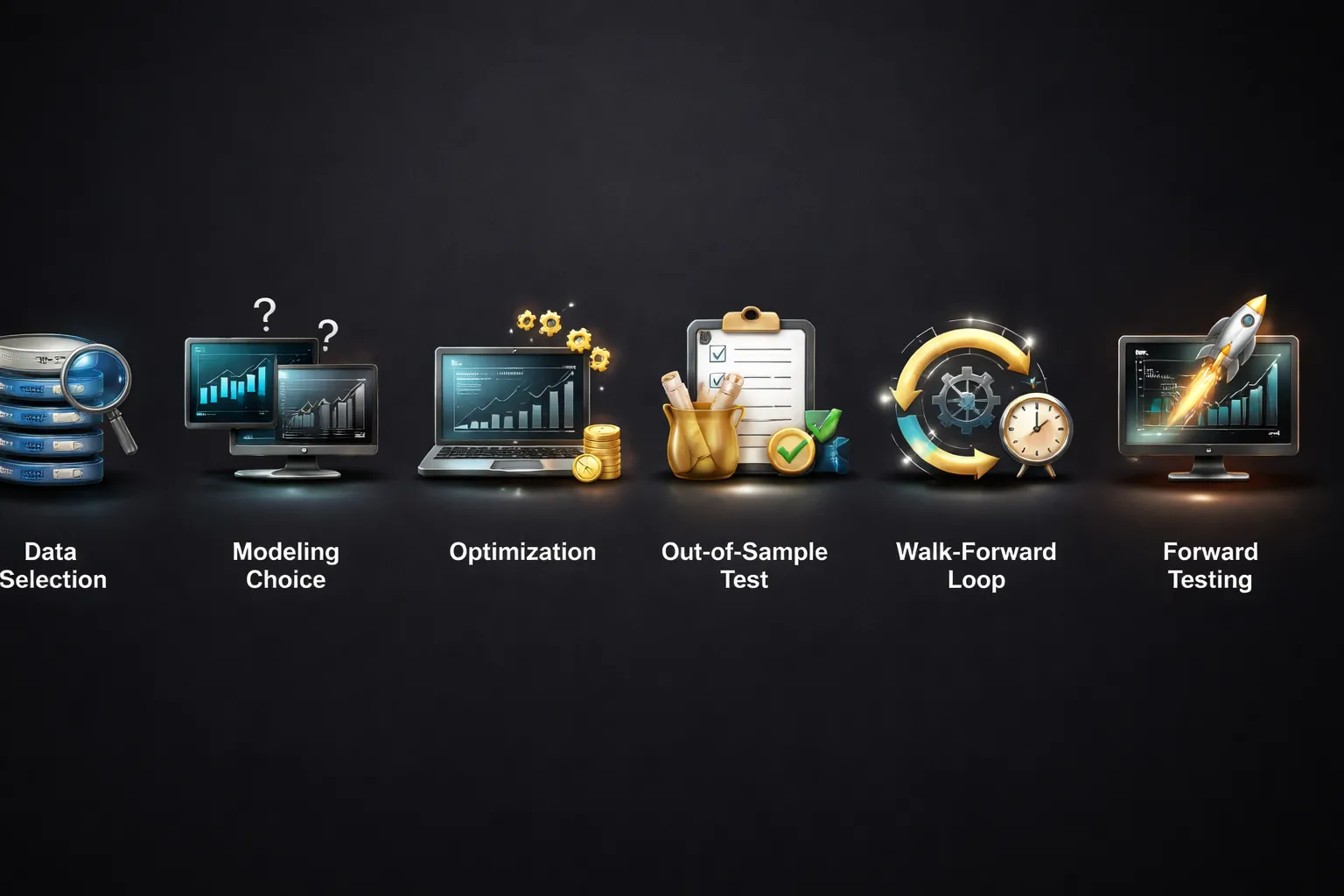
Testing Models and Accuracy
Your results depend on the model. If your tester uses bars, it guesses what happened inside the candle. If it uses ticks, it simulates every price change. That gap can flip a strategy from profitable to broken.
- Bar modeling (OHLC or 1-minute bars). Faster. Less accurate for scalping, grids, martingale, and tight stop systems. Entry and exit order matter can get misread.
- Tick modeling. Slower. Closer to live behavior. Required when your logic depends on spread changes, partial fills, stop hunting sensitivity, or intrabar triggers.
- Execution assumptions. Most testers still simplify fills. Limit orders fill too clean. Stops trigger too clean. You must add slippage and realistic spread behavior if your platform lets you.
Rule: if your strategy trades often, uses tight stops, or relies on exact entry price, you need tick-level testing and you need to stress it with slippage.
Parameter Optimization Without Curve Fitting
Optimization finds settings that fit your past data. It does not prove an edge. Your job is to stop it from lying to you.
- Reduce the search space. Use fewer parameters. Use ranges that make trading sense.
- Use coarse to fine. Start with broad steps, then narrow on the best zone. Avoid brute forcing thousands of combinations.
- Prefer stable plateaus. Pick settings that work across a range, not one sharp peak.
- Penalize fragility. Test small changes to spread, slippage, and session filters. If performance collapses, you overfit.
Keep a simple rule. One extra filter can turn a weak idea into a perfect backtest. It can also turn it into a future loser.
Walk-Forward Testing and Out-of-Sample Validation
Split your history. Build on one part. Validate on a different part. Then repeat the process in rolling windows.
- Step 1, define periods. In-sample for development. Out-of-sample for validation. Keep them contiguous and time-ordered.
- Step 2, optimize on in-sample. Pick a rule set and parameters. Do not look at out-of-sample while tuning.
- Step 3, run out-of-sample. Check if the edge survives with similar drawdown and trade frequency.
- Step 4, roll forward. Move the window and repeat. Track how often the strategy stays profitable.
- Step 5, forward test live. Run it on demo or tiny size with real spreads, swaps, and execution.
If your platform stack changes between MT4 and MT5, confirm your tester settings match the version you trade. Use this guide on MetaTrader 4 vs MetaTrader 5 before you compare results across MetaTrader builds.
Data Sourcing, Spreads, Commissions, and Swap
Backtests fail because inputs stay wrong. Fix the inputs first.
- Price data. Use high-quality tick data when possible. Match the symbol’s digits and session hours to your broker.
- Spread. Fixed spread tests flatter results. Use variable spread if available. If not, run multiple tests with wider spreads.
- Commission. Model it per lot, per side, and per account type. A low-profit system can die from commissions.
- Swap and financing. Include swaps. Many swing systems flip after costs. Respect triple-swap days.
- Slippage. Add it. Then double it. If your edge survives, you have something stronger.
- Trading hours and news gaps. If your strategy avoids certain sessions, hard-code those hours. Do not rely on local time.
When you compare cTrader and MetaTrader results, treat any mismatch in data feed, spread model, or commission assumptions as a failed comparison.
How to Read a Backtest Report Like a Pro
Stop staring at net profit. Focus on risk, consistency, and trade distribution.
| Metric | What it tells you | What to watch |
|---|---|---|
| Max drawdown | Worst peak-to-trough decline | Compare to expected account risk. Watch relative drawdown, not just money drawdown. |
| Profit factor | Gross profit divided by gross loss | Good looks good, but it can hide tail risk. Check drawdown and losing streaks too. |
| Expectancy per trade | Average profit after losses and costs | If expectancy is tiny, spread and slippage can erase it. |
| Win rate and payoff ratio | How often you win and how big wins are vs losses | High win rate with big occasional losses signals fragile risk control. |
| Sharpe or similar | Return vs volatility | Use it as a filter, not a verdict. Watch for smooth equity from curve fitting. |
| Trade count | Sample size | Low trade counts produce fake confidence. More trades and more market regimes matter. |
| Longest losing streak | Psychological and capital stress | Size your risk for the streak, not for the average month. |
| Equity curve shape | Consistency over time | Look for regime dependence. One strong year can carry the whole report. |
Final check. Pull random trades from the report and replay them against chart history. Confirm the entries, exits, and spreads match what your strategy claims to do.
Copy Trading, Social Trading, and Signal Ecosystems
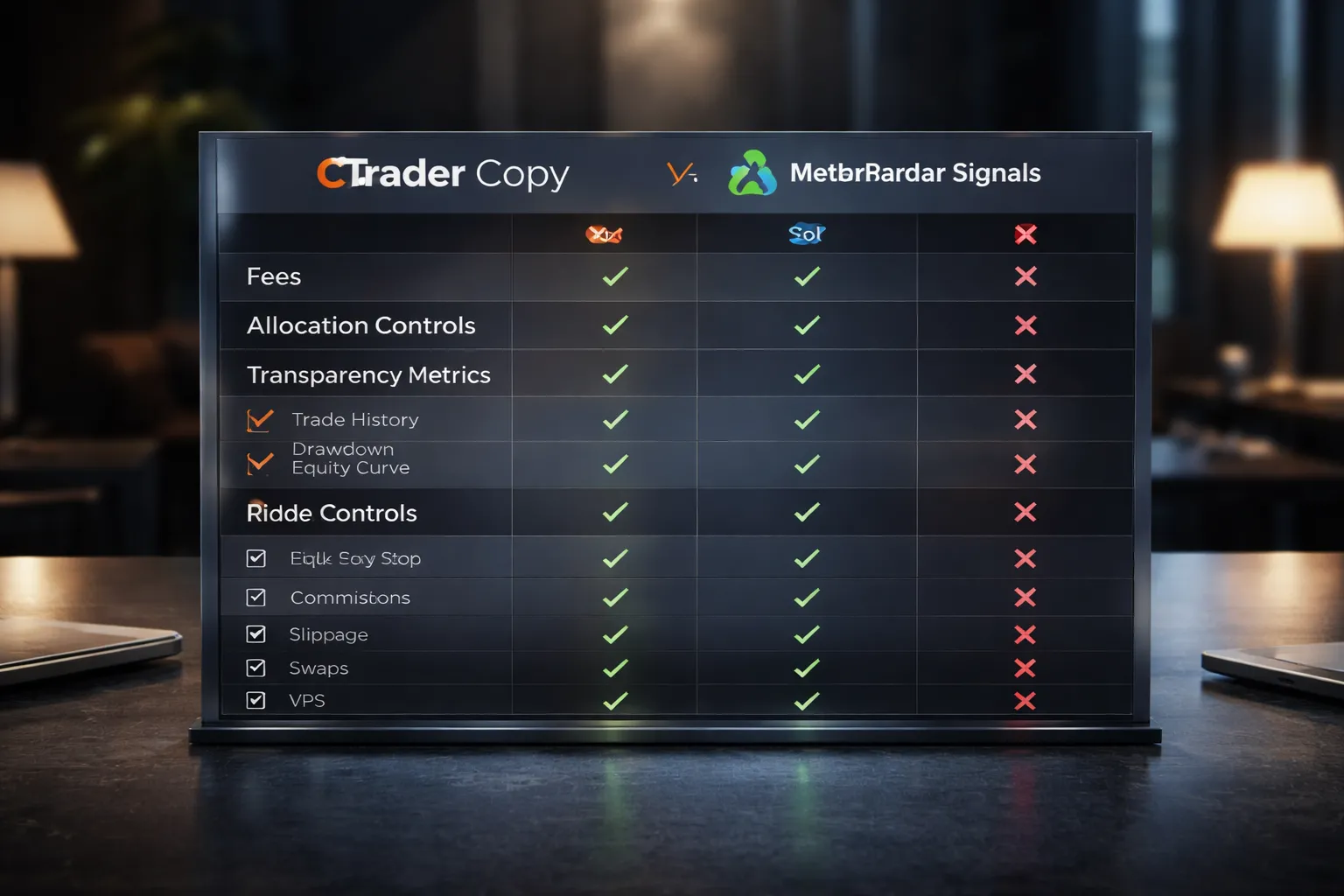
How cTrader Copy Works
cTrader Copy lets you follow a strategy provider and mirror trades in your account. You choose how much to allocate. The platform calculates your trade sizes based on that allocation.
- Fees: Providers can charge a performance fee, a management fee, or a volume fee. Your broker may also add its own trading costs.
- Allocation: You set a fixed amount for each strategy. You can run multiple strategies at once with separate allocations.
- Transparency: You can usually review equity curves, drawdowns, trade history, and fee terms before you subscribe. You still need to validate trade quality against spread and slippage.
MetaTrader Signals and Marketplace Dynamics
MetaTrader runs a large public marketplace for signals and tools. You subscribe inside the platform. Your terminal copies trades to your account.
- Signal supply: The marketplace has many providers. Quality varies. Marketing and short track records often dominate rankings.
- Broker dependency: Copy results depend on your broker’s execution, spreads, commissions, and symbol settings. The same signal can perform differently across brokers.
- Platform lock-in: Many signal sellers optimize for MetaTrader’s ecosystem, including EAs, indicators, and hosting. That convenience can hide weak risk control.
Due Diligence Checklist for Strategy Providers
- Track record length: Prefer long history across multiple market regimes, not a few strong months.
- Max drawdown: Check both balance and equity drawdown. Large equity dips signal grid, martingale, or averaging behavior.
- Risk per trade: Look for consistent position sizing. Watch for sudden lot jumps after losses.
- Trade distribution: Too many tiny wins with rare large losses often indicates hidden tail risk.
- Holding time: Very short holds increase spread and slippage impact. Very long holds can hide swap costs and margin stress.
- Instrument fit: Confirm the strategy trades symbols your broker offers with similar contract specs.
- Execution realism: Replay sample trades on historical charts and compare entry price, spread, and session liquidity.
Risk Settings You Should Use
Copy trading fails when you let one provider control your entire account. Put hard limits in place before you subscribe.
- Allocation limits: Cap each strategy to a set amount. Avoid allocating 100 percent to one provider.
- Equity stop: Set an account level equity stop if your broker or platform supports it. If not, use broker-side protections or scripts where available.
- Max drawdown control: Set a maximum loss threshold per strategy. Stop copying when equity hits that level. Do not “wait for recovery.”
- Leverage discipline: If a provider uses high leverage, reduce your allocation. Do not match aggressive risk with full capital.
- Correlation check: Two different providers can still load the same risk, like long USD or short JPY. Diversify by driver, not by name.
Costs Beyond Performance Fees
Your real cost is the full execution chain. Most subscribers underestimate it.
- Spreads and markups: Some brokers widen spreads on certain account types. That widens your gap versus the provider.
- Commissions: Round-turn commissions can erase edge on high frequency strategies.
- Slippage: Copy execution often lags the provider. Fast markets, news, and thin sessions amplify slippage.
- Swaps and financing: Overnight holding adds or subtracts carry. Strategies that “hold and hope” can bleed slowly.
- Platform and hosting: VPS costs matter if the signal requires low latency. MetaTrader users often add VPS to reduce missed fills.
If you want a broader platform feature breakdown, use this platform comparison to map copy features against charting, automation, and broker support.
Broker Availability, Account Types, and Real Trading Costs
Broker support decides the platform first
Your broker choice sets your platform. Not the other way around.
MetaTrader has wider broker coverage. You will find MT4 and MT5 at more forex and CFD brokers across more regions. cTrader support is strong but narrower. Many cTrader brokers target ECN style execution and active traders.
Regulation changes what you can trade and how much leverage you get. A broker can offer MetaTrader in one entity and block it in another. The same happens with cTrader. Always check the exact regulated entity you will open your account under, not just the brand name.
If you want a broader platform feature breakdown, use this platform comparison to map copy features against charting, automation, and broker support.
Account types and how you see real costs
Most brokers give you two pricing models, regardless of platform.
- Standard. Spread only. No separate commission line item in most cases.
- RAW, ECN, or Zero. Tighter spread plus a commission per lot, per side, or per round turn.
Your real cost per trade equals spread cost plus commission, then add slippage and any swap if you hold overnight.
How platforms display those costs can change what you notice.
- Spread. Both platforms show live bid and ask. Some brokers also publish typical spreads, but they can widen in news and low liquidity.
- Commission. Some setups show commission clearly in the trade or history line items. Others keep it less visible until you check the detailed statement.
- Swap, rollover. You need to find the swap rate per symbol and confirm the triple swap day. Brokers often apply triple swap on a weekday to account for weekend financing.
Commission structures and spread behavior
Commission pricing varies more than most traders expect. You must confirm the exact unit.
- Per side vs round turn. A broker can quote commission per side, meaning you pay it twice per trade. Another quotes round turn, meaning entry and exit combined.
- Per lot size. Commission usually scales by lot. Confirm the contract size for each symbol, especially metals and indices.
- Minimum commission. Some brokers enforce a minimum, which hits small position sizes.
Spreads behave differently by symbol and session. Major pairs often hold tighter spreads in liquid hours. Exotic pairs can blow out even in normal conditions. If you scalp or trade around news, record spread snapshots during your trading window. Do not rely on advertised minimums.
Swap and rollover visibility
Swap can turn a good entry into a bad hold. You need the numbers before you place a multi day trade.
- Check long swap and short swap for your symbol.
- Confirm the server time and the daily rollover cut off.
- Confirm the triple swap day.
- Check if the broker uses variable swap that can change day to day.
Do not assume swap is small. On some symbols it becomes the main cost.
Deposits, withdrawals, and base currency drag
Trading costs do not stop at spreads and commission. Funding can cut your net returns.
- Deposit fees. Cards and e wallets can add fees or bad FX conversion rates.
- Withdrawal fees. Some brokers charge per withdrawal or enforce minimum amounts.
- Base currency. If your account currency differs from your funding currency, you pay a conversion spread. If your account currency differs from your profit currency, you may pay again when you withdraw.
- Inactivity and admin fees. These hit small accounts and long breaks.
If you trade in USD instruments but earn and bank in EUR or GBP, model the currency conversions. Small monthly conversion costs can outweigh a small spread advantage.
Questions to ask a broker before you choose cTrader or MetaTrader
- Which regulated entity will hold my account, and which platforms does that entity allow?
- Do you offer both platforms on the same account type, or do platforms map to different pricing?
- What are the typical spreads by session for the symbols I trade, not the minimum spreads?
- Is commission quoted per side or round turn, and what is the amount per lot?
- Do you charge a minimum commission per trade?
- Where can I see commission and swap in the platform and in the statement?
- What is the rollover time, server time zone, and triple swap day?
- Are swap rates fixed or variable, and where do you publish updates?
- Do you support hedging, scalping, and EAs, and do you have any execution rules around them?
- What are deposit and withdrawal fees, processing times, and any third party charges?
- What account base currencies do you offer, and what FX conversion rate do you apply?
- Do you offer a VPS, what is the cost, and can I host it near your trading servers?
Platform Security, Reliability, and Compliance Considerations
Login, encryption, and account protection basics
cTrader and MetaTrader encrypt the connection between your device and the broker server. That protects your login and trade data in transit. It does not protect you from a compromised device or stolen credentials.
- Use strong passwords. Use a unique password for your broker area, email, and the platform login. Do not reuse.
- Turn on 2FA where it exists. Most brokers apply 2FA on the client portal, funding, and withdrawals. Platform-level 2FA varies by broker and setup.
- Lock down your email. Your email controls password resets. Use 2FA, security keys if possible, and recovery codes.
- Control API and copy access. If you connect copy trading, trade mirroring, or API keys, limit permissions and revoke access you do not need.
- Harden your device. Keep OS updates on, use anti malware, and avoid installing cracked indicators, plugins, or terminals.
Your main security risk usually sits outside the platform. It sits in your broker portal access, your email, and what you install.
Server stability, downtime risk, and how to reduce single points of failure
Execution quality depends more on your broker stack than on cTrader or MetaTrader. The same platform can feel stable at one broker and unreliable at another.
- Measure uptime in practice. Track disconnections, requotes, trade context errors, and order delays during news and rollover.
- Check server location and latency. Lower ping helps, but stable routing matters more than peak speed.
- Use a VPS near the trading server. You cut local internet risk and keep algos running. Ask your broker where their platform servers sit before you pick a VPS region.
- Reduce single points of failure. Keep a second internet option, a mobile hotspot, and the mobile app logged in. Save emergency close instructions and support contacts.
- Plan for maintenance windows. Brokers reboot servers. You need to know the schedule and how open orders behave during restarts.
Regulation, negative balance protection, and client fund segregation
Platforms do not regulate your broker. Your broker choice decides most of your safety outcomes.
- Regulation. Verify the broker license number on the regulator site. Do not trust a logo in the footer.
- Client money segregation. Ask where client funds sit, which bank holds them, and whether the broker mixes operational cash with client cash.
- Negative balance protection. Some jurisdictions require it for retail clients, others do not. Confirm your account type and entity, since protections can change across entities.
- Compensation schemes and complaint paths. Know what applies to your entity, and the exact process if you dispute fills or withdrawals.
If you trade high leverage, negative balance protection and margin closeout rules matter as much as spreads.
Auditability of trades and reporting for taxes and journaling
You need clean, exportable records. You also need your broker statements to match your platform history.
- Export formats. Confirm you can export trades to CSV or HTML. Test it before you scale up.
- Time zone and symbol mapping. Platform timestamps can differ from your local time. Symbols can differ across brokers. Normalize both in your journal.
- Execution detail. Save fill price, spread, commissions, swaps, and partial fills. You need this to reconcile slippage and costs.
- Statement source of truth. Use the broker back office statement for tax reporting, then reconcile the platform log for execution disputes.
- Keep logs. Keep daily backups of statements, trade history, and platform logs during active periods.
If you want a platform walk through that also covers where to find logs and reports, use this MetaTrader vs cTrader comparison guide as a reference point.
How to spot common platform-related scams
Most platform scams target your access or your deposits. They use fake tools and fake performance claims.
- Fake platform downloads. Only download from the broker client portal you verified, or the official vendor site. Avoid ads and “mirror” links.
- Rogue plugins and cracked indicators. If it needs you to disable antivirus or run an installer from a zip file, treat it as hostile.
- Malicious EAs and scripts. Read what it can do. Watch for hidden trade copying, stealth lot scaling, and unauthorized symbol trading. Test on a demo, then a small live account.
- Signal fraud. Demand verified track records, full trade history, and broker statements. Avoid accounts that show only balance curves or edited screenshots.
- Account manager pressure. Walk away if someone pushes remote access software, asks for your password, or demands you install a “risk tool”.
- Withdrawal interference. Any bonus or managed account offer that blocks withdrawals with vague terms is a red flag.
Keep control of three things, your login, your device, and your withdrawal path.
Hosting, Latency, and Performance for Active Traders
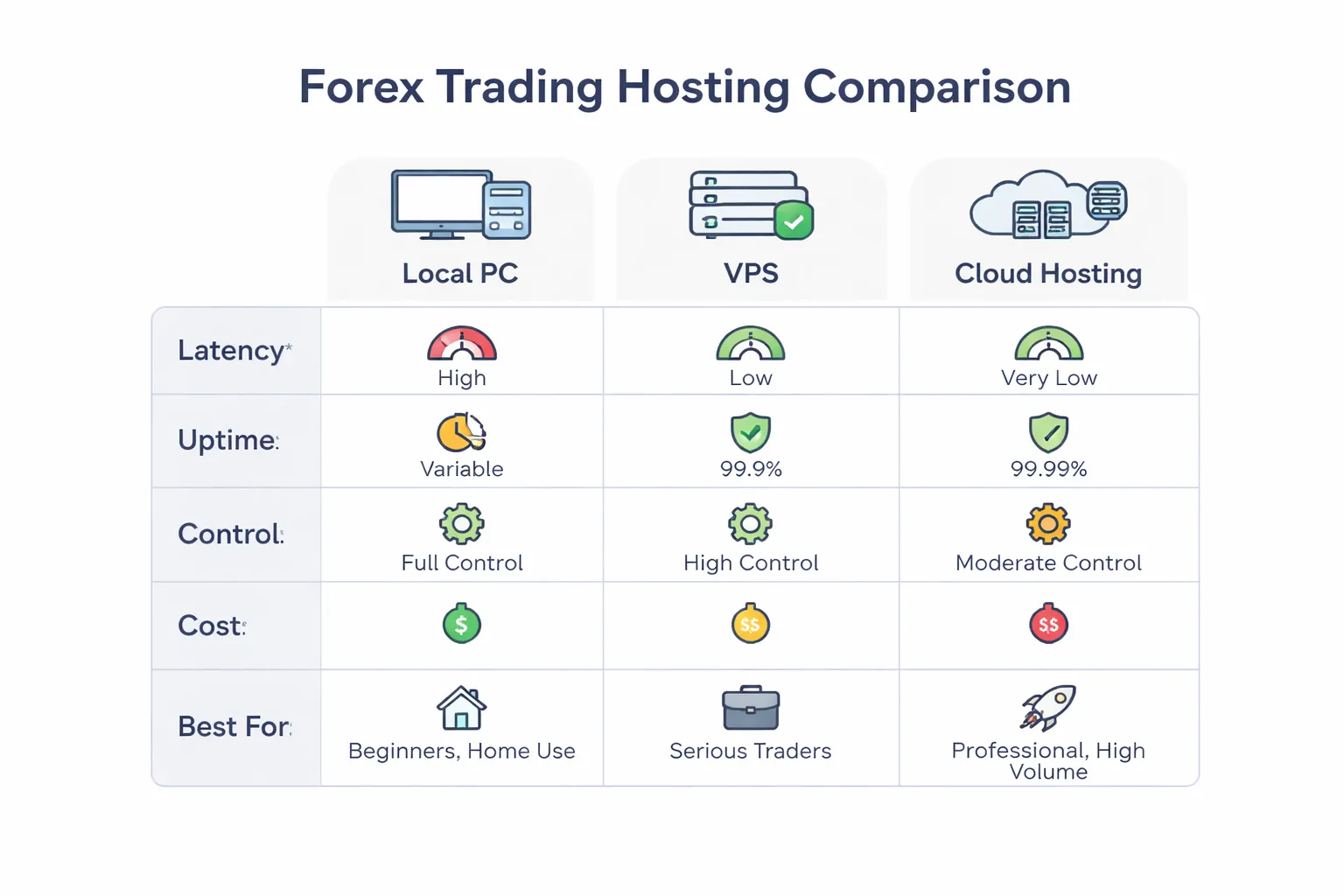
When You Need VPS vs Cloud Hosting
You need hosted execution when your strategy depends on speed, uptime, or 24, 5 automation. A home PC and Wi-Fi break that fast.
- Use a VPS when you run EAs or bots, need low latency to one broker server, and want a fixed Windows setup. You control the OS, updates, and platform files.
- Use cloud hosting when you need easy scaling, snapshots, and quick rebuilds. You trade some control for convenience.
- Use your local machine when you trade manually, swing trade, and do not need constant connectivity.
For MetaTrader, VPS is the common path for 24, 5 EAs. For cTrader, the same applies if you run cBots on a desktop install. Some brokers also offer integrated hosting options. Treat those as convenience, not a guarantee of best routing.
Latency-Sensitive Strategies and Practical Optimization
Latency matters most when your edge depends on a few milliseconds or on tight execution at specific prices.
- Most sensitive, scalping on fast markets, news trading, arbitrage style logic, high frequency tick logic, tight stop entries, partial fills management.
- Less sensitive, position trading, higher timeframes, wide stops, limit orders placed far from price.
Do the basics before you pay for more hardware.
- Host near your broker server location. Pick the same city or the closest region your broker lists.
- Use wired Ethernet on your side when you trade manually. Avoid Wi-Fi.
- Reduce platform load. Limit charts, indicators, and custom panels on the trading instance.
- Separate analysis from execution. Run heavy charting on one machine, run your execution terminal on another.
- Test on a demo server that matches the live server region. Demo latency often differs from live.
Track results with numbers. Measure average ping to the broker, average order execution time, and slippage distribution. If you do not log it, you will guess.
Resource Usage on Windows, macOS, and Lightweight Setups
MetaTrader runs natively on Windows. On macOS, many traders use a compatibility layer or a virtual machine. That adds overhead and can increase crash risk during updates.
cTrader mainly targets Windows for desktop. If you trade on macOS, plan for a hosted Windows environment for stable automation and consistent behavior.
- Lightweight setup for execution, one trading terminal, one or two charts, minimal indicators, alerts off unless you need them.
- Keep your VPS clean, no extra apps, no browser tabs, no sync tools, no auto updaters you do not control.
- Control updates, schedule OS updates outside market hours, disable forced restarts, test platform updates before you push them to your live instance.
RAM and CPU needs depend on what you run. Multiple charts, multiple symbols, and tick level logic push usage up fast. Plan capacity for worst case volatility, not calm sessions.
Running Multiple Instances and Managing Profiles Safely
Multiple strategies often need multiple terminal instances. You reduce cross strategy interference and simplify troubleshooting.
- Use one instance per broker or per strategy cluster.
- Keep separate data folders and separate log folders per instance.
- Name profiles clearly. Include broker, account type, and strategy ID.
- Lock down permissions. Do not store passwords in plain text notes. Use your broker portal security features.
- Back up templates, profiles, and bot settings after every meaningful change.
For MetaTrader, isolate EAs by chart and symbol. Avoid running many EAs on one chart. For cTrader, isolate cBots by instance or by clear configuration. You want clean boundaries so one failure does not cascade.
Monitoring: Logs, Error Handling, and Uptime Alerts
Active trading needs monitoring. You cannot manage what you do not see.
- Platform logs, review trade logs daily, filter for disconnects, rejected orders, trade context errors, and repeated retries.
- Bot logs, log every decision point that triggers an order. Log symbol, spread, slippage, and execution result.
- Connection checks, track timeouts and reconnect counts. A stable strategy can still fail on a bad link.
- Uptime alerts, set alerts for VPS reboot, terminal crash, and internet loss. Use email or push notifications, not only on-screen alerts.
- Fail-safe rules, define what your system does on disconnect, high spread, high slippage, or partial fills. Code it. Do not rely on memory.
If you also use external charting for analysis, keep alerts there too. See TradingView for Forex charts and alerts for a clean alert workflow that does not overload your execution terminal.
Pros and Cons: cTrader vs MetaTrader for Forex
cTrader advantages in a real-world trading workflow
- Cleaner execution workflow. You get solid order entry, quick modifications, and clear position management. This matters when you manage risk fast.
- Level II pricing and depth of market. If your broker provides it, you can see liquidity and size, which helps for scalping and large tickets.
- Strong charting out of the box. You spend less time adding plugins to reach a usable charting baseline.
- Better separation of trading and automation. cTrader Automate (cAlgo) keeps algo work distinct from manual execution, which reduces accidental changes.
- C# for automation. If you code, you can use a mainstream language and tooling, which can speed up development and testing.
cTrader limitations to be aware of before committing
- Smaller ecosystem. You will find fewer third-party indicators, bots, and paid tools than MetaTrader.
- Broker availability varies. Many brokers still prioritize MetaTrader, so your cTrader choices can narrow fast when you filter for regulation, spreads, and execution.
- Portability can be harder. Moving a setup between brokers can mean different symbol naming, contract specs, and liquidity features.
- Automation depends on broker setup. Backtest quality, tick history, and execution modeling depend on what your broker provides, not just the platform.
MetaTrader advantages for most retail forex traders
- Largest broker and tool support. You can switch brokers without changing your platform habits. You also get a huge library of indicators and EAs.
- Fast setup for common workflows. Most guides, templates, VPS providers, and trade copiers assume MetaTrader first.
- Mature algo trading stack. Strategy tester, optimization, and EA deployment work for many retail systems, especially on MT5.
- Low friction for signals and copy trading. Many brokers and communities build directly around MetaTrader accounts.
MetaTrader limitations (MT4 vs MT5 fragmentation and broker-dependent constraints)
- MT4 vs MT5 split. Indicators and EAs do not transfer cleanly. Some brokers offer only one, which can lock you into a toolset. If you need help choosing, see the MT4 vs MT5 guide.
- Execution quality is broker-controlled. Slippage rules, requotes, minimum stop distance, and order types depend on the broker’s bridge and settings.
- Data quality varies. Backtests can mislead you if your tick data, spread model, or commission model does not match live conditions.
- UI and charting often need add-ons. Many traders end up stacking custom indicators, scripts, and panels, which increases complexity and failure points.
Which weaknesses matter most depending on your strategy
- Scalping and short holding times. You care about order handling, depth of market, and clear fills. cTrader often feels tighter here, but only if your broker’s feed and execution support it.
- EA-heavy automation. You care about marketplace size, developer availability, and easy hosting. MetaTrader wins on ecosystem. MT5 usually wins on tester capability, but your broker still controls contract specs and execution.
- Discretionary swing trading. You care about stable charts, alerts, and simple risk controls. Either works. Choose based on broker quality, mobile usability, and how much you want to customize.
- Multi-broker flexibility. You care about portability. MetaTrader usually gives you more broker options, but you must manage MT4 vs MT5 compatibility.
- Operational risk. You care about platform stability, VPS behavior, and fail-safes on disconnect. Test your full workflow, alerts, and order rules under bad connectivity before you fund size.
How to Choose the Better Platform for Your Needs (Decision Framework)
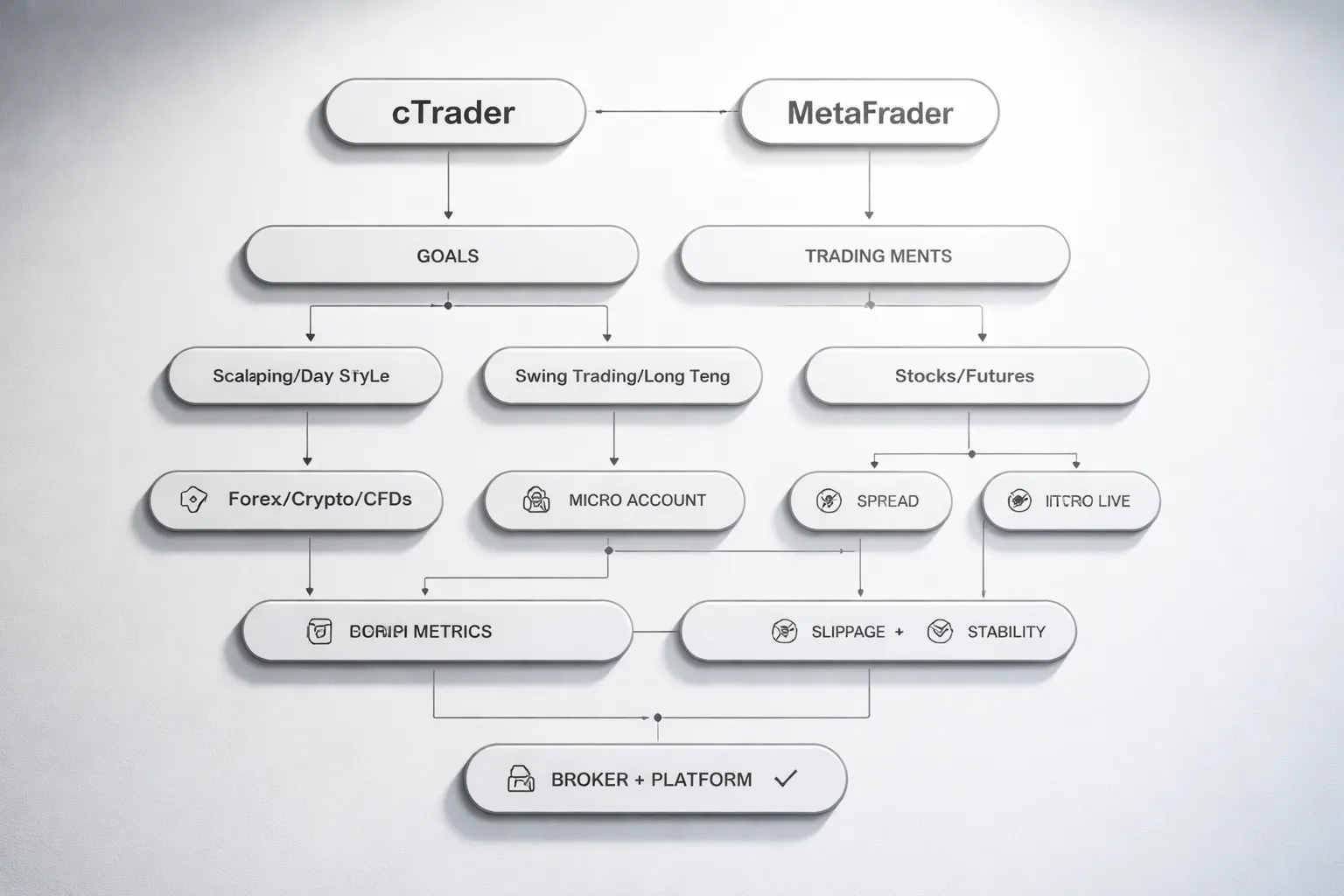
Step-by-step self-assessment
- Define your goal. Manual trading, automation, or copying. Pick one primary goal, one secondary goal.
- Define your cadence. Scalping needs fast execution and tight workflow. Swing trading needs clean chart work and stable alerts. News trading needs strict order controls and quick cancel and replace.
- List your instruments. FX only, or FX plus indices, metals, crypto, CFDs. Check what your broker actually offers on each platform.
- Map your workflow. Where you chart, where you enter, where you manage risk, where you journal. Friction costs money.
- Decide your portability level. If you change brokers often, MetaTrader tends to give you more options. You then manage MT4 vs MT5 support across brokers. Use this guide if you need to choose between versions: MT4 vs MT5.
- Set your risk controls. Decide hard limits before you pick tools. Max daily loss, max open risk, max positions, allowed slippage, allowed latency.
Feature checklist by strategy
| Strategy | You need | cTrader tends to fit when | MetaTrader tends to fit when |
|---|---|---|---|
| Scalping | Low-latency execution, one-click trading, hotkeys, depth of market, fast position management | You use DOM often. You want clear order tickets and fast manual control. | You rely on broker choice and VPS setups. You use EAs built for MT4 or MT5. |
| Swing trading | Clean charts, multi-timeframe layouts, alerts, stable mobile monitoring | You want modern chart UX and quick layout handling across devices. | You want broad indicator and template availability across brokers. |
| News trading | Pending order control, fast modify and cancel, strict risk rules, connection stability | You keep it manual and you want quick order ladder control. | You use specialized EAs or scripts for brackets and rapid order management. |
| Algo trading | Backtesting, parameter sweeps, robust execution logic, logs, VPS reliability | You code in C# and you want a modern dev stack. | You need the largest EA ecosystem, more brokers, more off-the-shelf code. |
| Copy trading | Transparent stats, risk scaling, easy allocation, provider filtering | You want copying integrated into the platform workflow. | You use broker or third-party copy solutions built around MT. |
Testing plan: demo, then live micro, then KPI tracking
- Phase 1, demo (2 to 5 trading days). Validate workflow speed. Build your default layouts. Set alerts. Place, modify, and cancel market and pending orders. Test partial closes, trailing stops, and break-even rules.
- Stress test (same week). Simulate bad connectivity. Switch networks. Close the app mid-trade. Reopen and verify positions, stops, and limits. Confirm how alerts behave.
- Phase 2, live micro account (20 to 50 trades). You need real fills and real spreads. Keep size small. Track slippage and execution consistency.
| KPI | How to measure | Decision rule |
|---|---|---|
| Median spread at your trading hours | Log spreads at entry time for each trade | Pick the setup with lower typical cost, not the best-case screenshot |
| Slippage on market orders | Entry price vs requested price, in pips | Reject the setup if slippage clusters during your active window |
| Order handling time | Time from click to confirmation, repeated samples | Reject the setup if you miss fills due to platform friction |
| Platform stability | Disconnects, freezes, failed order sends, log errors | Reject the setup if issues recur under normal conditions |
| Alert reliability | Planned alert count vs received alerts | Reject the setup if alerts fail during mobile use |
| Rule compliance | Percent of trades that follow your plan | Pick the setup that reduces mistakes |
Migration tips: templates, indicators, bots, and settings
- Start by migrating your rules, not your tools. Write your entry, exit, and risk rules in plain steps. Then rebuild the minimum tooling needed to execute them.
- Expect rewrites for automation. cTrader automation uses C#. MetaTrader uses MQL. You usually cannot port bots by copying files. Budget time to rewrite, then re-test.
- Standardize indicators. Use common indicators where possible. Custom indicators often differ in calculation details across platforms. Verify signals bar-by-bar on the same data window.
- Recreate chart templates from scratch. Map timeframes, colors, sessions, and object settings. Screenshots help you replicate layouts fast.
- Rebuild alerts and notifications. Recreate them manually and test on desktop and mobile. Confirm push notifications work before you trade size.
- Re-validate execution logic. If your strategy depends on specific order types, fill rules, or partial close behavior, test those actions again. Do not assume parity.
- Keep a rollback path. Run your old setup in parallel for a week. Compare fills, costs, and errors before you fully switch.
Recommended combinations: broker plus platform fit criteria
- If you scalped or traded news. Choose the broker and platform combo that shows the lowest effective cost in your KPI log. Effective cost equals spread plus commissions plus typical slippage. Prioritize execution and stability over extra features.
- If you run algos. Choose the combo with clean backtest workflow, stable VPS behavior, and predictable logs. Then choose the platform that matches your codebase. C# points you to cTrader. Existing MQL code points you to MetaTrader.
- If you switch brokers often. Choose MetaTrader when you need the broadest broker coverage. Then choose MT4 or MT5 based on what your target brokers support and what your tools require.
- If you trade mostly on mobile. Choose the combo with the best alert reliability, fastest order edits, and lowest error rate on your device. Track this in the stress test, not in a store rating.
- If you copy trade. Choose the combo that shows clear provider stats, stable allocation controls, and easy risk scaling. Avoid setups that hide drawdowns or change history presentation.
- Non-negotiables to require from any broker. Published commissions, clear swap rates, stable server uptime, realistic margin rules, and responsive support. If the broker fails here, the platform choice will not save you.
FAQ
Is cTrader better than MetaTrader for beginners?
cTrader feels cleaner and faster to learn, especially for order entry and chart control. MetaTrader has more tutorials and more community tools. Pick the platform your broker supports with the lowest real trading costs, tight execution, and stable servers.
Which platform is better for algorithmic trading?
MetaTrader leads on ecosystem size. You get more ready-made EAs, indicators, and code examples. cTrader uses C# through cTrader Automate, which many developers prefer. Judge both on backtest quality, VPS stability, and how the broker handles slippage.
Can you run the same bot on both platforms?
No. MetaTrader uses MQL4 or MQL5. cTrader uses C#. You must rewrite the strategy or pay for a port. Treat it like changing engines, not changing skins.
What is better for scalping and fast execution?
The broker matters more than the platform. You need low latency, stable fills, and honest reporting on slippage. cTrader often shows depth of market tools more clearly. MetaTrader can still scalp well with the right broker and server.
Which has better charting and order tools?
cTrader gives strong native charting and smooth order management out of the box. MetaTrader charts work well, but many traders add custom indicators and scripts. If you want fewer add-ons, cTrader usually wins.
Which is better on mobile?
MetaTrader mobile wins on availability across brokers and account types. cTrader mobile feels cleaner for order flow on supported brokers. Your real limit is broker integration, symbol list, and how fast the app stays in sync with the server.
Do cTrader and MetaTrader support copy trading?
Yes, but features differ by broker. cTrader copy tools usually sit inside the platform. MetaTrader often relies on broker plugins or third-party services. Require audited performance stats, clear fees, and strict risk controls before you allocate funds.
MT4 vs MT5, which should you choose if you go with MetaTrader?
MT5 adds more order types, faster backtesting, and better multi-asset support. MT4 stays popular for legacy EAs and simple setups. Use this guide on MetaTrader 4 vs MetaTrader 5 to match your needs.
What should you check before choosing a broker for either platform?
- Published commissions and spreads, per account type.
- Swap rates you can verify, per symbol.
- Execution policy, slippage reporting, and order rejections.
- Server uptime and platform stability at peak hours.
- Margin rules, stop-out levels, and negative balance policy.
- Fast support that can answer trade log questions.
Conclusion
cTrader and MetaTrader can both execute fast, manage risk, and run automation. The difference comes down to workflow and broker quality.
Pick cTrader if you want a cleaner interface, strong built-in charting, and Level II depth of market. Pick MetaTrader if you want the widest broker selection, the largest EA and indicator market, and more third-party tooling.
Your edge comes from what you can measure. Do a short live test on each platform with the same broker conditions. Track real spreads, commissions, and slippage during your normal trading hours. Check swap charges on the symbols you trade. Review the trade log after volatile events. Keep the platform that gives you lower total cost, fewer execution issues, and clearer records.
- Day trading and scalping: prioritize execution stats and slippage reporting.
- Swing trading: prioritize swaps, margin rules, and order handling.
- Algo trading: prioritize stability, VPS support, and backtest realism.
- Mobile-first: prioritize chart usability, order entry speed, and alerts.
If you choose MetaTrader, follow a MT5 beginner walkthrough and set up templates, risk presets, and a clean watchlist on day one. That saves time and reduces errors.
-
-
- Is cTrader better than MetaTrader for beginners?
- Which platform is better for algorithmic trading?
- Can you run the same bot on both platforms?
- What is better for scalping and fast execution?
- Which has better charting and order tools?
- Which is better on mobile?
- Do cTrader and MetaTrader support copy trading?
- MT4 vs MT5, which should you choose if you go with MetaTrader?
- What should you check before choosing a broker for either platform?
-
-
-
- Is cTrader better than MetaTrader for beginners?
- Which platform is better for algorithmic trading?
- Can you run the same bot on both platforms?
- What is better for scalping and fast execution?
- Which has better charting and order tools?
- Which is better on mobile?
- Do cTrader and MetaTrader support copy trading?
- MT4 vs MT5, which should you choose if you go with MetaTrader?
- What should you check before choosing a broker for either platform?
-
-
Forex Lot Size Calculator: How to Use It to Size Trades Correctly
2 weeks ago -
How to Calculate Position Size in Forex (Position Sizing Formula + Examples)
2 weeks ago -
Forex Leverage Explained: How It Works, Pros, Cons & Examples
2 weeks ago -
Margin vs Leverage in Forex: What’s the Difference?
2 weeks ago -
What Is Forex Trading? A Beginner’s Guide to How It Works
3 weeks ago
-
Forex Leverage Explained: How It Works, Pros, Cons & Examples
2 weeks ago -
Is Forex Trading Legal in the United States? Rules, Regulators & What to Know
3 weeks ago -
Spread vs Commission: Which Forex Account Type Is Cheaper?
3 weeks ago -
What Are Pips in Forex? Definition, Examples & Why They Matter
3 weeks ago -
What Is a Lot Size in Forex? Lot Types + Quick Examples
3 weeks ago