Forex Order Types Explained: Market vs Limit vs Stop Orders

Your order type decides how you enter and exit a forex trade. It also decides how much price control you have, and how much slippage you accept. Get it wrong and you pay more in spread, miss fills, or enter at a worse price during fast moves.
This guide breaks down the three core forex order types, market, limit, and stop. You will learn what each order does, when to use it, and the main risk to watch. You will also learn how gaps and volatile news can change your fill, and how to place orders that match your plan.
If you trade short-term, pair this with our scalping forex strategy for beginners for entry rules and risk control.
Key Takeaways
Key Takeaways
- In het kort: Market orders prioritize speed, limit orders prioritize price, stop orders trigger after price reaches a level.
- You use a market order when you need an immediate fill, you accept slippage.
- You use a limit order when you want a specific price or better, you accept the risk of no fill.
- You use a stop order to enter on momentum or to exit with a stop loss, you accept gap risk and worse fills in fast markets.
- News and low liquidity increase spread and slippage, your market and stop fills can land far from the level you see.
- Set order type based on your plan, not your mood. Define entry, stop, and target before you place anything.
- Know your exit tools. Use stops for risk control, use limits for targets. Review stop loss vs take profit for clean rules and examples.
Forex order basics: pricing, execution, and why order types matter
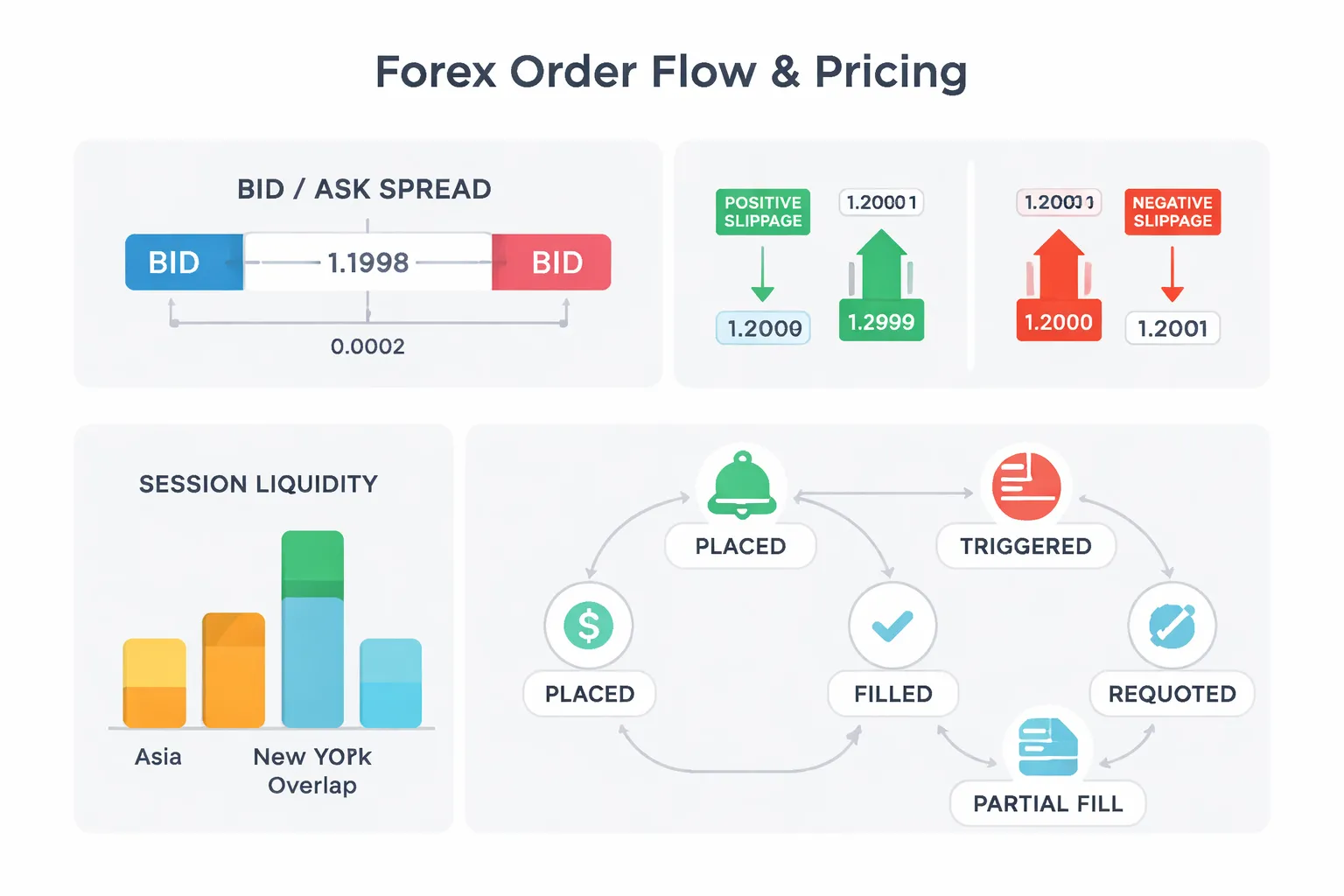
Pricing 101: bid, ask, and spread
Forex quotes have two prices. The bid is where you sell. The ask is where you buy. The spread is the difference.
Spread is a real cost. You start every trade behind by the spread.
- If you buy: you enter at the ask, you exit at the bid.
- If you sell: you enter at the bid, you exit at the ask.
- Wider spread: larger hurdle to break even, bigger stop distance needed to avoid noise.
Spread expands in low liquidity and around news. Your stop and market orders feel that first.
Slippage: positive vs negative fills
Slippage is the gap between your requested price and your fill price. It happens when price moves before your order hits the market, or when there is not enough liquidity at your level.
- Negative slippage: you buy higher than planned, or sell lower than planned.
- Positive slippage: you buy lower than planned, or sell higher than planned.
Market orders can slip because they take the best available price. Stop orders can slip because they activate into a market order when price touches the stop level. In fast moves, your fill can land several pips away.
Liquidity, volatility, and session timing
Liquidity decides how easily you get filled near your price. Volatility decides how fast price runs away from it. Both change by session.
- Asian session: often thinner liquidity in many majors, spreads can widen.
- London session: higher liquidity, tighter spreads, more follow-through.
- London and New York overlap: peak volume for many pairs, fastest execution, but sharp spikes around data and opens.
Plan order type around conditions. Use limits when you need price control. Expect more slippage with market and stop orders during news, rollovers, and thin hours.
Market execution vs instant execution
Execution rules depend on your broker and account type.
- Market execution: you send an order, you get filled at the best available price. Slippage can be positive or negative. Requotes do not apply.
- Instant execution: you request a specific price. If price changes, the broker can reject the request and send a new price. That is a requote. You then accept or cancel.
Market execution fits speed. Instant execution fits strict price control, but you can miss the trade when price moves.
Order lifecycle: placed, triggered, filled
Know what happens after you click.
- Placed: your pending order sits at the broker until price reaches the level, or until expiry or cancellation.
- Triggered: a stop or stop loss activates when price trades at the trigger level. A limit becomes eligible when price reaches your limit level.
- Filled: the broker matches your order with available liquidity. Fill price can differ from your level.
- Partially filled: part of your size fills, the rest waits or fills at worse levels, more common in thin markets and large sizes.
- Requoted: instant execution can reject your requested price and offer a new one.
Use stops for risk control. Use limits for targets. If you need clean rules for placement, see how to place a stop loss.
Market orders in forex (fast execution, variable price)
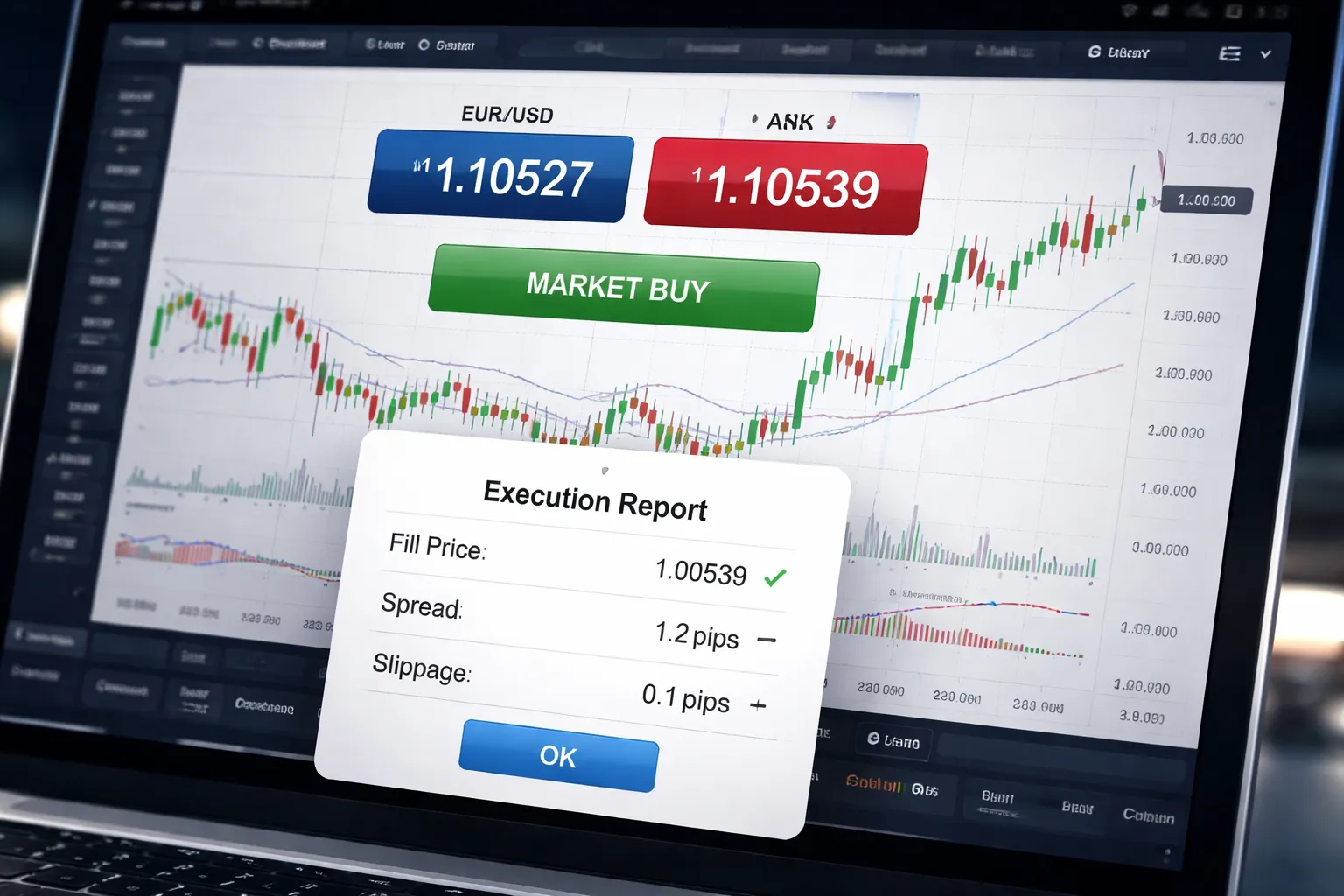
What a market order does in a decentralized FX market
A market order tells your broker to fill now at the best available price.
Forex has no single exchange. Price comes from your broker’s liquidity providers. Your order matches against the current bid and ask, plus available depth at each level.
You control speed. You do not control the exact fill price.
Best-use scenarios
- Urgent exits. When you need out due to risk, margin, or a broken setup.
- High-liquidity pairs. EUR/USD, USD/JPY, GBP/USD, and other majors during London and New York hours.
- Fast strategies. Scalping and short-term trading where delay matters more than a few tenths of a pip. See scalping forex strategy for execution-focused rules.
Main risks: slippage, widening spreads, and news spikes
- Slippage. You click buy or sell, price moves before fill. Positive slippage can happen, but you must plan for negative slippage.
- Widening spreads. Your entry or exit can cost more when spreads expand, common around rollovers, low-liquidity sessions, and volatility bursts.
- News spikes. Liquidity can vanish for seconds. Market orders can fill several pips away, or in multiple pieces, especially on larger size.
Practical example: buying EUR/USD at market and calculating effective entry
Assume EUR/USD quotes 1.10000 bid and 1.10002 ask. You send a market buy for 100,000 EUR.
- If you fill at 1.10002, your spread cost is 0.2 pips.
- If price jumps and you fill at 1.10005, your slippage is 0.3 pips.
- Your effective entry is 1.10005. Your total entry cost versus mid price 1.10001 equals 0.4 pips.
| Item | Value |
|---|---|
| Bid, Ask | 1.10000, 1.10002 |
| Mid price | 1.10001 |
| Fill price | 1.10005 |
| Total cost vs mid | 0.4 pips |
For a 100,000 unit EUR/USD position, 1 pip is about $10. A 0.4 pip entry cost is about $4, plus any commission your broker charges.
How to reduce surprises
- Avoid illiquid times. Be cautious near daily rollover, late Friday, and thin holiday sessions.
- Trade smaller size. Smaller orders hit top-of-book liquidity more often and reduce partial fills and worse average prices.
- Check current spread and quotes. If the spread looks wide for that pair, wait or switch to a more liquid pair.
- Use depth tools if available. Level II, order book views, or liquidity meters can warn you when the top levels look thin.
- Respect the calendar. Before high-impact releases, assume spreads and slippage can jump even on majors.
Limit orders in forex (price control, uncertain fill)
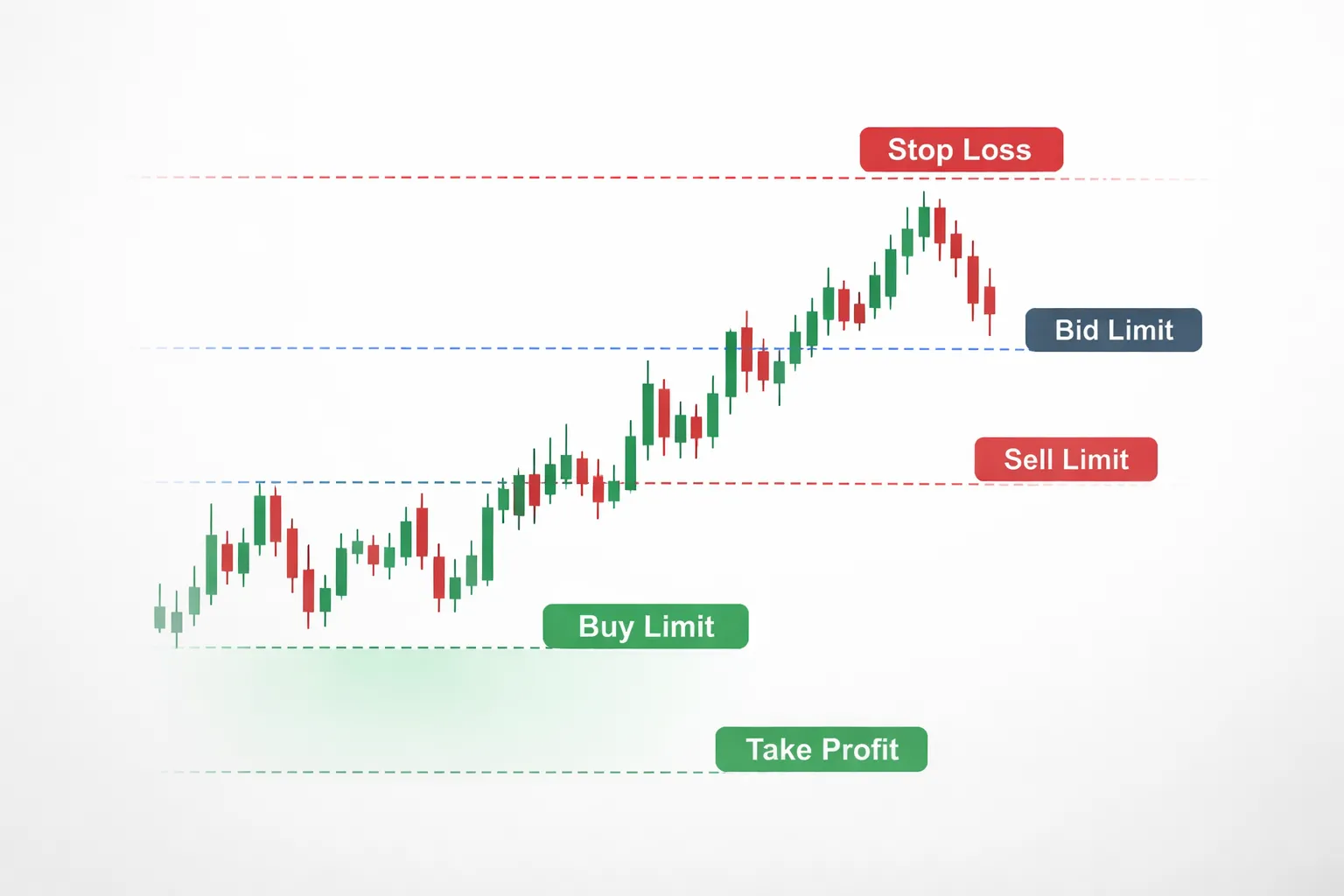
Limit orders in forex, price control with uncertain fill
A limit order tells your broker the worst price you will accept. You control entry price. You do not control whether you get filled.
In forex, your fill depends on available liquidity at your limit price. If price touches your level but liquidity is thin, you can get a partial fill or no fill. Some brokers show this as a pending order that never triggers, even if your chart prints the level.
Buy limit vs sell limit
- Buy limit, you place it below the current ask. You want to buy only if price drops to your level or better.
- Sell limit, you place it above the current bid. You want to sell only if price rises to your level or better.
Your platform will usually let you set the limit price, position size, time-in-force, and attached stop loss and take profit.
Common strategies, pullbacks and mean reversion
- Pullback entry in a trend. You wait for a retracement into a prior support or resistance area, then place a limit order at the level you want.
- Mean reversion. You fade an extended move and place a limit order near an extreme level, often around a prior range edge or a volatility band. Pair this with tight risk rules and a clear invalidation point.
If you rely on structure levels, learn to map them cleanly with trend lines and channels.
Pros and cons, better pricing vs missed trades
- Pro, you cap your entry price. You avoid paying through a spike.
- Pro, you can define risk before you enter, since the entry price stays fixed.
- Con, you can miss trades. Price can turn one pip before your limit.
- Con, you can get partial fills, especially around news, rollovers, and thin sessions.
- Con, spread changes can block fills. A chart may show price hit your level, but your executable bid or ask never reached it.
Limit order example, retracement entry with predefined risk
Assume EUR/USD trades at 1.0850. You want a pullback buy at prior support.
- Buy limit at 1.0820.
- Stop loss at 1.0790. Risk is 30 pips.
- Take profit at 1.0880. Target is 60 pips.
You now have a 1:2 risk to reward setup on paper. Your real outcome depends on whether you get filled at 1.0820 and whether spreads stay stable during the pullback.
Working with spreads, place limits that can actually fill
Limits execute on the quote side you trade. Buys fill on the ask. Sells fill on the bid. Your chart often plots the mid price. That gap matters.
- When spreads widen, price can “hit” your level on the mid chart, but the ask or bid never reaches it. Your order stays pending.
- Place buy limits with room for the ask. Place sell limits with room for the bid.
- Check typical spread for the pair and session. If EUR/USD averages 0.8 pips in London but 1.8 pips late US, adjust your levels or skip the trade.
- Avoid placing limits exactly on obvious round numbers and exact highs or lows. Liquidity can be thin at the touch, and you risk a miss by a fraction of a pip.
- If your platform supports it, plot bid and ask lines. Use them when you set limits near tight levels.
Stop orders in forex (triggered orders for breakouts and protection)
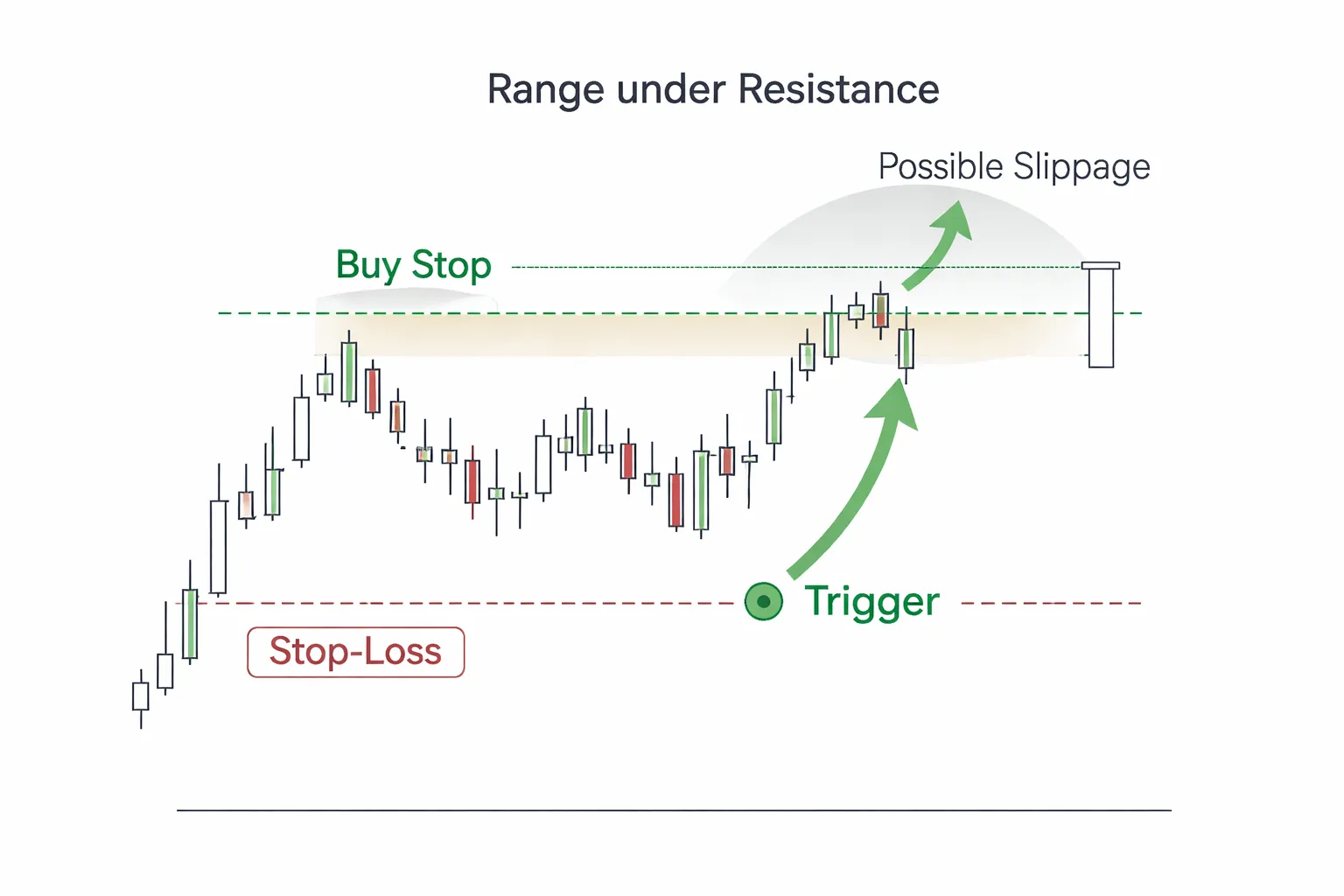
Stop orders in forex (triggered orders for breakouts and protection)
A stop order activates when price hits your stop level. After the trigger, it becomes a market order and seeks the next available price. You use stops to enter with momentum or to exit when your idea fails.
Buy stop vs sell stop (momentum confirmation)
- Buy stop. Place it above current price. It triggers when price trades up to your level. Use it to join upside breaks.
- Sell stop. Place it below current price. It triggers when price trades down to your level. Use it to join downside breaks.
Stops act like a filter. Price must move into your level first. You give up price certainty to avoid guessing the turn.
Stop-loss vs stop-entry (same mechanism, different purpose)
- Stop-entry. You start with no position. The stop triggers to open a trade when price confirms direction.
- Stop-loss. You already hold a position. The stop triggers to close the trade when price breaks your invalidation level.
Both use the same trigger logic. The difference is intent. One enters strength, one exits weakness.
Why stop orders can slip (volatility, gaps, thin liquidity)
Stops do not guarantee your fill price. They guarantee execution once triggered. Slippage rises when liquidity falls and speed rises.
- Volatility spikes. News releases and session opens can jump several pips in a second. Your fill prints at the best available price after the trigger.
- Gaps. Weekends and major headlines can gap price past your stop. You get filled at the first tradable price, not your level.
- Thin liquidity. Late US, holidays, and exotic pairs often show fewer quotes. The book is shallow and price can step through levels.
Watch your pair’s typical spread and its behavior around scheduled news. Wider spread can trigger stops earlier than you expect, because your platform uses bid and ask, not a single mid price.
Example (buy stop above resistance for a breakout plan)
Setup. EUR/USD ranges under 1.0850 resistance. You want a breakout only if price proves it can trade above that level.
- Define the level using recent swing highs and closes, then confirm with your chart read. Use trend lines and channels if you trade breaks.
- Place a buy stop a few pips above resistance, far enough to avoid spread noise and shallow probes.
- Set your stop-loss at the invalidation point, often back inside the range, below the breakout structure.
- Plan your target before entry. Use the prior range height, next liquidity area, or a fixed R multiple.
Risk controls (position sizing, invalidation, and stop placement)
- Size from the stop. Pick your account risk first, then calculate lots from stop distance in pips and pip value. Do not pick lot size first.
- Place stops at invalidation. Put the stop where your trade idea fails, not where you feel comfortable.
- Account for spread. For long trades, exits trigger on bid. For short trades, exits trigger on ask. Give the stop room for normal spread expansion.
- Avoid obvious stop clusters. Many traders hide stops just beyond the same highs and lows. If you use those points, give extra buffer or accept higher stop-out odds.
- Reduce exposure into news. If your strategy cannot handle slippage, cut size, widen the stop with smaller lots, or stay flat.
Market order vs limit order vs stop order forex: side-by-side comparison
Execution certainty vs price certainty
Market orders give execution certainty. You accept the next available price.
Limit orders give price certainty. You accept no worse than your limit price. You accept the risk of no fill.
Stop orders give conditional execution. Price must hit the stop level first. After trigger, the order behaves like a market order unless you use a stop-limit.
- Use a market order when getting in or out matters more than the exact price.
- Use a limit order when the exact price matters more than being filled.
- Use a stop order when you want action only after price proves a level, or when you need a hard exit.
Side-by-side comparison
| Order type | What you control | What you give up | Best use | Main risk |
|---|---|---|---|---|
| Market | Timing | Exact price | Fast entry, fast exit, emergency stop-out | Slippage, wider spreads, worse fills in news |
| Limit | Max buy price or min sell price | Fill certainty | Range entries, pullback entries, take-profit targets | Missed trades, partial fills, price never returns |
| Stop | Trigger level | Exact fill price after trigger | Breakout entries, stop-loss exits | Slippage, stop runs, gaps through level |
When each order type tends to perform best
- Trend conditions
- Market works when you need in now, after confirmation or on a fast continuation move.
- Limit fits pullbacks to a level, if the trend often retraces before continuation.
- Stop fits breakout entries, if your edge comes from momentum after a level breaks.
- Range conditions
- Limit usually wins for entries at range edges and exits at the opposite side.
- Market fits exits when price snaps back fast and you do not want to wait.
- Stop can bleed you with false breaks, use wider triggers and smaller size or avoid.
- News and high-volatility windows
- Market and stop orders can fill far from your level. Expect slippage.
- Limit protects price, but you may get no fill, or only a partial fill, as price spikes.
- If you cannot tolerate slippage, reduce size or stay flat. Keep this aligned with your risk management rules.
Typical trader mistakes and how to avoid them
- Using market orders in thin liquidity. Trade liquid sessions. Avoid market orders during spreads spikes.
- Placing limits at obvious levels and expecting perfect fills. Price may front-run your level. Consider placing slightly inside the zone, or accept missed trades.
- Using stop entries too close to the breakout line. Small spikes trigger you, then price snaps back. Place triggers beyond the noise, then size down.
- Confusing stop entry vs stop loss. A stop entry adds risk after trigger. A stop loss removes risk. Treat them differently in planning.
- Ignoring bid and ask. Long stops often trigger on bid, long take-profits often fill on bid, short stops often trigger on ask. Test on your platform.
- Placing stop losses where everyone places them. Add buffer, or move the stop to a level your thesis breaks, not where the chart looks neat.
Quick decision table, entries vs exits
| Goal | Typical order | Why | Watch for |
|---|---|---|---|
| Enter now | Market | Highest fill certainty | Spread, slippage |
| Enter on pullback | Limit | Controls entry price | No fill, partial fill |
| Enter on breakout | Stop (buy stop, sell stop) | Triggers only if price reaches level | False breaks, slippage after trigger |
| Take profit at a target | Limit | Controls exit price | Missed fill if price reverses just short |
| Cut loss fast | Stop | Forces an exit after trigger | Gaps, slippage, spread expansion |
| Exit during chaos | Market | Gets you flat | Worst fills during news |
Partial fills and rapid price moves
Partial fills happen when your order size is larger than available liquidity at your price.
- Limit orders can fill in pieces. You may get a better average price, or you may stay partly unfilled as price moves away.
- Market orders can fill across multiple prices. The final average can be worse than the quote you saw.
- Stop orders can trigger at your stop level, then fill at the next available prices. Fast moves make this worse.
Rapid moves and gaps can jump over your level.
- A stop loss can fill far beyond the stop price. Your risk expands.
- A limit may not fill at all if price never trades at your limit.
- If you need price protection, use a limit for entries and targets, and keep stop placement and position size conservative during high-risk windows.
Advanced variants: stop-limit, trailing stop, and time-in-force
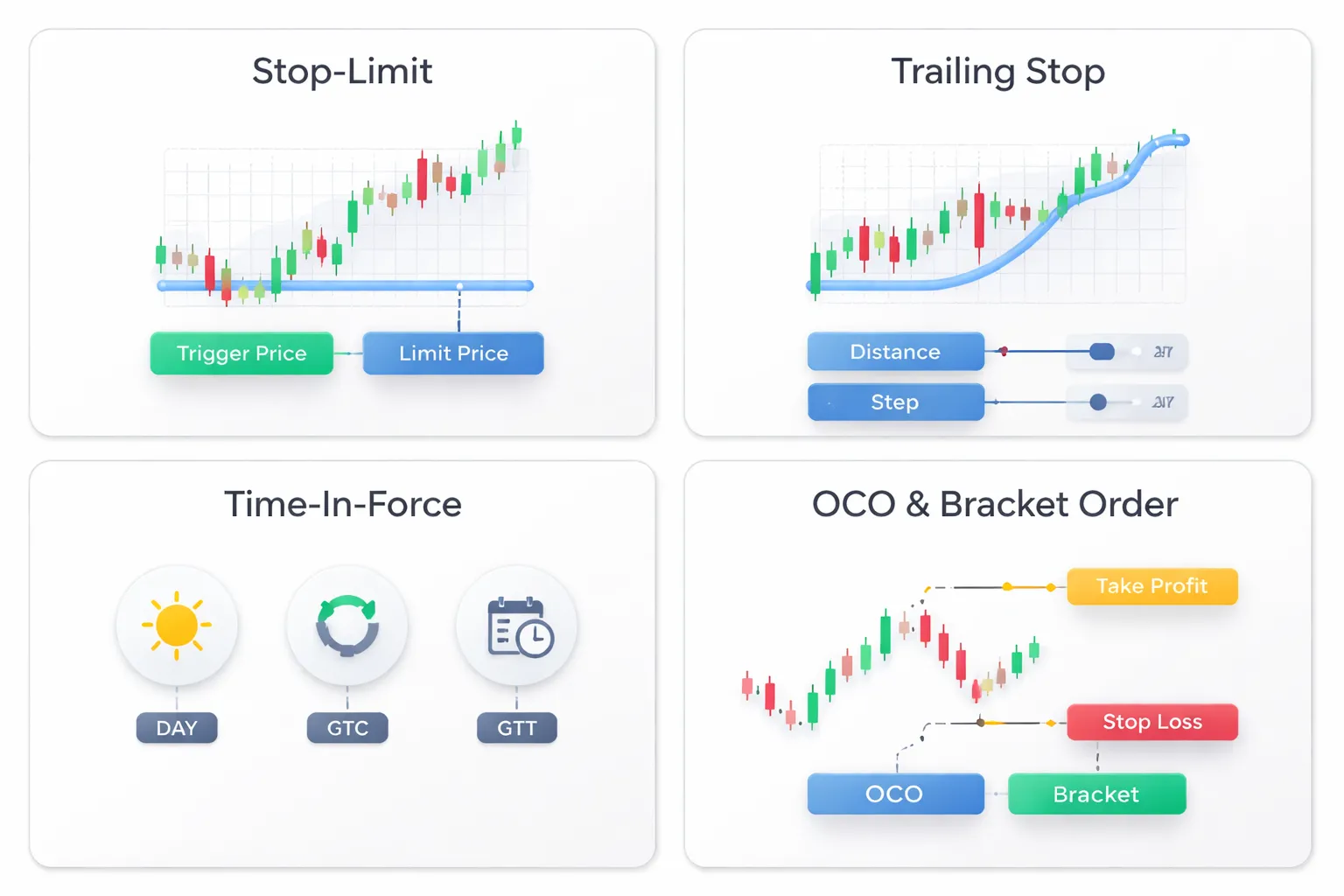
Stop-limit orders
A stop-limit order uses two prices.
- Stop price, the trigger. When price hits it, your platform activates the order.
- Limit price, the worst price you accept. The order becomes a limit order at this price.
Example, buy stop-limit.
- Stop at 1.2050.
- Limit at 1.2055.
If price spikes from 1.2048 to 1.2062, your order triggers but may not fill. Price never traded at 1.2055 or better. You avoid a bad fill, but you accept a miss.
Keep the stop to limit gap realistic for the pair and session. Wider gaps fill more often. Wider gaps also increase slippage risk inside your allowed range.
Trailing stops
A trailing stop moves your stop as price moves in your favor. It never moves away from price.
- Distance, the trail size in pips or points. Example, 30 pips.
- Step, how often the stop updates. Some platforms use a fixed step, others update tick by tick.
- Recalculation, most platforms trail from the best price since entry, based on bid or ask. Check which quote your broker uses.
Two platform details matter.
- Many trailing stops run on the client terminal. If your app closes or loses connection, the stop may stop trailing. The existing stop may remain, but it will not update.
- Trailing logic can update after a price close, after a tick, or after a minimum step. This changes how tight the stop behaves during fast moves.
A trailing stop does not fix gaps. If price gaps through your stop, you still fill at the next available price.
Time-in-force
Time-in-force controls how long a pending order stays active.
- Day, the order cancels at the end of the trading day or session cut. Brokers define the cutoff.
- GTC (good till canceled), the order stays until you cancel it or it triggers. Many brokers auto-expire GTC after a set number of days.
- Good-till-time (GTT), the order cancels at a date and time you set.
Use time limits to prevent old ideas from filling days later. This matters around news, weekends, and session changes.
OCO and bracket orders
OCO means one cancels the other. You link two orders so only one can fill.
- Common use, a breakout plan. Place a buy stop above resistance and a sell stop below support. When one triggers, the other cancels.
- Common use, two profit targets. If one hits, the other cancels.
A bracket order wraps risk controls around your entry.
- Entry order.
- Take-profit limit.
- Stop-loss stop or stop-limit.
After entry fills, the platform places the attached stop and target. This reduces missed protection when price moves fast.
Alerts plus pending orders
Use alerts to control when you engage. Use pending orders to control how you execute.
- Set a price alert at your decision level.
- When the alert hits, check spread, liquidity, and the calendar.
- Place a limit or stop entry with a time-in-force that matches your setup window.
- Attach a stop and target with a bracket if your platform supports it.
This workflow cuts impulse entries. It also keeps your execution rules consistent. If you need a refresher on the mechanics, follow this step-by-step forex trade walkthrough.
Price gaps, weekend risk, and news events (what competitors often under-explain)
Price gaps, weekend risk, and why stops can fail
Forex trading pauses over the weekend. Price can reopen at a new level. That jump is a gap.
Your stop triggers when price reaches your stop level. Your fill depends on the next available price. If the market reopens beyond your stop, your broker cannot fill you at your stop price. You get filled at the first tradable price. This creates slippage.
- Stop-loss orders do not guarantee price. They convert to a market order once triggered.
- Gaps hit stop entries too. A stop entry can trigger and fill far from your trigger level.
- Stop-limit controls price, not fills. If price gaps past your limit, you may not get filled at all.
Weekend gap risk rises when markets close with unresolved catalysts, central bank uncertainty, elections, or war headlines. You cannot manage that risk with tighter stops. A tighter stop can get jumped the same way, and you exit with slippage.
High-impact news, spread widening, and execution delays
During major releases, liquidity thins and spreads expand. Your platform may show fast prints, but available quotes can disappear between ticks. This affects every order type.
- Market orders: highest fill certainty, lowest price certainty. Slippage risk spikes.
- Limit orders: price certainty, fill uncertainty. You may miss the move if price touches and pulls away, or if quotes gap.
- Stop orders: trigger certainty depends on prints, fill can be worse than expected. A stop can trigger on a brief spike and fill at a poor price.
Common news effects you should plan for are spread widening, requotes or delays on some brokers, partial fills on larger size, and fast price reversal after the first move.
Managing event risk with clear rules
Use rules you can repeat. Pick one approach per setup. Do not improvise mid-event.
- Stay flat: the cleanest choice for small accounts or tight-stop strategies.
- Reduce size: cut position size so a worse fill does not break your risk limit.
- Widen the stop: only if your setup supports it and your position size drops to keep dollars-at-risk constant.
- Use limits for entries: accept missed trades to avoid chasing widened spreads.
- Avoid holding over the weekend: unless your edge assumes gap risk and you sized for it.
Write the rule in your plan, then follow it. This is where discipline breaks, and where a simple checklist helps. Use these forex trading psychology tips to keep your execution consistent when volatility spikes.
Choose pairs with deeper liquidity to reduce slippage risk
Liquidity lowers slippage risk. It does not remove it.
- Major pairs: EUR/USD, USD/JPY, GBP/USD often hold tighter spreads in normal hours.
- Crosses and exotics: wider spreads, thinner books, larger gaps around news and market opens.
- Session overlap: London and New York overlap usually brings deeper liquidity than late New York or early Asia.
If your strategy depends on tight execution, trade the most liquid pairs, during the most liquid hours, and avoid placing large market orders into thin conditions.
Contingency planning after slippage or a missed fill
Bad fills happen. Your response decides the damage.
- If you get slipped on a stop-loss: accept the fill, record the slippage, and review whether you traded into an avoidable event window.
- If your stop-limit does not fill: do not chase with a market order unless your plan allows it. Recalculate risk using the new price, then decide.
- If your limit entry misses: let it go. Missing a trade beats entering at a worse price with the same stop.
- If spread blows out: cancel pending orders that no longer make sense, especially tight stop entries that can trigger on noise.
- If execution breaks your risk cap: reduce exposure fast. Close part of the position, or exit fully. Then reassess.
Track three numbers in your journal, planned risk in pips, actual fill price, and slippage in pips. This data tells you which pairs, sessions, and event windows you should avoid.
How to place these orders on common forex platforms (MT4/MT5/cTrader/web brokers)
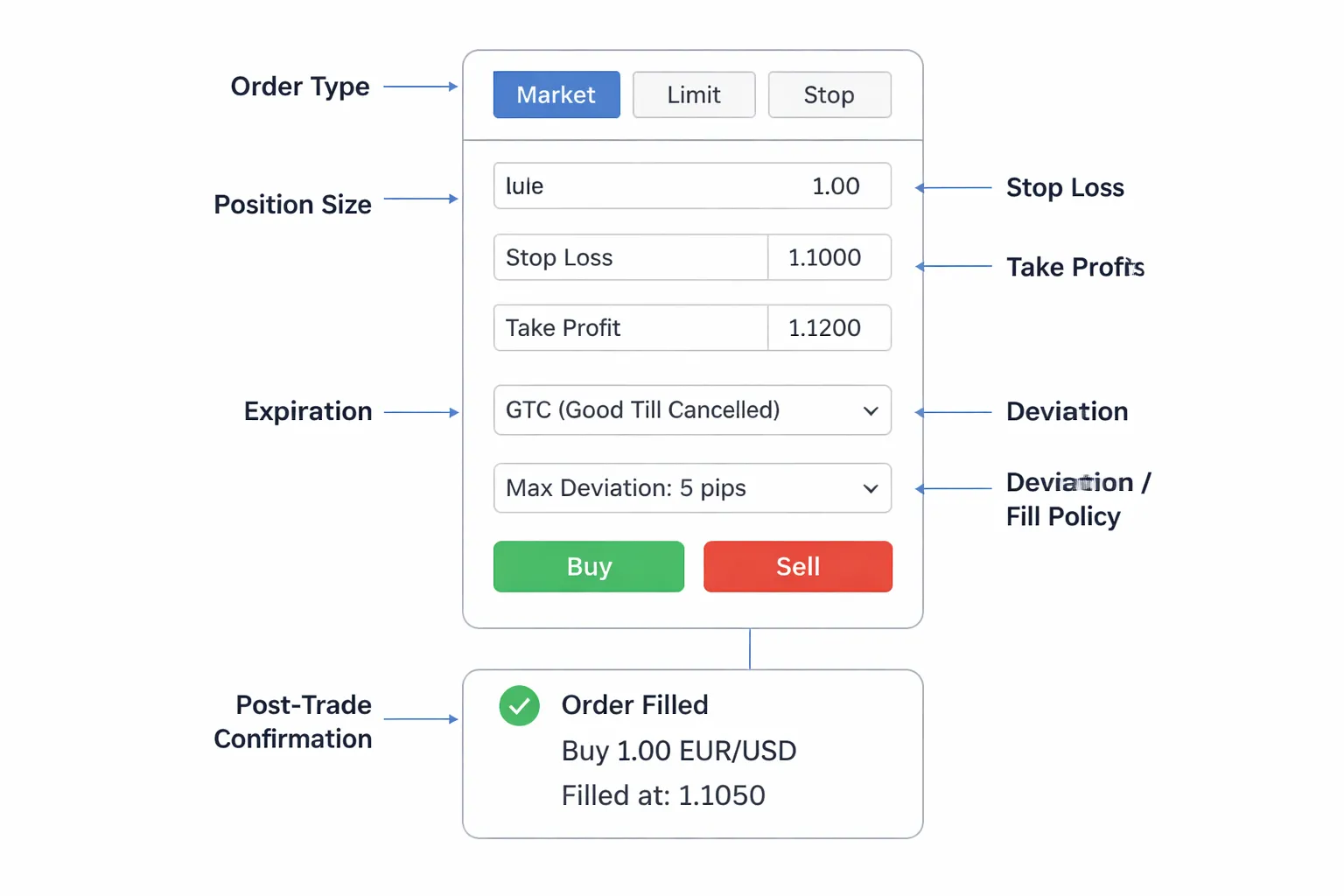
Mapping order types to platform labels
Platforms use different words for the same order.
- Market order: MT4 uses Market Execution or Instant Execution, MT5 uses Market, cTrader uses Market, web brokers often show Buy/Sell with no extra label.
- Limit order (buy below, sell above): MT4 and MT5 show Pending Order then Buy Limit or Sell Limit. cTrader shows Limit. Web brokers often show Limit or Entry Limit.
- Stop order (buy above, sell below): MT4 and MT5 show Pending Order then Buy Stop or Sell Stop. cTrader shows Stop. Web brokers often show Stop or Stop Entry.
- Stop loss and take profit: MT4 and MT5 show Stop Loss and Take Profit fields in the order window or in Modify. cTrader shows SL and TP. Web brokers vary, many use Stop Loss, Take Profit, and sometimes Close at profit.
- Expiry: MT4 and MT5 show Expiration for pending orders. cTrader shows Expiration. Some web brokers call it Good Till Date or Time in Force.
Step-by-step checklist before you click Buy or Sell
- Confirm the instrument: correct pair, correct account, correct symbol suffix if your broker uses one.
- Confirm direction: buy means you profit if price rises, sell means you profit if price falls.
- Choose order type: market for immediate entry, limit for better price, stop for breakout entry.
- Set size first: enter lots or units, then re-check your money risk.
- Set stop loss: place the SL level before sending if the platform allows it. If it does not, place it immediately after fill. Use a hard stop, not a mental stop. See how to place a stop loss.
- Set take profit: optional, but define it if you use fixed targets.
- Check entry price fields: for pending orders, verify the exact trigger or limit price. One wrong digit flips the trade.
- Set expiry for pending orders: avoid orders sitting through news or low-liquidity hours.
- Confirm trading hours: some CFDs and exotics have pauses, early closes, or wide spreads at rollover.
- Screenshot or note the plan: planned entry, planned SL in pips, planned risk in currency.
Common platform settings that change outcomes
- MT4 deviation: in Instant Execution, Deviation sets the max slippage you accept. Too tight, you get requotes. Too wide, you accept worse fills.
- MT4 Market Execution: you do not get requotes, you can get slippage. Your fill can differ from the displayed price.
- MT5 fill policy: brokers can allow Fill or Kill, Immediate or Cancel, or Return. This changes partial fills and rejection behavior.
- cTrader protection settings: cTrader lets you set default SL and TP templates. Wrong defaults create repeated errors across trades.
- Stop vs stop-limit: many web brokers offer Stop and Stop Limit. Stop triggers a market order. Stop-limit triggers a limit order, you can miss the entry in fast moves.
- GSLO: some web brokers offer a guaranteed stop for a fee. It can cap gap risk, but you pay for it and rules differ by instrument.
- One-click trading: it speeds execution but increases fat-finger risk. Use it only with fixed size presets you trust.
Mobile vs desktop differences that cause order entry errors
- Chart tap errors: on mobile you can drag SL and TP lines by mistake. Re-check the exact price numbers after any drag.
- Default order size: mobile apps often remember the last lot size. Desktop order tickets often reset. Verify size every time.
- Order type shortcuts: mobile may default to market. Desktop makes pending selection clearer. Slow down when you need a limit or stop entry.
- Hidden fields: on mobile, SL, TP, and expiry may sit behind an expand button. Do not assume they are set.
- Spread display: mobile may show mid price on charts but execute on bid or ask. Always read the bid and ask on the ticket.
- Connectivity: weak signal causes delayed submission and stale prices. If you see a lag, reduce size or wait.
Verification after placing the order
- Confirm status: market orders should show Open Position. pending orders should show Pending.
- Confirm ticket details: symbol, direction, size, open price, SL, TP, and time.
- Confirm levels on the chart: entry line, SL line, TP line. Check the numbers match your plan.
- Confirm distance in pips: SL pips from entry, TP pips from entry. Do not trust the chart zoom.
- Check margin impact: free margin after entry, especially if you trade multiple positions.
- Log execution: planned entry vs fill price, slippage in pips, and spread at entry. This links platform behavior to your results.
- Set alerts: price alert at entry, near SL, and near TP. Alerts reduce screen-watching and help you follow the plan.
| Platform | Where you place the order | What to double-check |
|---|---|---|
| MT4 | New Order, then Market or Pending | Execution mode, Deviation, correct pending type, Expiration |
| MT5 | New Order, choose Market or Pending | Fill policy, SL and TP fields, Expiration and order type |
| cTrader | Trade ticket or chart order | Order protection defaults, SL and TP method, expiration |
| Web brokers | Order ticket on platform | Stop vs stop-limit, time in force, GSLO rules, unit sizing |
Risk management rules tied to order selection (E-E-A-T practical framework)
Define invalidation first, pick the order second
Start with one line, your trade idea becomes wrong at this price.
That price sets your stop loss. It also decides your order type.
- Market order, use when your edge depends on being in now, and you accept spread and slippage risk.
- Limit order, use when your edge depends on price improvement, and you accept missed fills.
- Stop order, use when your edge needs confirmation beyond a level, and you accept gap and slippage risk.
- Stop-limit order, use when you need a trigger plus a max fill price, and you accept higher non-fill risk during fast moves.
Do not place the stop where pain starts. Place it where the setup fails.
Size your position from stop distance
Risk per trade stays constant. Lot size changes with the stop.
Use this sequence.
- Set account risk percent per trade. Many traders use 0.25% to 2%.
- Convert that into money risk. Risk money = Account balance × Risk %.
- Measure stop distance in pips from entry to invalidation.
- Find pip value for your pair and position size.
- Size the trade. Position size = Risk money ÷ (Stop pips × Pip value per unit).
| Input | Example |
|---|---|
| Account balance | $10,000 |
| Risk % | 1% |
| Risk money | $100 |
| Stop distance | 25 pips |
| Allowed loss per pip | $100 ÷ 25 = $4 per pip |
If your stop must be wider, your size must be smaller. Do not “keep the size” and move the stop.
Plan R:R with take-profit orders, then decide what you manage manually
Decide your target before you enter. Link it to the same logic as the stop.
- If you trade mean reversion, limits and fixed take profits fit better. You need precision on price.
- If you trade breakouts, stops for entry and trailing exits fit better. You need participation in momentum.
Use take-profit orders when execution matters and you might not be at the screen. Use manual exits only if you follow a written rule and you can execute it in real time.
Keep your R:R realistic for the pair and session. Tight targets can fail from spread. Wide targets can fail from time and swap costs.
For a deeper framework, see risk-reward ratio.
Avoid hidden leverage issues, margin, swap, and gap exposure
Order type changes your real risk. Your platform shows stop distance, but it does not cap everything.
- Margin, large size plus a stop entry can stack exposure fast if multiple stops trigger in the same move.
- Gaps, stop losses can fill worse than your stop price. Your loss can exceed your planned risk.
- Swap and rollover, holding overnight can turn a flat trade into a loser. Include expected swap in your plan if you hold for days.
- GSLO rules, if your broker offers guaranteed stops, read the premium, distance limits, and refund rules. Use them when gap risk dominates.
Check free margin before placing pending orders. Treat every pending trigger as future leverage.
Journal execution, slippage, fills, and spread
Track execution like a system. Your data tells you which order type fits your broker and strategy.
- Record intended entry, actual fill, and slippage in pips.
- Record spread at entry and exit. Spread widens during news and rollover.
- Tag the order type and time in force. Note whether a limit missed or a stop slipped.
- Log stop loss and take profit placement method. Fixed pips, swing point, ATR, structure.
- Review weekly. If slippage clusters around specific sessions or events, change order type or avoid those windows.
Execution is part of risk. If your fills differ from your plan, your sizing and R:R calculations become wrong.
FAQ
What is the main difference between market, limit, and stop orders?
Market orders fill now at the best available price. Limit orders fill only at your price or better. Stop orders trigger after price reaches your stop level, then execute as a market order or become a limit order if you use stop-limit.
When should you use a market order?
Use a market order when execution matters more than price. Examples: fast breakouts, news protection exits, or liquid sessions. Expect slippage. Reduce size around high impact events, or use a limit or stop-limit if price control matters.
When should you use a limit order?
Use a limit order when price matters more than speed. Examples: pullback entries, mean reversion, or taking profit at a level. You risk no fill. Track missed fills. If misses increase, adjust the level, session, or use a different entry method.
When should you use a stop order?
Use a stop order for momentum entries and protective exits. A buy stop sits above price, a sell stop sits below. Stops can slip in gaps and spikes. Place stops where your trade idea breaks, not where you feel safe.
What is slippage, and why does it matter?
Slippage is the difference between your expected price and your fill. It changes your risk per trade and your R:R. Log it. If slippage clusters in specific sessions or news windows, change order type, reduce size, or avoid those periods.
Can a limit order slip?
A limit order does not slip on price. It either fills at your limit or better, or it does not fill. You can still get partial fills or delayed fills in thin markets. Your main risk is missed execution and lost opportunity.
Can a stop order skip your price?
Yes. If price jumps past your stop, the stop triggers and the market fill can land far from the stop level. This happens in gaps, news spikes, and low liquidity. If you need price control, use a stop-limit and accept no fill risk.
What is a stop-limit order?
A stop-limit order triggers at the stop price, then places a limit order. It caps your worst fill. It can fail to execute if price moves past your limit. Use it when slippage would break your risk rules and a missed fill is acceptable.
What does time in force mean for forex orders?
Time in force sets how long the order stays active. Common options: GTC, day, and IOC. Shorter durations reduce stale orders around session changes. Match duration to your setup timeframe. Cancel unfilled orders when the trade idea expires.
Where should you place stop loss and take profit orders?
Base levels on structure, swing points, or ATR. Keep stops outside normal noise for your pair and timeframe. Place take profit where price has reacted before or where your plan ends. For more detail, see how to place a stop loss.
How do you choose the right order type for your strategy?
Define your priority. If you need entry certainty, use market and manage slippage. If you need price precision, use limit and accept no fills. If you need confirmation, use stop and accept gaps. Backtest fills, not just signals.
Conclusion
Conclusion
Market, limit, and stop orders solve different problems. Market gets you in. Limit gives you a price. Stop gives you confirmation. Each one carries a cost, slippage, missed fills, or gaps.
Trade like execution matters, because it does. Your edge can vanish if your fills differ from your backtest.
- Track real fills. Log requested price, filled price, spread, and slippage on every trade.
- Use session rules. Expect more slippage at news, rollover, and thin liquidity.
- Set a failure rule. If a limit does not fill, skip or use a stop entry, do not chase with a late market order.
- Protect every trade. Attach a stop loss and size the position so one trade cannot hurt your account.
Pick one default order type for your strategy, then define when you switch. Write it down in your plan, and pair it with simple rules from risk management in forex for beginners.
-
Stop Loss vs Take Profit: Differences, Examples & Best Practices
4 months ago -
How to Set Stop Loss and Take Profit (Step-by-Step)
4 months ago -
How to Start Forex Trading Step by Step (Beginner Roadmap)
4 months ago -
Risk Management in Forex for Beginners (Rules That Keep You in the Game)
4 months ago -
How to Place a Stop Loss in Forex (Beginner-Friendly Guide)
4 months ago
-
- Stop orders in forex (triggered orders for breakouts and protection)
- Buy stop vs sell stop (momentum confirmation)
- Stop-loss vs stop-entry (same mechanism, different purpose)
- Why stop orders can slip (volatility, gaps, thin liquidity)
- Example (buy stop above resistance for a breakout plan)
- Risk controls (position sizing, invalidation, and stop placement)
-
- What is the main difference between market, limit, and stop orders?
- When should you use a market order?
- When should you use a limit order?
- When should you use a stop order?
- What is slippage, and why does it matter?
- Can a limit order slip?
- Can a stop order skip your price?
- What is a stop-limit order?
- What does time in force mean for forex orders?
- Where should you place stop loss and take profit orders?
- How do you choose the right order type for your strategy?
-
- Stop orders in forex (triggered orders for breakouts and protection)
- Buy stop vs sell stop (momentum confirmation)
- Stop-loss vs stop-entry (same mechanism, different purpose)
- Why stop orders can slip (volatility, gaps, thin liquidity)
- Example (buy stop above resistance for a breakout plan)
- Risk controls (position sizing, invalidation, and stop placement)
-
- What is the main difference between market, limit, and stop orders?
- When should you use a market order?
- When should you use a limit order?
- When should you use a stop order?
- What is slippage, and why does it matter?
- Can a limit order slip?
- Can a stop order skip your price?
- What is a stop-limit order?
- What does time in force mean for forex orders?
- Where should you place stop loss and take profit orders?
- How do you choose the right order type for your strategy?
-
How to Place a Forex Trade Step by Step (Your First Trade Explained)
2 months ago -
Forex Trading vs Crypto Trading: Which Market Is Better for Beginners?
2 months ago -
Forex Lot Size Calculator: How to Use It to Size Trades Correctly
4 months ago -
How to Calculate Position Size in Forex (Position Sizing Formula + Examples)
4 months ago -
Forex Leverage Explained: How It Works, Pros, Cons & Examples
4 months ago
-
Is Forex Trading Legal in the United States? Rules, Regulators & What to Know
4 months ago -
Forex Market Hours & Trading Sessions Explained (Best Times to Trade)
4 months ago -
Forex Trading Platforms Comparison: MetaTrader vs cTrader vs TradingView
4 months ago -
Forex Leverage Explained: How It Works, Pros, Cons & Examples
4 months ago -
What Is a Lot Size in Forex? Lot Types + Quick Examples
4 months ago